3.1. ブランクプロジェクト
本節では、Webアプリケーション向けの開発プロジェクトを作成する方法について説明する。
本ガイドラインでは、マルチプロジェクト構成を採用することを推奨している。推奨するマルチプロジェクト構成の説明については、「プロジェクト構成」を参照されたい。
3.1.1. ブランクプロジェクトとは
「ブランクプロジェクト」とは、Webアプリケーション開発のための雛形プロジェクトである。 本ガイドラインでは、開発を効率化し、推奨される構成や設定をあらかじめ盛り込んだプロジェクトを「ブランクプロジェクト」として提供している。
主な特徴:
商用環境向けの本格的なアプリケーションや、PoC・プロトタイプ・サンプルなど簡易的なアプリケーションの作成に利用可能
Maven Archetypeとして、MyBatis3用・O/R Mapper非依存など複数の雛形が用意されている
推奨するマルチプロジェクト構成やシングルプロジェクト構成が選択可能
すぐに開発を始められるように、必要な設定や構成が整ったプロジェクトの雛形
3.1.2. ブランクプロジェクトの種類
ブランクプロジェクトは、使用用途に応じて以下の2種類を提供している。
種別 |
使用用途 |
|---|---|
商用環境にリリースするような本格的なアプリケーションを開発する際に使用する。 プロジェクトの雛形は、MavenのArchetypeとして以下を用意している。
本ガイドラインでは、マルチプロジェクト構成のプロジェクトを使用する事を推奨している。 |
|
PoC(Proof of Concept)、プロトタイプ、サンプルなどの簡易的なアプリケーションを作成する際に使用する。 プロジェクトの雛形は、MavenのArchetypeとして以下を用意している。 |
Note
本ガイドラインにおける「マルチプロジェクト」の用語定義について
Maven Archetypeで作成したプロジェクトは、正確にはマルチモジュール構成のプロジェクトとなる。
本ガイドラインでは、マルチモジュール構成のプロジェクトをマルチプロジェクトと呼んでいる。
3.1.3. ブランクプロジェクトの作成
開発プロジェクトを、 Maven Archetype Pluginのarchetype:generateを使用して作成する。
前提条件
以降の説明では、
Maven(
mvnコマンド)が使用可能であることインターネットに繋がっていること
インターネットにプロキシ経由で繋ぐ場合は、Mavenのプロキシ設定が行われていること
を前提としている。
前提条件が整っていない場合は、まずこれらのセットアップを行ってほしい。
オフライン環境での作業については、「オフライン環境におけるアプリケーション開発」を参照されたい。
3.1.3.1. Archetypeの選択
ブランクプロジェクトを作成するためのArchetypeとして、以下を用意している。
項番 |
Archetype(ArtifactId) |
説明 |
|---|---|---|
macchinetta-web-blank-jsp-archetype |
O/R Mapperに依存しないシングルプロジェクトを生成するためのArchetype。 |
|
macchinetta-web-blank-jsp-mybatis3-archetype |
O/R MapperとしてMyBatis3を使用するためのシングルプロジェクトを生成するためのArchetype。 |
|
macchinetta-multi-web-blank-jsp-mybatis3-archetype |
O/R MapperとしてMyBatis3を使用するためのマルチプロジェクトを生成するためのArchetype。 |
項番 |
Archetype(ArtifactId) |
説明 |
|---|---|---|
macchinetta-web-blank-thymeleaf-archetype |
O/R Mapperに依存しないシングルプロジェクトを生成するためのArchetype。 |
|
macchinetta-web-blank-thymeleaf-mybatis3-archetype |
O/R MapperとしてMyBatis3を使用するためのシングルプロジェクトを生成するためのArchetype。 |
|
macchinetta-multi-web-blank-thymeleaf-mybatis3-archetype |
O/R MapperとしてMyBatis3を使用するためのマルチプロジェクトを生成するためのArchetype。 |
項番 |
Archetype(ArtifactId) |
説明 |
|---|---|---|
macchinetta-web-blank-xmlconfig-jsp-archetype |
O/R Mapperに依存しないシングルプロジェクトを生成するためのArchetype。 |
|
macchinetta-web-blank-xmlconfig-jsp-mybatis3-archetype |
O/R MapperとしてMyBatis3を使用するためのシングルプロジェクトを生成するためのArchetype。 |
|
macchinetta-multi-web-blank-xmlconfig-jsp-mybatis3-archetype |
O/R MapperとしてMyBatis3を使用するためのマルチプロジェクトを生成するためのArchetype。 |
項番 |
Archetype(ArtifactId) |
説明 |
|---|---|---|
macchinetta-web-blank-xmlconfig-thymeleaf-archetype |
O/R Mapperに依存しないシングルプロジェクトを生成するためのArchetype。 |
|
macchinetta-web-blank-xmlconfig-thymeleaf-mybatis3-archetype |
O/R MapperとしてMyBatis3を使用するためのシングルプロジェクトを生成するためのArchetype。 |
|
macchinetta-multi-web-blank-xmlconfig-thymeleaf-mybatis3-archetype |
O/R MapperとしてMyBatis3を使用するためのマルチプロジェクトを生成するためのArchetype。 |
この中から適切なArchetype(ArtifactId)を選択する。
3.1.3.2. プロジェクトの作成
プロジェクトを作成するフォルダに移動する。
cd C:\work
Maven Archetype Pluginのarchetype:generateを使用して、プロジェクトを作成する。
mvn archetype:generate -B^
 -DarchetypeGroupId=com.github.macchinetta.blank^
 -DarchetypeArtifactId=macchinetta-multi-web-blank-jsp-mybatis3-archetype^
 -DarchetypeVersion=1.11.1.RELEASE^
 -DgroupId=com.example.todo^
 -DartifactId=todo^
 -Dversion=1.0.0-SNAPSHOT
パラメータ |
説明 |
カスタマイズ要否 |
|---|---|---|
-B
|
batch mode (対話を省略) |
否 |
-DarchetypeGroupId
|
ブランクプロジェクトのgroupIdを指定する。 |
否 |
-DarchetypeArtifactId
|
ブランクプロジェクトのarchetypeId(雛形を特定するためのID)を指定する。 Archetypeの選択で選択したArchetype(ArtifactId)を指定する。
上記例では、 |
要 |
-DarchetypeVersion
|
ブランクプロジェクトのバージョンを指定する。 |
否 |
-DgroupId
|
作成するプロジェクトのgroupIdを指定する。 上記例では、 |
要 |
-DartifactId
|
作成するプロジェクトのartifactIdを指定する。 上記例では、 |
要 |
-Dversion
|
作成するプロジェクトのバージョンを指定する。 上記例では、 |
要 |
Tip
Bash上でmvn archetype:generateを実行する場合は、以下のように”^“を”\“に置き換えて実行すればよい。
mvn archetype:generate -B\
 -DarchetypeGroupId=com.github.macchinetta.blank\
 -DarchetypeArtifactId=macchinetta-web-blank-jsp-archetype\
 -DarchetypeVersion=1.11.1.RELEASE\
 -DgroupId=com.example.todo\
 -DartifactId=todo\
 -Dversion=1.0.0-SNAPSHOT
C:\work>mvn archetype:generate -B^
More?  -DarchetypeGroupId=com.github.macchinetta.blank^
More?  -DarchetypeArtifactId=macchinetta-multi-web-blank-jsp-mybatis3-archetype^
More?  -DarchetypeVersion=1.11.1.RELEASE^
More?  -DgroupId=com.example.todo^
More?  -DartifactId=todo^
More?  -Dversion=1.0.0-SNAPSHOT
[INFO] Scanning for projects...
[INFO]
[INFO] ------------------< org.apache.maven:standalone-pom >-------------------
[INFO] Building Maven Stub Project (No POM) 1
[INFO] --------------------------------[ pom ]---------------------------------
[INFO]
[INFO] >>> archetype:3.3.1:generate (default-cli) > generate-sources @ standalone-pom >>>
[INFO]
[INFO] <<< archetype:3.3.1:generate (default-cli) < generate-sources @ standalone-pom <<<
[INFO]
[INFO]
[INFO] --- archetype:3.3.1:generate (default-cli) @ standalone-pom ---
[INFO] Generating project in Batch mode
[INFO] Archetype repository not defined. Using the one from [com.github.macchinetta.blank:macchinetta-multi-web-blank-jsp-mybatis3-archetype:1.11.1.RELEASE] found in catalog local
[INFO] ----------------------------------------------------------------------------
[INFO] Using following parameters for creating project from Archetype: macchinetta-multi-web-blank-jsp-mybatis3-archetype:1.11.1.RELEASE
[INFO] ----------------------------------------------------------------------------
[INFO] Parameter: groupId, Value: com.example.todo
[INFO] Parameter: artifactId, Value: todo
[INFO] Parameter: version, Value: 1.0.0-SNAPSHOT
[INFO] Parameter: package, Value: com.example.todo
[INFO] Parameter: packageInPathFormat, Value: com/example/todo
[INFO] Parameter: package, Value: com.example.todo
[INFO] Parameter: ProjectName, Value: todo
[INFO] Parameter: groupId, Value: com.example.todo
[INFO] Parameter: artifactId, Value: todo
[INFO] Parameter: version, Value: 1.0.0-SNAPSHOT
[INFO] Project created from Archetype in dir: C:\work\todo
[INFO] ------------------------------------------------------------------------
[INFO] BUILD SUCCESS
[INFO] ------------------------------------------------------------------------
[INFO] Total time:  1.174 s
[INFO] Finished at: 2025-02-10T16:40:44+09:00
[INFO] ------------------------------------------------------------------------
todo
├ pom.xml
└ src
todo
├ pom.xml
├ todo-domain
├ todo-env
├ todo-initdb
├ todo-selenium
└ todo-web
Caution
O/R Mapperを使用するブランクプロジェクトの場合、H2 Databaseがdependencyとして定義されているが、この設定は簡易的なアプリケーションを簡単に作成するためのものであり、実際のアプリケーション開発で使用されることは想定していない。
以下の定義は、実際のアプリケーション開発を行う際は削除すること。
<dependency>
    <groupId>com.h2database</groupId>
    <artifactId>h2</artifactId>
    <scope>runtime</scope>
</dependency>
詳細は、「データソース設定」を参照されたい。
3.1.4. ブランクプロジェクトのSTSへのインポート
STSのインストールと設定が未実施の場合は、「STSの設定手順」を参照してインストールと設定を行う。
作成したブランクプロジェクトをSTSへインポートする。
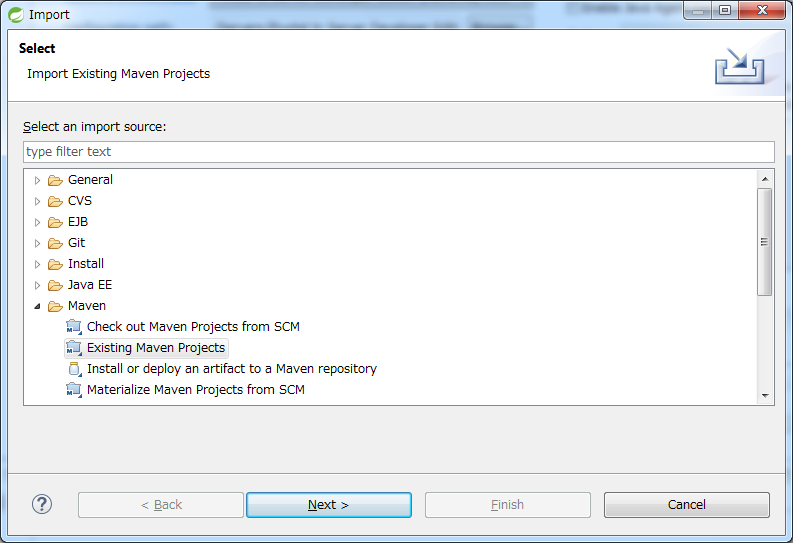
STSのメニューから、[File] -> [Import] -> [Maven] -> [Existing Maven Projects] -> [Next]を選択し、archetypeで作成したプロジェクトを選択する。
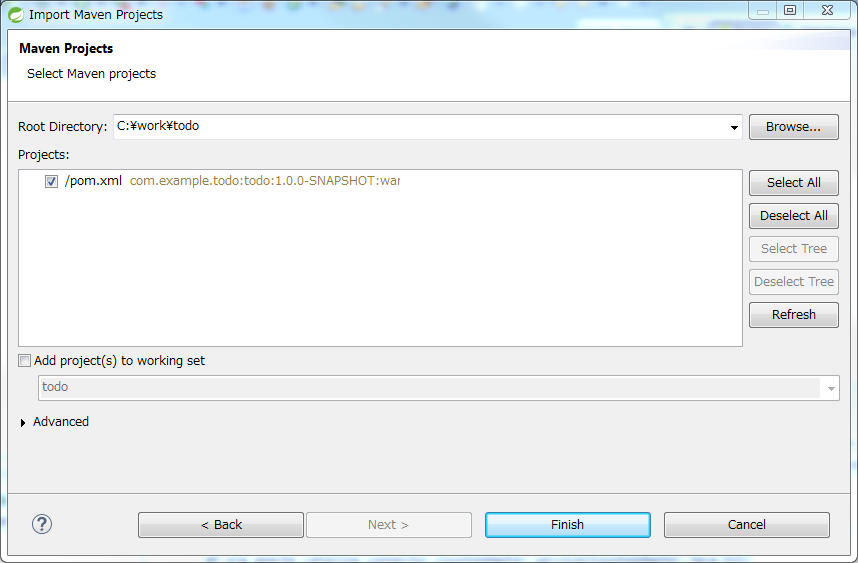
Root DirectoryにC:\work\todoを設定し、Projectsにtodoのpom.xmlが選択された状態で、[Finish]を押下する。
インポートが完了すると、Package Explorerに次のようなプロジェクトが表示される。
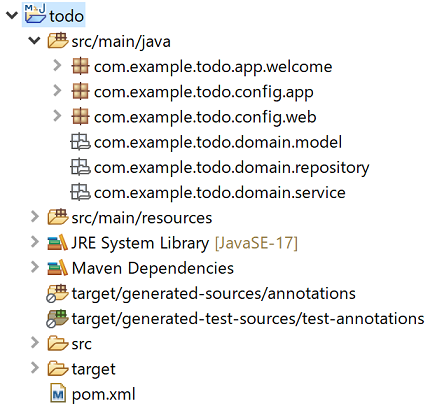
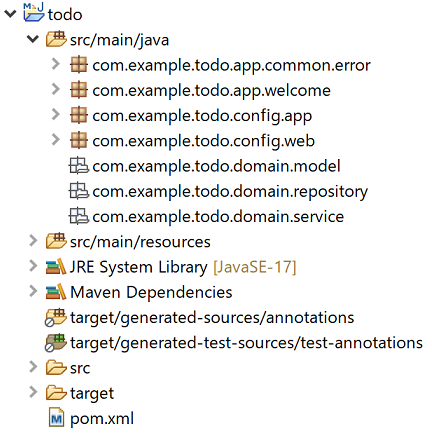
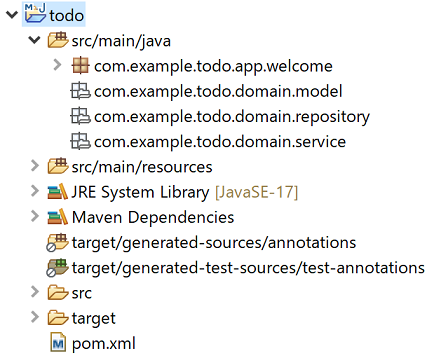
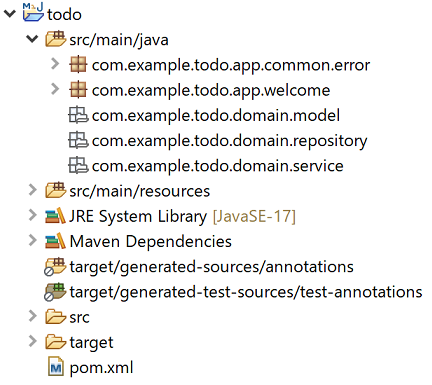
プロジェクトのJavaバージョンを変更したい場合はJavaバージョンが異なる場合の対応を参照されたい。
Note
インポート後にビルドエラーが発生する場合は、プロジェクト名を右クリックし、「Maven」->「Update Project…」をクリックし、「OK」ボタンをクリックすることでエラーが解消されるケースがある。
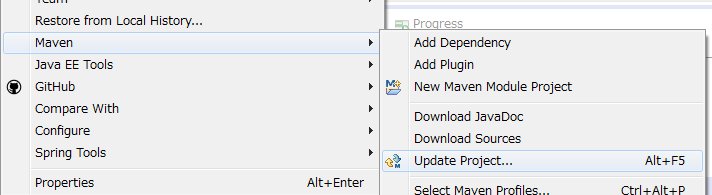
ブランクプロジェクトの実装内容に関しては、後述の「設定ファイルの確認」を参照されたい。
3.1.5. ブランクプロジェクトの動作確認
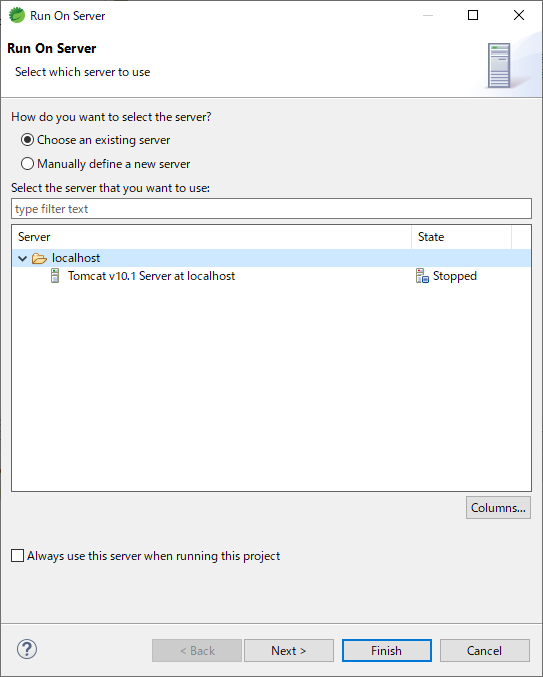
ブランクプロジェクトを右クリックして「Run As」->「Run on Server」を選択する。
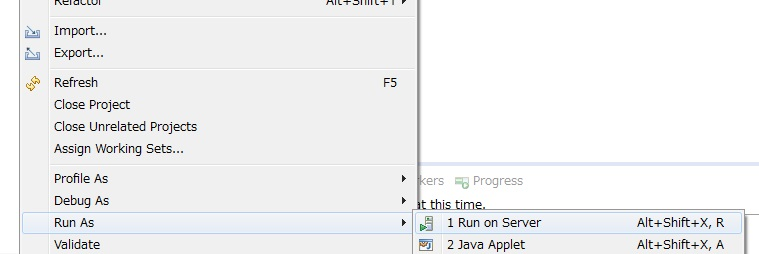
APサーバー(Tomcat v10.1 Server at localhost)を選択し、「Next」をクリックする。
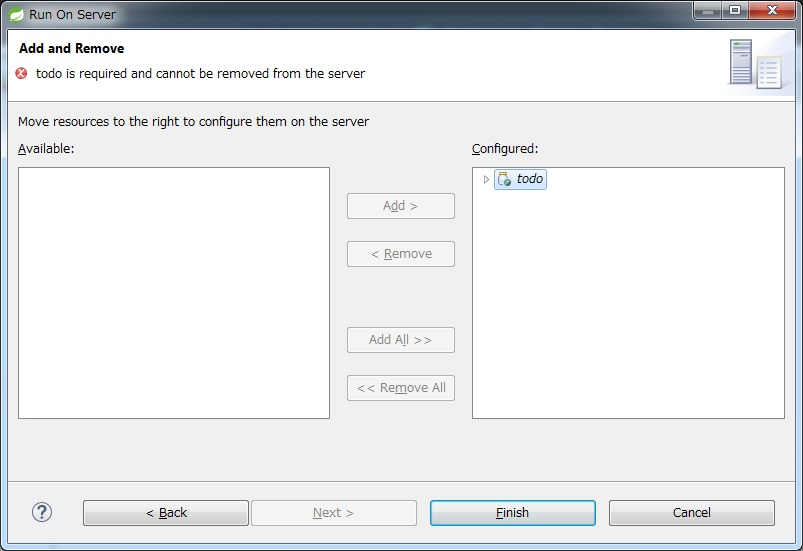
todoが「Configured」に含まれていることを確認して「Finish」をクリックしてサーバーを起動する。
起動すると以下のようなログが出力される。
“/“というパスに対してcom.example.todo.app.welcome.HelloControllerのhomeメソッドがマッピングされていることが分かる。
date:2022-11-25 17:22:36      thread:main     X-Track:        level:INFO      logger:o.springframework.web.servlet.DispatcherServlet  message:Initializing Servlet 'appServlet'
date:2022-11-25 17:22:37      thread:main     X-Track:        level:TRACE     logger:o.s.w.s.m.m.a.RequestMappingHandlerMapping       message:
    c.e.t.a.w.HelloController:
    {GET [/]}: home(Locale,Model)
date:2022-11-25 17:22:37      thread:main     X-Track:        level:DEBUG     logger:o.s.w.s.m.m.a.RequestMappingHandlerMapping       message:1 mappings in 'requestMappingHandlerMapping'
date:2022-11-25 17:22:37      thread:main     X-Track:        level:INFO      logger:o.springframework.web.servlet.DispatcherServlet  message:Completed initialization in 753 ms
ブラウザでhttp://localhost:8080/todoにアクセスすると、以下のように表示される。
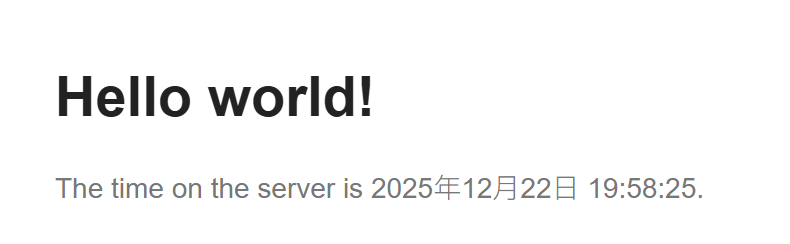
コンソールを見ると、
共通ライブラリから提供している
TraceLoggingInterceptorのTRACEログControllerで実装されているINFOログ
が出力されていることがわかる。
date:2025-01-28 14:00:49      thread:http-nio-8080-exec-2     X-Track:aae50332dd844ee28c44067d96e1f09f        level:TRACE     logger:o.t.gfw.web.logging.TraceLoggingInterceptor      message:[START CONTROLLER] HelloController.home(Locale,Model)
date:2025-01-28 14:00:49      thread:http-nio-8080-exec-2     X-Track:aae50332dd844ee28c44067d96e1f09f        level:INFO      logger:com.example.todo.app.welcome.HelloController     message:Welcome home! The client locale is ja.
date:2025-01-28 14:00:49      thread:http-nio-8080-exec-2     X-Track:aae50332dd844ee28c44067d96e1f09f        level:TRACE     logger:o.t.gfw.web.logging.TraceLoggingInterceptor      message:[END CONTROLLER  ] HelloController.home(Locale,Model)-> view=welcome/home, model={serverTime=2025年1月28日 14:00:49 JST}
date:2025-01-28 14:00:49      thread:http-nio-8080-exec-2     X-Track:aae50332dd844ee28c44067d96e1f09f        level:TRACE     logger:o.t.gfw.web.logging.TraceLoggingInterceptor      message:[HANDLING TIME   ] HelloController.home(Locale,Model)-> 87,161,900 ns
TraceLoggingInterceptorについては「TraceLoggingInterceptor」を参照されたい。
3.1.6. ブランクプロジェクトの構成
ブランクプロジェクトはガイドラインで推奨している以下の構成となっている。
レイヤ毎のプロジェクト構成
環境依存性の排除を考慮したプロジェクト構成
CI(Continuous Integration)を意識したプロジェクト構成
ブランクプロジェクトの設定ファイルにはガイドラインで推奨している基本的な設定が含まれている。
ブランクプロジェクトにはコンポーネントの簡易実装が含まれているので、以下のいずれかの対応を行うこと。
アプリケーション要件にあわせて修正
不要なコンポーネントは削除
Note
REST API用のプロジェクトを作成する場合の手順について
「 ブランクプロジェクトの作成」で作成したプロジェクトは、伝統的なWebアプリケーション(リクエストパラメータを受け取ってHTMLを応答するアプリケーション)を構築する際に必要となる推奨設定となっている。 そのため、JSONやXMLを扱うREST APIを構築する際には不要な設定が存在する。
REST APIを構築するためのプロジェクトを作成する場合は、「RESTful Web Serviceの アプリケーションの設定」を参照し、REST API向けの設定を適用すること。
Note
以降の説明で[artifactId]と表現している部分は、プロジェクト作成時に指定したartifactIdに置き換えて読み進めてほしい。
3.1.6.1. シングルプロジェクトの構成
シングルプロジェクトには以下の種類のプロジェクトがある。
自分が使用する種類のプロジェクトの節を参照されたい。
3.1.6.1.1. O/R Mapperに依存しないプロジェクトの場合
[artifactId]
├ pom.xml ... (1)
└ src
  ├ main
  │ ├ java
  │ │ └ com
  │ │   └ example
  │ │     └ project
  │ │       ├ app ... (2)
  │ │       │ └ welcome
  │ │       │   └ HelloController.java ... (3)
  │ │       ├ domain ... (4)
  │ │       │ ├ model ... (5)
  │ │       │ ├ repository ... (6)
  │ │       │ └ service ... (7)
  │ │       └ config ... (8)
  │ │         ├ app
  │ │         │ ├ ApplicationContextConfig.java ... (9)
  │ │         │ ├ [artifactId]CodeListConfig.java ... (10)
  │ │         │ ├ [artifactId]DomainConfig.java ... (11)
  │ │         │ └ [artifactId]InfraConfig.java ... (12)
  │ │         └ web
  │ │           ├ SpringMvcConfig.java ... (13)
  │ │           └ SpringSecurityConfig.java ... (14)
  │ ├ resources
  │ │ ├ i18n ... (15)
  │ │ │ └ application-messages.properties ... (16)
  │ │ ├ logback.xml ... (17)
  │ │ └ ValidationMessages.properties ... (18)
項番 |
説明 |
|---|---|
(1)
|
シングルプロジェクト全体の構成を定義するPOM(Project Object Model)ファイル。 このファイルでは、主に以下の定義を行う。
|
(2)
|
アプリケーション層のクラスを格納するパッケージ。 |
(3)
|
Welcomeページを表示するためのリクエストを受け取るためのControllerクラス。 |
(4)
|
ドメイン層のクラスを格納するパッケージ。 |
(5)
|
Domain Objectを格納するパッケージ。 |
(6)
|
Repositoryを格納するパッケージ。 Domain Object用のRepositoryを格納するためのパッケージを作成する |
(7)
|
Serviceを格納するパッケージ。 |
(8)
|
Spring関連の設定ファイルを格納するディレクトリ。 |
(9)
|
Webアプリケーション用のアプリケーションコンテキストを作成するためのBean定義ファイル。 このファイルには、以下のBeanを定義する。
|
(10)
|
コードリストを定義するためのBean定義ファイル。 |
(11)
|
ドメイン層のコンポーネントを定義するためのBean定義ファイル。 このファイルには、以下のBeanを定義する。
|
(12)
|
インフラストラクチャ層のコンポーネントを定義するためのBean定義ファイル。 このファイルには、O/R MapperなどのBean定義を行う。 |
(13)
|
このファイルには、以下のBeanを定義する。
REST APIを構築する場合は、ファイル名を |
(14)
|
Spring Securityのコンポーネントを定義するためのBean定義ファイル。 このファイルは、Webアプリケーション用のアプリケーションコンテキストを作成する際に読み込む。 |
(15)
|
アプリケーション層で使用するメッセージ定義ファイルを格納するディレクトリ。 |
(16)
|
アプリケーション層で使用するメッセージを定義するプロパティファイル。
|
(17)
|
Logback(ログ出力)の設定ファイル。 ログ出力については、「ロギング」を参照されたい。 |
(18)
|
システムが利用するデフォルトのメッセージを定義するプロパティファイル。 このファイルについては、「エラーメッセージの定義」を参照されたい。 |
[artifactId]
 ├ pom.xml ... (1)
 └ src
   ├ main
   │ ├ java
   │ │ └ com
   │ │   └ example
   │ │     └ project
   │ │       ├ app ... (2)
   │ │       │ ├ welcome
   │ │       │ │ └ HelloController.java ... (3)
   │ │       │ └ common
   │ │       │   └ error
   │ │       │     └ CommonErrorController.java ... (4)
   │ │       ├ domain ... (5)
   │ │       │ ├ model ... (6)
   │ │       │ ├ repository ... (7)
   │ │       │ └ service ... (8)
   │ │       └ config ... (9)
   │ │         ├ app
   │ │         │ ├ ApplicationContextConfig.java ... (10)
   │ │         │ ├ [artifactId]CodeListConfig.java ... (11)
   │ │         │ ├ [artifactId]DomainConfig.java ... (12)
   │ │         │ └ [artifactId]InfraConfig.java ... (13)
   │ │         └ web
   │ │           ├ SpringMvcConfig.java ... (14)
   │ │           └ SpringSecurityConfig.java ... (15)
   │ ├ resources
   │ │ ├ i18n ... (16)
   │ │ │ └ application-messages.properties ... (17)
   │ │ ├ logback.xml ... (18)
   │ │ └ ValidationMessages.properties ... (19)
項番 |
説明 |
|---|---|
(1)
|
シングルプロジェクト全体の構成を定義するPOM(Project Object Model)ファイル。 このファイルでは、主に以下の定義を行う。
|
(2)
|
アプリケーション層のクラスを格納するパッケージ。 |
(3)
|
Welcomeページを表示するためのリクエストを受け取るためのControllerクラス。 |
(4)
|
エラー画面を表示するためのControllerクラス。
|
(5)
|
ドメイン層のクラスを格納するパッケージ。 |
(6)
|
Domain Objectを格納するパッケージ。 |
(7)
|
Repositoryを格納するパッケージ。 Domain Object用のRepositoryを格納するためのパッケージを作成する |
(8)
|
Serviceを格納するパッケージ。 |
(9)
|
Spring関連の設定ファイルを格納するディレクトリ。 |
(10)
|
Webアプリケーション用のアプリケーションコンテキストを作成するためのBean定義ファイル。 このファイルには、以下のBeanを定義する。
|
(11)
|
コードリストを定義するためのBean定義ファイル。 |
(12)
|
ドメイン層のコンポーネントを定義するためのBean定義ファイル。 このファイルには、以下のBeanを定義する。
|
(13)
|
インフラストラクチャ層のコンポーネントを定義するためのBean定義ファイル。 このファイルには、O/R MapperなどのBean定義を行う。 |
(14)
|
このファイルには、以下のBeanを定義する。
REST APIを構築する場合は、ファイル名を |
(15)
|
Spring Securityのコンポーネントを定義するためのBean定義ファイル。 このファイルは、Webアプリケーション用のアプリケーションコンテキストを作成する際に読み込む。 |
(16)
|
アプリケーション層で使用するメッセージ定義ファイルを格納するディレクトリ。 |
(17)
|
アプリケーション層で使用するメッセージを定義するプロパティファイル。
|
(18)
|
Logback(ログ出力)の設定ファイル。 ログ出力については、「ロギング」を参照されたい。 |
(19)
|
システムが利用するデフォルトのメッセージを定義するプロパティファイル。 このファイルについては、「エラーメッセージの定義」を参照されたい。 |
[artifactId]
 ├ pom.xml ... (1)
 └ src
   ├ main
   │ ├ java
   │ │ └ com
   │ │   └ example
   │ │     └ project
   │ │       ├ app ... (2)
   │ │       │ ├ welcome
   │ │       │ │ └ HelloController.java ... (3)
   │ │       └ domain ... (4)
   │ │         ├ model ... (5)
   │ │         ├ repository ... (6)
   │ │         └ service ... (7)
   │ ├ resources
   │ │ ├ i18n ... (8)
   │ │ │ └ application-messages.properties ... (9)
   │ │ ├ META-INF
   │ │ │ └ spring ... (10)
   │ │ │   ├ applicationContext.xml ... (11)
   │ │ │   ├ spring-mvc.xml ... (12)
   │ │ │   ├ spring-security.xml ... (13)
   │ │ │   ├ [artifactId]-codelist.xml ... (14)
   │ │ │   ├ [artifactId]-domain.xml ... (15)
   │ │ │   └ [artifactId]-infra.xml ... (16)
   │ │ ├ logback.xml ... (17)
   │ │ └ ValidationMessages.properties ... (18)
項番 |
説明 |
|---|---|
(1)
|
シングルプロジェクト全体の構成を定義するPOM(Project Object Model)ファイル。 このファイルでは、主に以下の定義を行う。
|
(2)
|
アプリケーション層のクラスを格納するパッケージ。 |
(3)
|
Welcomeページを表示するためのリクエストを受け取るためのControllerクラス。 |
(4)
|
ドメイン層のクラスを格納するパッケージ。 |
(5)
|
Domain Objectを格納するパッケージ。 |
(6)
|
Repositoryを格納するパッケージ。 Domain Object用のRepositoryを格納するためのパッケージを作成する |
(7)
|
Serviceを格納するパッケージ。 |
(8)
|
アプリケーション層で使用するメッセージ定義ファイルを格納するディレクトリ。 |
(9)
|
アプリケーション層で使用するメッセージを定義するプロパティファイル。
|
(10)
|
Spring関連の設定ファイルを格納するディレクトリ。 |
(11)
|
Webアプリケーション用のアプリケーションコンテキストを作成するためのBean定義ファイル。 このファイルには、以下のBeanを定義する。
|
(12)
|
このファイルには、以下のBeanを定義する。
REST APIを構築する場合は、ファイル名を |
(13)
|
Spring Securityのコンポーネントを定義するためのBean定義ファイル。 このファイルは、Webアプリケーション用のアプリケーションコンテキストを作成する際に読み込む。 |
(14)
|
コードリストを定義するためのBean定義ファイル。 |
(15)
|
ドメイン層のコンポーネントを定義するためのBean定義ファイル。 このファイルには、以下のBeanを定義する。
|
(16)
|
インフラストラクチャ層のコンポーネントを定義するためのBean定義ファイル。 このファイルには、O/R MapperなどのBean定義を行う。 |
(17)
|
Logback(ログ出力)の設定ファイル。 ログ出力については、「ロギング」を参照されたい。 |
(18)
|
システムが利用するデフォルトのメッセージを定義するプロパティファイル。 このファイルについては、「エラーメッセージの定義」を参照されたい。 |
[artifactId]
 ├ pom.xml ... (1)
 └ src
   ├ main
   │ ├ java
   │ │ └ com
   │ │   └ example
   │ │     └ project
   │ │       ├ app ... (2)
   │ │       │ ├ welcome
   │ │       │ │ └ HelloController.java ... (3)
   │ │       │ └ common
   │ │       │   └ error
   │ │       │     └ CommonErrorController.java ... (4)
   │ │       └ domain ... (5)
   │ │         ├ model ... (6)
   │ │         ├ repository ... (7)
   │ │         └ service ... (8)
   │ ├ resources
   │ │ ├ i18n ... (9)
   │ │ │ └ application-messages.properties ... (10)
   │ │ ├ META-INF
   │ │ │ └ spring ... (11)
   │ │ │   ├ applicationContext.xml ... (12)
   │ │ │   ├ spring-mvc.xml ... (13)
   │ │ │   ├ spring-security.xml ... (14)
   │ │ │   ├ [artifactId]-codelist.xml ... (15)
   │ │ │   ├ [artifactId]-domain.xml ... (16)
   │ │ │   └ [artifactId]-infra.xml ... (17)
   │ │ ├ logback.xml ... (18)
   │ │ └ ValidationMessages.properties ... (19)
項番 |
説明 |
|---|---|
(1)
|
シングルプロジェクト全体の構成を定義するPOM(Project Object Model)ファイル。 このファイルでは、主に以下の定義を行う。
|
(2)
|
アプリケーション層のクラスを格納するパッケージ。 |
(3)
|
Welcomeページを表示するためのリクエストを受け取るためのControllerクラス。 |
(4)
|
エラー画面を表示するためのControllerクラス。
|
(5)
|
ドメイン層のクラスを格納するパッケージ。 |
(6)
|
Domain Objectを格納するパッケージ。 |
(7)
|
Repositoryを格納するパッケージ。 Domain Object用のRepositoryを格納するためのパッケージを作成する |
(8)
|
Serviceを格納するパッケージ。 |
(9)
|
アプリケーション層で使用するメッセージ定義ファイルを格納するディレクトリ。 |
(10)
|
アプリケーション層で使用するメッセージを定義するプロパティファイル。
|
(11)
|
Spring関連の設定ファイルを格納するディレクトリ。 |
(12)
|
Webアプリケーション用のアプリケーションコンテキストを作成するためのBean定義ファイル。 このファイルには、以下のBeanを定義する。
|
(13)
|
このファイルには、以下のBeanを定義する。
REST APIを構築する場合は、ファイル名を |
(14)
|
Spring Securityのコンポーネントを定義するためのBean定義ファイル。 このファイルは、Webアプリケーション用のアプリケーションコンテキストを作成する際に読み込む。 |
(15)
|
コードリストを定義するためのBean定義ファイル。 |
(16)
|
ドメイン層のコンポーネントを定義するためのBean定義ファイル。 このファイルには、以下のBeanを定義する。
|
(17)
|
インフラストラクチャ層のコンポーネントを定義するためのBean定義ファイル。 このファイルには、O/R MapperなどのBean定義を行う。 |
(18)
|
Logback(ログ出力)の設定ファイル。 ログ出力については、「ロギング」を参照されたい。 |
(19)
|
システムが利用するデフォルトのメッセージを定義するプロパティファイル。 このファイルについては、「エラーメッセージの定義」を参照されたい。 |
│ └ webapp
│   ├ WEB-INF
│   │ ├ views ... (1)
│   │ │ ├ common
│   │ │ │ ├ error ... (2)
│   │ │ │ │ ├ accessDeniedError.jsp
│   │ │ │ │ ├ businessError.jsp
│   │ │ │ │ ├ dataAccessError.jsp
│   │ │ │ │ ├ invalidCsrfTokenError.jsp
│   │ │ │ │ ├ missingCsrfTokenError.jsp
│   │ │ │ │ ├ resourceNotFoundError.jsp
│   │ │ │ │ ├ systemError.jsp
│   │ │ │ │ ├ transactionTokenError.jsp
│   │ │ │ │ └ unhandledSystemError.html
│   │ │ │ └ include.jsp ... (3)
│   │ │ ├ layout ... (4)
│   │ │ │ └ footer.jsp
│   │ │ └ welcome
│   │ │   └ home.jsp ... (5)
│   │ └ web.xml ... (6)
│   └ resources ... (7)
│     └ app
│       └ css
│         └ styles.css ... (8)
項番
|
説明
|
|---|---|
(1)
|
Viewを構築するテンプレートファイル(JSPなど)を格納するディレクトリ。 |
(2)
|
エラー画面を表示するためのJSP及びHTMLを格納するディレクトリ。
作成時点では、アプリケーション実行時に発生する可能性があるエラーに対応するJSP(HTML)が格納されている。
アプリケーションの要件(UI規約など)にあわせて必ず修正すること。
|
(3)
|
インクルード用の共通JSPファイル。
このファイルは、全てのJSPファイルの先頭にインクルードされる。
インクルード用の共通JSPファイルについては、「インクルード用の共通JSPの作成」を参照されたい。
|
(4)
|
共通化するJSPファイルを格納する格納するディレクトリ。 |
(5)
|
Welcomeページを表示するJSPファイル。 |
(6)
|
Webアプリケーションの構成定義ファイル。 |
(7)
|
静的なリソースファイルを格納するディレクトリ。 このディレクトリは、リクエストの内容によって応答する内容がかわらないファイルを格納する。
具体的には以下のファイルを格納する。
Spring MVCが提供する静的リソースの管理メカニズムを適用しやすくするために、専用のディレクトリを設ける構成を採用している。 |
(8)
|
アプリケーション全体に適用する画面スタイルを定義するCSSファイル。 |
│ └ webapp
│   ├ WEB-INF
│   │ ├ views ... (1)
│   │ │ ├ common
│   │ │ │ └ error ... (2)
│   │ │ │   ├ accessDeniedError.html
│   │ │ │   ├ businessError.html
│   │ │ │   ├ dataAccessError.html
│   │ │ │   ├ invalidCsrfTokenError.html
│   │ │ │   ├ missingCsrfTokenError.html
│   │ │ │   ├ resourceNotFoundError.html
│   │ │ │   ├ systemError.html
│   │ │ │   ├ transactionTokenError.html
│   │ │ │   └ unhandledSystemError.html
│   │ │ └ welcome
│   │ │   └ home.html ... (3)
│   │ └ web.xml ... (4)
│   └ resources ... (5)
│     └ app
│       └ css
│         └ styles.css ... (6)
項番
|
説明
|
|---|---|
(1)
|
Viewを構築するテンプレートファイル(HTMLなど)を格納するディレクトリ。 |
(2)
|
エラー画面を表示するためのテンプレートHTML及び静的なHTMLを格納するディレクトリ。
作成時点では、アプリケーション実行時に発生する可能性があるエラーに対応するテンプレートHTML及び静的なHTMLが格納されている。
アプリケーションの要件(UI規約など)にあわせて必ず修正すること。
|
(3)
|
Welcomeページを表示するテンプレートHTMLファイル。 |
(4)
|
Webアプリケーションの構成定義ファイル。 |
(5)
|
静的なリソースファイルを格納するディレクトリ。 このディレクトリは、リクエストの内容によって応答する内容がかわらないファイルを格納する。
具体的には以下のファイルを格納する。
Spring MVCが提供する静的リソースの管理メカニズムを適用しやすくするために、専用のディレクトリを設ける構成を採用している。 |
(6)
|
アプリケーション全体に適用する画面スタイルを定義するCSSファイル。 |
3.1.6.1.2. MyBatis3用のプロジェクトの場合
[artifactId]
├ pom.xml ... (1)
└ src
  ├ main
  │ ├ java
  │ │ └ com
  │ │   └ example
  │ │     └ project
  │ │       ├ app ... (2)
  │ │       │ └ welcome
  │ │       │   └ HelloController.java ... (3)
  │ │       ├ domain ... (4)
  │ │       │ ├ model ... (5)
  │ │       │ ├ repository ... (6)
  │ │       │ └ service ... (7)
  │ │       └ config ... (8)
  │ │         ├ app
  │ │         │ ├ mybatis
  │ │         │ │ └ MybatisConfig.java ... (9)
  │ │         │ ├ ApplicationContextConfig.java ... (10)
  │ │         │ ├ [artifactId]CodeListConfig.java ... (11)
  │ │         │ ├ [artifactId]DomainConfig.java ... (12)
  │ │         │ ├ [artifactId]InfraConfig.java ... (13)
  │ │         │ └ [artifactId]EnvConfig.java ... (14)
  │ │         └ web
  │ │           ├ SpringMvcConfig.java ... (15)
  │ │           └ SpringSecurityConfig.java ... (16)
  │ ├ resources
  │ │ ├ i18n ... (17)
  │ │ │ └ application-messages.properties ... (18)
  │ │ ├ database ... (19)
  │ │ │ ├ H2-dataload.sql
  │ │ │ └ H2-schema.sql
  │ │ ├ com
  │ │ │ └ example
  │ │ │   └ project
  │ │ │     └ domain
  │ │ │       └ repository ... (20)
  │ │ │         └ sample
  │ │ │           └ SampleRepository.xml ... (21)
  │ │ ├ META-INF
  │ │ │ └ spring
  │ │ │   └ [artifactId]-infra.properties ... (22)
  │ │ ├ logback.xml ... (23)
  │ │ └ ValidationMessages.properties ... (24)
項番 |
説明 |
|---|---|
(1)
|
シングルプロジェクト全体の構成を定義するPOM(Project Object Model)ファイル。 このファイルでは、主に以下の定義を行う。
|
(2)
|
アプリケーション層のクラスを格納するパッケージ。 |
(3)
|
Welcomeページを表示するためのリクエストを受け取るためのControllerクラス。 |
(4)
|
ドメイン層のクラスを格納するパッケージ。 |
(5)
|
Domain Objectを格納するパッケージ。 |
(6)
|
Repositoryを格納するパッケージ。 Domain Object用のRepositoryを格納するためのパッケージを作成する |
(7)
|
Serviceを格納するパッケージ。 |
(8)
|
Spring関連の設定ファイルを格納するディレクトリ。 |
(9)
|
MyBatis3の設定ファイル。 作成時点では、いくつかの推奨設定が定義されている。 |
(10)
|
Webアプリケーション用のアプリケーションコンテキストを作成するためのBean定義ファイル。 このファイルには、以下のBeanを定義する。
|
(11)
|
コードリストを定義するためのBean定義ファイル。 |
(12)
|
ドメイン層のコンポーネントを定義するためのBean定義ファイル。 このファイルには、以下のBeanを定義する。
|
(13)
|
インフラストラクチャ層のコンポーネントを定義するためのBean定義ファイル。 このファイルには、O/R MapperなどのBean定義を行う。 |
(14)
|
環境依存するコンポーネントを定義するBean定義ファイル。 このファイルには、以下のBeanを定義する。
|
(15)
|
このファイルには、以下のBeanを定義する。
REST APIを構築する場合は、ファイル名を |
(16)
|
Spring Securityのコンポーネントを定義するためのBean定義ファイル。 このファイルは、Webアプリケーション用のアプリケーションコンテキストを作成する際に読み込む。 |
(17)
|
アプリケーション層で使用するメッセージ定義ファイルを格納するディレクトリ。 |
(18)
|
アプリケーション層で使用するメッセージを定義するプロパティファイル。
|
(19)
|
インメモリデータベース(H2 Database)をセットアップするためのSQLを格納するディレクトリ。
このディレクトリは、ちょっとした動作検証を行う時のために用意しているディレクトリである。
実際のアプリケーション開発で使用することは想定していないので、基本的にはこのディレクトリは削除すること。
|
(20)
|
MyBatis3のMapperファイルを格納するディレクトリ。 |
(21)
|
MyBatis3のMapperファイルのサンプルファイル。
Maven Archetypeで作成したプロジェクトでは、サンプル実装がコメントアウトされた状態になっている。
実際のアプリケーション開発で使用することは想定していないので、基本的にはこのファイルは削除すること。
|
(22)
|
環境依存する設定値を定義するプロパティファイル。 作成時点では、データソースの設定値(接続情報とコネクションプールの設定値)が定義されている。 |
(23)
|
Logback(ログ出力)の設定ファイル。 ログ出力については、「ロギング」を参照されたい。 |
(24)
|
システムが利用するデフォルトのメッセージを定義するプロパティファイル。 このファイルについては、「エラーメッセージの定義」を参照されたい。 |
[artifactId]
├ pom.xml ... (1)
└ src
  ├ main
  │ ├ java
  │ │ └ com
  │ │   └ example
  │ │     └ project
  │ │       ├ app ... (2)
  │ │       │ ├ welcome
  │ │       │ │ └ HelloController.java ... (3)
  │ │       │ └ common
  │ │       │   └ error
  │ │       │     └ CommonErrorController.java ... (4)
  │ │       ├ domain ... (5)
  │ │       │ ├ model ... (6)
  │ │       │ ├ repository ... (7)
  │ │       │ └ service ... (8)
  │ │       └ config ... (9)
  │ │         ├ app
  │ │         │ ├ mybatis
  │ │         │ │ └ MybatisConfig.java ... (10)
  │ │         │ ├ ApplicationContextConfig.java ... (11)
  │ │         │ ├ [artifactId]CodeListConfig.java ... (12)
  │ │         │ ├ [artifactId]DomainConfig.java ... (13)
  │ │         │ ├ [artifactId]InfraConfig.java ... (14)
  │ │         │ └ [artifactId]EnvConfig.java ... (15)
  │ │         └ web
  │ │           ├ SpringMvcConfig.java ... (16)
  │ │           └ SpringSecurityConfig.java ... (17)
  │ ├ resources
  │ │   ├ i18n ... (18)
  │ │   │ └ application-messages.properties ... (19)
  │ │   ├ database ... (20)
  │ │   │ ├ H2-dataload.sql
  │ │   │ └ H2-schema.sql
  │ │   ├ com
  │ │   │ └ example
  │ │   │   └ project
  │ │   │     └ domain
  │ │   │       └ repository ... (21)
  │ │   │         └ sample
  │ │   │           └ SampleRepository.xml ... (22)
  │ │   ├ META-INF
  │ │   │ └ spring
  │ │   │   └ [artifactId]-infra.properties ... (23)
  │ │   ├ logback.xml ... (24)
  │ │   └ ValidationMessages.properties ... (25)
項番 |
説明 |
|---|---|
(1)
|
シングルプロジェクト全体の構成を定義するPOM(Project Object Model)ファイル。 このファイルでは、主に以下の定義を行う。
|
(2)
|
アプリケーション層のクラスを格納するパッケージ。 |
(3)
|
Welcomeページを表示するためのリクエストを受け取るためのControllerクラス。 |
(4)
|
エラー画面を表示するためのControllerクラス。
|
(5)
|
ドメイン層のクラスを格納するパッケージ。 |
(6)
|
Domain Objectを格納するパッケージ。 |
(7)
|
Repositoryを格納するパッケージ。 Domain Object用のRepositoryを格納するためのパッケージを作成する |
(8)
|
Serviceを格納するパッケージ。 |
(9)
|
Spring関連の設定ファイルを格納するディレクトリ。 |
(10)
|
MyBatis3の設定ファイル。 作成時点では、いくつかの推奨設定が定義されている。 |
(11)
|
Webアプリケーション用のアプリケーションコンテキストを作成するためのBean定義ファイル。 このファイルには、以下のBeanを定義する。
|
(12)
|
コードリストを定義するためのBean定義ファイル。 |
(13)
|
ドメイン層のコンポーネントを定義するためのBean定義ファイル。 このファイルには、以下のBeanを定義する。
|
(14)
|
インフラストラクチャ層のコンポーネントを定義するためのBean定義ファイル。 このファイルには、O/R MapperなどのBean定義を行う。 |
(15)
|
環境依存するコンポーネントを定義するBean定義ファイル。 このファイルには、以下のBeanを定義する。
|
(16)
|
このファイルには、以下のBeanを定義する。
REST APIを構築する場合は、ファイル名を |
(17)
|
Spring Securityのコンポーネントを定義するためのBean定義ファイル。 このファイルは、Webアプリケーション用のアプリケーションコンテキストを作成する際に読み込む。 |
(18)
|
アプリケーション層で使用するメッセージ定義ファイルを格納するディレクトリ。 |
(19)
|
アプリケーション層で使用するメッセージを定義するプロパティファイル。
|
(20)
|
インメモリデータベース(H2 Database)をセットアップするためのSQLを格納するディレクトリ。
このディレクトリは、ちょっとした動作検証を行う時のために用意しているディレクトリである。
実際のアプリケーション開発で使用することは想定していないので、基本的にはこのディレクトリは削除すること。
|
(21)
|
MyBatis3のMapperファイルを格納するディレクトリ。 |
(22)
|
MyBatis3のMapperファイルのサンプルファイル。
Maven Archetypeで作成したプロジェクトでは、サンプル実装がコメントアウトされた状態になっている。
実際のアプリケーション開発で使用することは想定していないので、基本的にはこのファイルは削除すること。
|
(23)
|
環境依存する設定値を定義するプロパティファイル。 作成時点では、データソースの設定値(接続情報とコネクションプールの設定値)が定義されている。 |
(24)
|
Logback(ログ出力)の設定ファイル。 ログ出力については、「ロギング」を参照されたい。 |
(25)
|
システムが利用するデフォルトのメッセージを定義するプロパティファイル。 このファイルについては、「エラーメッセージの定義」を参照されたい。 |
[artifactId]
├ pom.xml ... (1)
└ src
  ├ main
  │ ├ java
  │ │ └ com
  │ │   └ example
  │ │     └ project
  │ │       ├ app ... (2)
  │ │       │ └ welcome
  │ │       │   └ HelloController.java ... (3)
  │ │       └ domain ... (4)
  │ │         ├ model ... (5)
  │ │         ├ repository ... (6)
  │ │         └ service ... (7)
  │ ├ resources
  │ │ ├ META-INF
  │ │ │ ├ spring ... (8)
  │ │ │ │ ├ applicationContext.xml ... (9)
  │ │ │ │ ├ spring-mvc.xml ... (10)
  │ │ │ │ ├ spring-security.xml ... (11)
  │ │ │ │ ├ [artifactId]-codelist.xml ... (12)
  │ │ │ │ ├ [artifactId]-domain.xml ... (13)
  │ │ │ │ ├ [artifactId]-infra.xml ... (14)
  │ │ │ │ ├ [artifactId]-env.xml ... (15)
  │ │ │ │ └ [artifactId]-infra.properties ... (16)
  │ │ │ └ mybatis ... (17)
  │ │ │   └ mybatis-config.xml ... (18)
  │ │ ├ i18n ... (19)
  │ │ │ └ application-messages.properties ... (20)
  │ │ ├ com
  │ │ │ └ example
  │ │ │   └ project
  │ │ │     └ domain
  │ │ │       └ repository ... (21)
  │ │ │         └ sample
  │ │ │           └ SampleRepository.xml ... (22)
  │ │ ├ database ... (23)
  │ │ │ ├ H2-dataload.sql
  │ │ │ └ H2-schema.sql
  │ │ ├ logback.xml ... (24)
  │ │ └ ValidationMessages.properties ... (25)
項番 |
説明 |
|---|---|
(1)
|
シングルプロジェクト全体の構成を定義するPOM(Project Object Model)ファイル。 このファイルでは、主に以下の定義を行う。
|
(2)
|
アプリケーション層のクラスを格納するパッケージ。 |
(3)
|
Welcomeページを表示するためのリクエストを受け取るためのControllerクラス。 |
(4)
|
ドメイン層のクラスを格納するパッケージ。 |
(5)
|
Domain Objectを格納するパッケージ。 |
(6)
|
Repositoryを格納するパッケージ。 Domain Object用のRepositoryを格納するためのパッケージを作成する |
(7)
|
Serviceを格納するパッケージ。 |
(8)
|
Spring関連の設定ファイルを格納するディレクトリ。 |
(9)
|
Webアプリケーション用のアプリケーションコンテキストを作成するためのBean定義ファイル。 このファイルには、以下のBeanを定義する。
|
(10)
|
このファイルには、以下のBeanを定義する。
REST APIを構築する場合は、ファイル名を |
(11)
|
Spring Securityのコンポーネントを定義するためのBean定義ファイル。 このファイルは、Webアプリケーション用のアプリケーションコンテキストを作成する際に読み込む。 |
(12)
|
コードリストを定義するためのBean定義ファイル。 |
(13)
|
ドメイン層のコンポーネントを定義するためのBean定義ファイル。 このファイルには、以下のBeanを定義する。
|
(14)
|
インフラストラクチャ層のコンポーネントを定義するためのBean定義ファイル。 このファイルには、O/R MapperなどのBean定義を行う。 |
(15)
|
環境依存するコンポーネントを定義するBean定義ファイル。 このファイルには、以下のBeanを定義する。
|
(16)
|
環境依存する設定値を定義するプロパティファイル。 作成時点では、データソースの設定値(接続情報とコネクションプールの設定値)が定義されている。 |
(17)
|
MyBatis3の設定ファイルを格納するディレクトリ。 |
(18)
|
MyBatis3の設定ファイル。 作成時点では、いくつかの推奨設定が定義されている。 |
(19)
|
アプリケーション層で使用するメッセージ定義ファイルを格納するディレクトリ。 |
(20)
|
アプリケーション層で使用するメッセージを定義するプロパティファイル。
|
(21)
|
MyBatis3のMapperファイルを格納するディレクトリ。 |
(22)
|
MyBatis3のMapperファイルのサンプルファイル。
Maven Archetypeで作成したプロジェクトでは、サンプル実装がコメントアウトされた状態になっている。
実際のアプリケーション開発で使用することは想定していないので、基本的にはこのファイルは削除すること。
|
(23)
|
インメモリデータベース(H2 Database)をセットアップするためのSQLを格納するディレクトリ。
このディレクトリは、ちょっとした動作検証を行う時のために用意しているディレクトリである。
実際のアプリケーション開発で使用することは想定していないので、基本的にはこのディレクトリは削除すること。
|
(24)
|
Logback(ログ出力)の設定ファイル。 ログ出力については、「ロギング」を参照されたい。 |
(25)
|
システムが利用するデフォルトのメッセージを定義するプロパティファイル。 このファイルについては、「エラーメッセージの定義」を参照されたい。 |
[artifactId]
├ pom.xml ... (1)
└ src
  ├ main
  │ ├ java
  │ │ └ com
  │ │   └ example
  │ │     └ project
  │ │       ├ app ... (2)
  │ │       │ ├ welcome
  │ │       │ │ └ HelloController.java ... (3)
  │ │       │ └ common
  │ │       │   └ error
  │ │       │     └ CommonErrorController.java ... (4)
  │ │       └ domain ... (5)
  │ │         ├ model ... (6)
  │ │         ├ repository ... (7)
  │ │         └ service ... (8)
  │ ├ resources
  │ │ ├ META-INF
  │ │ │ ├ spring ... (9)
  │ │ │ │ ├ applicationContext.xml ... (10)
  │ │ │ │ ├ spring-mvc.xml ... (11)
  │ │ │ │ ├ spring-security.xml ... (12)
  │ │ │ │ ├ [artifactId]-codelist.xml ... (13)
  │ │ │ │ ├ [artifactId]-domain.xml ... (14)
  │ │ │ │ ├ [artifactId]-infra.xml ... (15)
  │ │ │ │ ├ [artifactId]-env.xml ... (16)
  │ │ │ │ └ [artifactId]-infra.properties ... (17)
  │ │ │ └ mybatis ... (18)
  │ │ │   └ mybatis-config.xml ... (19)
  │ │ ├ i18n ... (20)
  │ │ │ └ application-messages.properties ... (21)
  │ │ ├ com
  │ │ │ └ example
  │ │ │   └ project
  │ │ │     └ domain
  │ │ │       └ repository ... (22)
  │ │ │         └ sample
  │ │ │           └ SampleRepository.xml ... (23)
  │ │ ├ database ... (24)
  │ │ │ ├ H2-dataload.sql
  │ │ │ └ H2-schema.sql
  │ │ ├ logback.xml ... (25)
  │ │ └ ValidationMessages.properties ... (26)
項番 |
説明 |
|---|---|
(1)
|
シングルプロジェクト全体の構成を定義するPOM(Project Object Model)ファイル。 このファイルでは、主に以下の定義を行う。
|
(2)
|
アプリケーション層のクラスを格納するパッケージ。 |
(3)
|
Welcomeページを表示するためのリクエストを受け取るためのControllerクラス。 |
(4)
|
エラー画面を表示するためのControllerクラス。
|
(5)
|
ドメイン層のクラスを格納するパッケージ。 |
(6)
|
Domain Objectを格納するパッケージ。 |
(7)
|
Repositoryを格納するパッケージ。 Domain Object用のRepositoryを格納するためのパッケージを作成する |
(8)
|
Serviceを格納するパッケージ。 |
(9)
|
Spring関連の設定ファイルを格納するディレクトリ。 |
(10)
|
Webアプリケーション用のアプリケーションコンテキストを作成するためのBean定義ファイル。 このファイルには、以下のBeanを定義する。
|
(11)
|
このファイルには、以下のBeanを定義する。
REST APIを構築する場合は、ファイル名を |
(12)
|
Spring Securityのコンポーネントを定義するためのBean定義ファイル。 このファイルは、Webアプリケーション用のアプリケーションコンテキストを作成する際に読み込む。 |
(13)
|
コードリストを定義するためのBean定義ファイル。 |
(14)
|
ドメイン層のコンポーネントを定義するためのBean定義ファイル。 このファイルには、以下のBeanを定義する。
|
(15)
|
インフラストラクチャ層のコンポーネントを定義するためのBean定義ファイル。 このファイルには、O/R MapperなどのBean定義を行う。 |
(16)
|
環境依存するコンポーネントを定義するBean定義ファイル。 このファイルには、以下のBeanを定義する。
|
(17)
|
環境依存する設定値を定義するプロパティファイル。 作成時点では、データソースの設定値(接続情報とコネクションプールの設定値)が定義されている。 |
(18)
|
MyBatis3の設定ファイルを格納するディレクトリ。 |
(19)
|
MyBatis3の設定ファイル。 作成時点では、いくつかの推奨設定が定義されている。 |
(20)
|
アプリケーション層で使用するメッセージ定義ファイルを格納するディレクトリ。 |
(21)
|
アプリケーション層で使用するメッセージを定義するプロパティファイル。
|
(22)
|
MyBatis3のMapperファイルを格納するディレクトリ。 |
(23)
|
MyBatis3のMapperファイルのサンプルファイル。
Maven Archetypeで作成したプロジェクトでは、サンプル実装がコメントアウトされた状態になっている。
実際のアプリケーション開発で使用することは想定していないので、基本的にはこのファイルは削除すること。
|
(24)
|
インメモリデータベース(H2 Database)をセットアップするためのSQLを格納するディレクトリ。
このディレクトリは、ちょっとした動作検証を行う時のために用意しているディレクトリである。
実際のアプリケーション開発で使用することは想定していないので、基本的にはこのディレクトリは削除すること。
|
(25)
|
Logback(ログ出力)の設定ファイル。 ログ出力については、「ロギング」を参照されたい。 |
(26)
|
システムが利用するデフォルトのメッセージを定義するプロパティファイル。 このファイルについては、「エラーメッセージの定義」を参照されたい。 |
│ └ webapp
│   ├ WEB-INF
│   │ ├ views ... (1)
│   │ │ ├ common
│   │ │ │ ├ error ... (2)
│   │ │ │ │ ├ accessDeniedError.jsp
│   │ │ │ │ ├ businessError.jsp
│   │ │ │ │ ├ dataAccessError.jsp
│   │ │ │ │ ├ invalidCsrfTokenError.jsp
│   │ │ │ │ ├ missingCsrfTokenError.jsp
│   │ │ │ │ ├ resourceNotFoundError.jsp
│   │ │ │ │ ├ systemError.jsp
│   │ │ │ │ ├ transactionTokenError.jsp
│   │ │ │ │ └ unhandledSystemError.html
│   │ │ │ └ include.jsp ... (3)
│   │ │ ├ layout ... (4)
│   │ │ │ └ footer.jsp
│   │ │ └ welcome
│   │ │   └ home.jsp ... (5)
│   │ └ web.xml ... (6)
│   └ resources ... (7)
│     └ app
│       └ css
│         └ styles.css ... (8)
項番
|
説明
|
|---|---|
(1)
|
Viewを構築するテンプレートファイル(JSPなど)を格納するディレクトリ。 |
(2)
|
エラー画面を表示するためのJSP及びHTMLを格納するディレクトリ。
作成時点では、アプリケーション実行時に発生する可能性があるエラーに対応するJSP(HTML)が格納されている。
アプリケーションの要件(UI規約など)にあわせて必ず修正すること。
|
(3)
|
インクルード用の共通JSPファイル。
このファイルは、全てのJSPファイルの先頭にインクルードされる。
インクルード用の共通JSPファイルについては、「インクルード用の共通JSPの作成」を参照されたい。
|
(4)
|
共通化するJSPファイルを格納する格納するディレクトリ。 |
(5)
|
Welcomeページを表示するJSPファイル。 |
(6)
|
Webアプリケーションの構成定義ファイル。 |
(7)
|
静的なリソースファイルを格納するディレクトリ。 このディレクトリは、リクエストの内容によって応答する内容がかわらないファイルを格納する。
具体的には以下のファイルを格納する。
Spring MVCが提供する静的リソースの管理メカニズムを適用しやすくするために、専用のディレクトリを設ける構成を採用している。 |
(8)
|
アプリケーション全体に適用する画面スタイルを定義するCSSファイル。 |
│ └ webapp
│   ├ WEB-INF
│   │ ├ views ... (1)
│   │ │ ├ common
│   │ │ │ └ error ... (2)
│   │ │ │   ├ accessDeniedError.html
│   │ │ │   ├ businessError.html
│   │ │ │   ├ dataAccessError.html
│   │ │ │   ├ invalidCsrfTokenError.html
│   │ │ │   ├ missingCsrfTokenError.html
│   │ │ │   ├ resourceNotFoundError.html
│   │ │ │   ├ systemError.html
│   │ │ │   ├ transactionTokenError.html
│   │ │ │   └ unhandledSystemError.html
│   │ │ └ welcome
│   │ │   └ home.html ... (3)
│   │ └ web.xml ... (4)
│   └ resources ... (5)
│     └ app
│       └ css
│         └ styles.css ... (6)
項番
|
説明
|
|---|---|
(1)
|
Viewを構築するテンプレートファイル(HTMLなど)を格納するディレクトリ。 |
(2)
|
エラー画面を表示するためのテンプレートHTML及び静的なHTMLを格納するディレクトリ。
作成時点では、アプリケーション実行時に発生する可能性があるエラーに対応するテンプレートHTML及び静的なHTMLが格納されている。
アプリケーションの要件(UI規約など)にあわせて必ず修正すること。
|
(3)
|
Welcomeページを表示するテンプレートHTMLファイル。 |
(4)
|
Webアプリケーションの構成定義ファイル。 |
(5)
|
静的なリソースファイルを格納するディレクトリ。 このディレクトリは、リクエストの内容によって応答する内容がかわらないファイルを格納する。
具体的には以下のファイルを格納する。
Spring MVCが提供する静的リソースの管理メカニズムを適用しやすくするために、専用のディレクトリを設ける構成を採用している。 |
(6)
|
アプリケーション全体に適用する画面スタイルを定義するCSSファイル。 |
3.1.6.2. マルチプロジェクトの構成
まず、マルチプロジェクト全体の構成について説明する。
[artifactId]
├ pom.xml ... (1)
├ [artifactId]-web ... (2)
├ [artifactId]-domain ... (3)
├ [artifactId]-env ... (4)
├ [artifactId]-initdb ... (5)
└ [artifactId]-selenium ... (6)
項番
|
説明
|
|---|---|
(1)
|
マルチプロジェクト全体の構成を定義するPOM(Project Object Model)ファイル。 このファイルでは、主に以下の定義を行う。
マルチプロジェクトの階層関係については、「ブランクプロジェクトと共通ライブラリ群との依存関係」を参照されたい。 |
(2)
|
アプリケーション層(Web層)のコンポーネントを管理するモジュール。 このモジュールでは、主に以下のコンポーネントやファイルを管理する。
|
(3)
|
ドメイン層のコンポーネントを管理するモジュール。 このモジュールでは、主に以下のコンポーネントやファイルを管理する。
|
(4)
|
環境依存性をもつ設定ファイルを管理するモジュール。 このモジュールでは、主に以下のファイルを管理する。
|
(5)
|
データベースを初期化するためのSQLファイルを管理するモジュール このモジュールでは、主に以下のファイルを管理する。
|
(6)
|
Seleniumを使用したE2Eテスト用のコンポーネントを管理するモジュール。 このモジュールでは、主に以下のファイルを管理する。
|
3.1.6.2.1. webモジュールの構成
アプリケーション層(Web層)のコンポーネントを管理するモジュールの構成について説明する。
[artifactId]-web
├ pom.xml ... (1)
項番
|
説明
|
|---|---|
(1)
|
webモジュールの構成を定義するPOM(Project Object Model)ファイル。このファイルでは、以下の定義を行う。
|
Note
REST API用のプロジェクトを作成する際のwebモジュールのモジュール名について
REST APIを構築する場合は、モジュール名を[artifactId]-apiといった感じの名前にしておくと、アプリケーションの種類が識別しやすくなる。
└ src
  ├ main
  │ ├ java
  │ │ └ com
  │ │   └ example
  │ │     └ project
  │ │       ├ app ... (1)
  │ │       │ └ welcome
  │ │       │   └ HelloController.java ... (2)
  │ │       └ config
  │ │         ├ app
  │ │         │ └ ApplicationContextConfig.java ... (3)
  │ │         └ web
  │ │           ├ SpringMvcConfig.java ... (4)
  │ │           └ SpringSecurityConfig.java ... (5)
  │ ├ resources
  │ │ ├ META-INF
  │ │ │ └ spring ... (6)
  │ │ │   └ application.properties ... (7)
  │ │ └ i18n ... (8)
  │ │   └ application-messages.properties ... (9)
項番
|
説明
|
|---|---|
(1)
|
アプリケーション層のクラスを格納するためのパッケージ。 REST APIを構築する場合は、パッケージ名を |
(2)
|
Welcomeページを表示するためのリクエストを受け取るためのControllerクラス。 |
(3)
|
Webアプリケーション用のアプリケーションコンテキストを作成するためのBean定義ファイル。 このファイルには、以下のBeanを定義する。
|
(4)
|
このファイルには、以下のBeanを定義する。
REST APIを構築する場合は、ファイル名を |
(5)
|
Spring Securityのコンポーネントを定義するためのBean定義ファイル。 このファイルは、Webアプリケーション用のアプリケーションコンテキストを作成する際に読み込む。 |
(6)
|
Spring FrameworkのBean定義ファイルとプロパティファイルを格納するディレクトリ。 |
(7)
|
アプリケーション層で使用する設定値を定義するプロパティファイル。 作成時点では、空のファイルである。 |
(8)
|
アプリケーション層で使用するメッセージ定義ファイルを格納するディレクトリ。 |
(9)
|
アプリケーション層で使用するメッセージを定義するプロパティファイル。
|
└ src
  ├ main
  │ ├ java
  │ │ └ com
  │ │   └ example
  │ │     └ project
  │ │       ├ app ... (1)
  │ │       │ ├ common
  │ │       │ │ └ error
  │ │       │ │   └ CommonErrorController.java ... (2)
  │ │       │ └ welcome
  │ │       │   └ HelloController.java ... (3)
  │ │       └ config
  │ │         ├ app
  │ │         │ └ ApplicationContextConfig.java ... (4)
  │ │         └ web
  │ │           ├ SpringMvcConfig.java ... (5)
  │ │           └ SpringSecurityConfig.java ... (6)
  │ ├ resources
  │ │ ├ META-INF
  │ │ │ └ spring ... (7)
  │ │ │   └ application.properties ... (8)
  │ │ └ i18n ... (9)
  │ │   └ application-messages.properties ... (10)
項番
|
説明
|
|---|---|
(1)
|
アプリケーション層のクラスを格納するためのパッケージ。 REST APIを構築する場合は、パッケージ名を |
(2)
|
エラー画面を表示するためのControllerクラス。 |
(3)
|
Welcomeページを表示するためのリクエストを受け取るためのControllerクラス。 |
(4)
|
Webアプリケーション用のアプリケーションコンテキストを作成するためのBean定義ファイル。 このファイルには、以下のBeanを定義する。
|
(5)
|
このファイルには、以下のBeanを定義する。
REST APIを構築する場合は、ファイル名を |
(6)
|
Spring Securityのコンポーネントを定義するためのBean定義ファイル。 このファイルは、Webアプリケーション用のアプリケーションコンテキストを作成する際に読み込む。 |
(7)
|
Spring FrameworkのBean定義ファイルとプロパティファイルを格納するディレクトリ。 |
(8)
|
アプリケーション層で使用する設定値を定義するプロパティファイル。 作成時点では、空のファイルである。 |
(9)
|
アプリケーション層で使用するメッセージ定義ファイルを格納するディレクトリ。 |
(10)
|
アプリケーション層で使用するメッセージを定義するプロパティファイル。
|
└ src
  ├ main
  │ ├ java
  │ │ └ com
  │ │   └ example
  │ │     └ project
  │ │       └ app ... (1)
  │ │         └ welcome
  │ │           └ HelloController.java ... (2)
  │ ├ resources
  │ │ ├ META-INF
  │ │ │ └ spring ... (3)
  │ │ │   ├ application.properties ... (4)
  │ │ │   ├ applicationContext.xml ... (5)
  │ │ │   ├ spring-mvc.xml ... (6)
  │ │ │   └ spring-security.xml ... (7)
  │ │ ├ i18n ... (8)
  │ │ │ └ application-messages.properties ... (9)
項番
|
説明
|
|---|---|
(1)
|
アプリケーション層のクラスを格納するためのパッケージ。 REST APIを構築する場合は、パッケージ名を |
(2)
|
Welcomeページを表示するためのリクエストを受け取るためのControllerクラス。 |
(3)
|
Spring FrameworkのBean定義ファイルとプロパティファイルを格納するディレクトリ。 |
(4)
|
アプリケーション層で使用する設定値を定義するプロパティファイル。 作成時点では、空のファイルである。 |
(5)
|
Webアプリケーション用のアプリケーションコンテキストを作成するためのBean定義ファイル。 このファイルには、以下のBeanを定義する。
|
(6)
|
このファイルには、以下のBeanを定義する。
REST APIを構築する場合は、ファイル名を |
(7)
|
Spring Securityのコンポーネントを定義するためのBean定義ファイル。 このファイルは、Webアプリケーション用のアプリケーションコンテキストを作成する際に読み込む。 |
(8)
|
アプリケーション層で使用するメッセージ定義ファイルを格納するディレクトリ。 |
(9)
|
アプリケーション層で使用するメッセージを定義するプロパティファイル。
|
└ src
  ├ main
  │ ├ java
  │ │ └ com
  │ │   └ example
  │ │     └ project
  │ │       └ app ... (1)
  │ │         ├ common
  │ │         │ └ error
  │ │         │   └ CommonErrorController.java ... (2)
  │ │         └ welcome
  │ │           └ HelloController.java ... (3)
  │ ├ resources
  │ │ ├ META-INF
  │ │ │ └ spring ... (4)
  │ │ │   ├ application.properties ... (5)
  │ │ │   ├ applicationContext.xml ... (6)
  │ │ │   ├ spring-mvc.xml ... (7)
  │ │ │   └ spring-security.xml ... (8)
  │ │ ├ i18n ... (9)
  │ │ │ └ application-messages.properties ... (10)
項番
|
説明
|
|---|---|
(1)
|
アプリケーション層のクラスを格納するためのパッケージ。 REST APIを構築する場合は、パッケージ名を |
(2)
|
エラー画面を表示するためのControllerクラス。 |
(3)
|
Welcomeページを表示するためのリクエストを受け取るためのControllerクラス。 |
(4)
|
Spring FrameworkのBean定義ファイルとプロパティファイルを格納するディレクトリ。 |
(5)
|
アプリケーション層で使用する設定値を定義するプロパティファイル。 作成時点では、空のファイルである。 |
(6)
|
Webアプリケーション用のアプリケーションコンテキストを作成するためのBean定義ファイル。 このファイルには、以下のBeanを定義する。
|
(7)
|
このファイルには、以下のBeanを定義する。
REST APIを構築する場合は、ファイル名を |
(8)
|
Spring Securityのコンポーネントを定義するためのBean定義ファイル。 このファイルは、Webアプリケーション用のアプリケーションコンテキストを作成する際に読み込む。 |
(9)
|
アプリケーション層で使用するメッセージ定義ファイルを格納するディレクトリ。 |
(10)
|
アプリケーション層で使用するメッセージを定義するプロパティファイル。
|
Note
アプリケーションコンテキストとBean定義ファイルの関連については、「アプリケーションコンテキストの構成とBean定義ファイルの関係」を参照されたい。
│ └ webapp
│   ├ WEB-INF
│   │ ├ views ... (1)
│   │ │ ├ common
│   │ │ │ ├ error ... (2)
│   │ │ │ │ ├ accessDeniedError.jsp
│   │ │ │ │ ├ businessError.jsp
│   │ │ │ │ ├ dataAccessError.jsp
│   │ │ │ │ ├ invalidCsrfTokenError.jsp
│   │ │ │ │ ├ missingCsrfTokenError.jsp
│   │ │ │ │ ├ resourceNotFoundError.jsp
│   │ │ │ │ ├ systemError.jsp
│   │ │ │ │ ├ transactionTokenError.jsp
│   │ │ │ │ └ unhandledSystemError.html
│   │ │ │ └ include.jsp ... (3)
│   │ │ ├ layout ... (4)
│   │ │ │ ├ header.jsp
│   │ │ │ └ footer.jsp
│   │ │ └ welcome
│   │ │   └ home.jsp ... (5)
│   │ └ web.xml ... (6)
│   └ resources ... (7)
│     └ app
│       └ css
│         └ styles.css ... (8)
└ test
  ├ java
  └ resources
項番
|
説明
|
|---|---|
(1)
|
Viewを構築するテンプレートファイル(JSPなど)を格納するディレクトリ。 |
(2)
|
エラー画面を表示するためのJSP及びHTMLを格納するディレクトリ。
作成時点では、アプリケーション実行時に発生する可能性があるエラーに対応するJSP(HTML)が格納されている。
アプリケーションの要件(UI規約など)にあわせて必ず修正すること。
|
(3)
|
インクルード用の共通JSPファイル。
このファイルは、全てのJSPファイルの先頭にインクルードされる。
インクルード用の共通JSPファイルについては、「インクルード用の共通JSPの作成」を参照されたい。
|
(4)
|
共通化するJSPファイルを格納する格納するディレクトリ。 |
(5)
|
Welcomeページを表示するJSPファイル。 |
(6)
|
Webアプリケーションの構成定義ファイル。 |
(7)
|
静的なリソースファイルを格納するディレクトリ。 このディレクトリは、リクエストの内容によって応答する内容がかわらないファイルを格納する。
具体的には以下のファイルを格納する。
Spring MVCが提供する静的リソースの管理メカニズムを適用しやすくするために、専用のディレクトリを設ける構成を採用している。 |
(8)
|
アプリケーション全体に適用する画面スタイルを定義するCSSファイル。 |
│ └ webapp
│   ├ WEB-INF
│   │ ├ views ... (1)
│   │ │ ├ common
│   │ │ │ └ error ... (2)
│   │ │ │   ├ accessDeniedError.html
│   │ │ │   ├ businessError.html
│   │ │ │   ├ dataAccessError.html
│   │ │ │   ├ invalidCsrfTokenError.html
│   │ │ │   ├ missingCsrfTokenError.html
│   │ │ │   ├ resourceNotFoundError.html
│   │ │ │   ├ systemError.html
│   │ │ │   ├ transactionTokenError.html
│   │ │ │   └ unhandledSystemError.html
│   │ │ ├ layout ... (3)
│   │ │ │ ├ header.html
│   │ │ │ └ template.html
│   │ │ └ welcome
│   │ │   └ home.html ... (4)
│   │ └ web.xml ... (5)
│   └ resources ... (6)
│     └ app
│       └ css
│         └ styles.css ... (7)
└ test
  ├ java
  └ resources
項番
|
説明
|
|---|---|
(1)
|
Viewを構築するテンプレートファイル(HTMLなど)を格納するディレクトリ。 |
(2)
|
エラー画面を表示するためのテンプレートHTML及び静的なHTMLを格納するディレクトリ。
作成時点では、アプリケーション実行時に発生する可能性があるエラーに対応するテンプレートHTML及び静的なHTMLが格納されている。
アプリケーションの要件(UI規約など)にあわせて必ず修正すること。
|
(3)
|
Thymeleafのテンプレートレイアウト用のHTMLファイルを格納するディレクトリ。
Thymeleafのテンプレートレイアウト用のHTMLファイルの記載内容については、「Thymeleafにおける画面レイアウト」を参照されたい。
|
(4)
|
Welcomeページを表示するテンプレートHTMLファイル。 |
(5)
|
Webアプリケーションの構成定義ファイル。 |
(6)
|
静的なリソースファイルを格納するディレクトリ。 このディレクトリは、リクエストの内容によって応答する内容がかわらないファイルを格納する。
具体的には以下のファイルを格納する。
Spring MVCが提供する静的リソースの管理メカニズムを適用しやすくするために、専用のディレクトリを設ける構成を採用している。 |
(7)
|
アプリケーション全体に適用する画面スタイルを定義するCSSファイル。 |
3.1.6.2.2. domainモジュールの構成
ドメイン層のコンポーネントを管理するモジュールの構成について説明する。
3.1.6.2.2.1. MyBatis3用のプロジェクトの場合
[artifactId]-domain
├ pom.xml ... (1)
項番
|
説明
|
|---|---|
(1)
|
domainモジュールの構成を定義するPOM(Project Object Model)ファイル。 このファイルでは、以下の定義を行う。
|
└ src
  ├ main
  │ ├ java
  │ │ └ com
  │ │   └ example
  │ │     └ project
  │ │       ├ domain ... (1)
  │ │       │ ├ model
  │ │       │ ├ repository
  │ │       │ └ service
  │ │       └ config
  │ │         └ app
  │ │           ├ [artifactId]CodeListConfig.java ... (2)
  │ │           ├ [artifactId]DomainConfig.java ... (3)
  │ │           └ [artifactId]InfraConfig.java ... (4)
  │ └ resources
  │   └ META-INF
  │     └ spring ... (5)
項番
|
説明
|
|---|---|
(1)
|
ドメイン層のクラスを格納するためのパッケージ。 |
(2)
|
コードリストを定義するためのBean定義ファイル。 |
(3)
|
ドメイン層のコンポーネントを定義するためのBean定義ファイル。 このファイルには、以下のBeanを定義する。
|
(4)
|
インフラストラクチャ層のコンポーネントを定義するためのBean定義ファイル。 このファイルには、O/R MapperなどのBean定義を行う。 |
(5)
|
Spring Frameworkのプロパティファイルを格納するディレクトリ。 |
└ src
  ├ main
  │ ├ java
  │ │ └ com
  │ │   └ example
  │ │     └ project
  │ │       └ domain ... (1)
  │ │         ├ model
  │ │         ├ repository
  │ │         └ service
  │ └ resources
  │   └ META-INF
  │     └ spring ... (2)
  │       ├ [artifactId]-codelist.xml ... (3)
  │       ├ [artifactId]-domain.xml ... (4)
  │       └ [artifactId]-infra.xml ... (5)
項番
|
説明
|
|---|---|
(1)
|
ドメイン層のクラスを格納するためのパッケージ。 |
(2)
|
Spring FrameworkのBean定義ファイルとプロパティファイルを格納するディレクトリ。 |
(3)
|
コードリストを定義するためのBean定義ファイル。 |
(4)
|
ドメイン層のコンポーネントを定義するためのBean定義ファイル。 このファイルには、以下のBeanを定義する。
|
(5)
|
インフラストラクチャ層のコンポーネントを定義するためのBean定義ファイル。 このファイルには、O/R MapperなどのBean定義を行う。 |
└ test
  └ java
    └ com
      └ example
        └ project
          ├ domain
          │ ├ repository
          │ └ service
          └ config
            └ TestContextConfig.java ... (1)
項番
|
説明
|
|---|---|
(1)
|
ドメイン層のユニットテスト用のコンポーネントを定義するためのBean定義ファイル。 |
└ test
  ├ java
  │ └ com
  │   └ example
  │     └ project
  │       └ domain
  │         ├ repository
  │         └ service
  └ resources
    └ test-context.xml ... (1)
項番
|
説明
|
|---|---|
(1)
|
ドメイン層のユニットテスト用のコンポーネントを定義するためのBean定義ファイル。 |
└ src
  ├ main
  │ ├ java
  │ │ └ com
  │ │   └ example
  │ │     └ project
  │ │       ├ domain
  │ │       └ config
  │ │         └ mybatis ... (1)
  │ │           └ MybatisConfig.java ... (2)
  │ └ resources
  │   ├ META-INF
  │   │ └ spring
  (...)
  │   └ com
  │     └ example
  │       └ project
  │         └ domain
  │           └ repository ... (3)
  │             └ sample
  │               └ SampleRepository.xml ... (4)
項番
|
説明
|
|---|---|
(1)
|
MyBatis3の設定ファイルを格納するディレクトリ。 |
(2)
|
MyBatis3の設定ファイル。 作成時点では、いくつかの推奨設定が定義されている。 |
(3)
|
MyBatis3のMapperファイルを格納するディレクトリ。 |
(4)
|
MyBatis3のMapperファイルのサンプルファイル。
Maven Archetypeで作成したプロジェクトでは、サンプル実装がコメントアウトされた状態になっている。
実際のアプリケーション開発で使用することは想定していないので、基本的にはこのファイルは削除すること。
|
└ src
  ├ main
  │ ├ java
  (...)
  │ └ resources
  │   ├ META-INF
  │   │ ├ mybatis ... (1)
  │   │ │ └ mybatis-config.xml ... (2)
  │   │ └ spring
  (...)
  │   └ com
  │     └ example
  │       └ project
  │         └ domain
  │           └ repository ... (3)
  │             └ sample
  │               └ SampleRepository.xml ... (4)
項番
|
説明
|
|---|---|
(1)
|
MyBatis3の設定ファイルを格納するディレクトリ。 |
(2)
|
MyBatis3の設定ファイル。 作成時点では、いくつかの推奨設定が定義されている。 |
(3)
|
MyBatis3のMapperファイルを格納するディレクトリ。 |
(4)
|
MyBatis3のMapperファイルのサンプルファイル。
Maven Archetypeで作成したプロジェクトでは、サンプル実装がコメントアウトされた状態になっている。
実際のアプリケーション開発で使用することは想定していないので、基本的にはこのファイルは削除すること。
|
3.1.6.2.3. envモジュールの構成
環境依存性をもつ設定ファイルを管理するモジュールの構成について説明する。
[artifactId]-env
├ configs ... (1)
│ ├ production-server ... (2)
│ │ ├ java
│ │ └ resources
│ └ test-server
│   ├ java
│   └ resources
├ pom.xml ... (3)
項番
|
説明
|
|---|---|
(1)
|
環境依存する設定ファイルを管理するためのディレクトリ。 環境毎にサブディレクトリを作成し、環境依存する設定ファイルを管理する。 |
(2)
|
環境毎の設定ファイルを管理するためのディレクトリ。 作成時点では、最もシンプルな構成として、以下のディレクトリ(雛形のディレクトリ)が用意されている。
|
(3)
|
envモジュールの構成を定義するPOM(Project Object Model)ファイル。 このファイルでは、以下の定義を行う。
|
└ src
  └ main
    ├ java
    │ └ com
    │   └ example
    │     └ project
    │       └ config
    │         └ app
    │           └ [artifactId]EnvConfig.java ... (1)
    └ resources ... (2)
      ├ META-INF
      │ └ spring
      │   └ [artifactId]-infra.properties ... (3)
      ├ database ... (4)
      │ ├ H2-dataload.sql
      │ └ H2-schema.sql
      └ logback.xml ... (5)
項番
|
説明
|
|---|---|
(1)
|
環境依存するコンポーネントを定義するBean定義ファイル。 このファイルには、以下のBeanを定義する。
|
(2)
|
開発用の設定ファイルを管理するためのディレクトリ。 |
(3)
|
環境依存する設定値を定義するプロパティファイル。 作成時点では、データソースの設定値(接続情報とコネクションプールの設定値)が定義されている。 |
(4)
|
インメモリデータベース(H2 Database)をセットアップするためのSQLを格納するディレクトリ。
このディレクトリは、ちょっとした動作検証を行う時のために用意しているディレクトリである。
実際のアプリケーション開発で使用することは想定していないので、基本的にはこのディレクトリは削除すること。
|
(5)
|
Logback(ログ出力)の設定ファイル。 ログ出力については、「ロギング」を参照されたい。 |
└ src
  └ main
    └ resources ... (1)
      ├ META-INF
      │ └ spring
      │   ├ [artifactId]-env.xml ... (2)
      │   └ [artifactId]-infra.properties ... (3)
      ├ database ... (4)
      │ ├ H2-dataload.sql
      │ └ H2-schema.sql
      └ logback.xml ... (5)
項番
|
説明
|
|---|---|
(1)
|
開発用の設定ファイルを管理するためのディレクトリ。 |
(2)
|
環境依存するコンポーネントを定義するBean定義ファイル。 このファイルには、以下のBeanを定義する。
|
(3)
|
環境依存する設定値を定義するプロパティファイル。 作成時点では、データソースの設定値(接続情報とコネクションプールの設定値)が定義されている。 |
(4)
|
インメモリデータベース(H2 Database)をセットアップするためのSQLを格納するディレクトリ。
このディレクトリは、ちょっとした動作検証を行う時のために用意しているディレクトリである。
実際のアプリケーション開発で使用することは想定していないので、基本的にはこのディレクトリは削除すること。
|
(5)
|
Logback(ログ出力)の設定ファイル。 ログ出力については、「ロギング」を参照されたい。 |
3.1.6.2.4. initdbモジュールの構成
データベースを初期化するためのSQLファイルを管理するモジュールの構成について説明する。
[artifactId]-initdb
├ pom.xml ... (1)
└ src
  └ main
    └ sqls ... (2)
項番
|
説明
|
|---|---|
(1)
|
initdbモジュールの構成を定義するPOM(Project Object Model)ファイル。 このファイルでは、以下の定義を行う。
作成時点では、PostgreSQL用の雛形設定が定義されている。 |
(2)
|
データベースを初期化するためのSQLファイルを格納するためのディレクトリ。 作成時点では、空のディレクトリである。
作成例については、サンプルアプリケーションのinitdbプロジェクトを参照されたい。
|
SQL Maven Pluginのsql:executeを使用して、SQLを実行できる。
mvn sql:execute
3.1.6.2.5. seleniumモジュールの構成
Seleniumを使用したE2E(End To End)テスト用のコンポーネントを管理するモジュールの構成について説明する。
[artifactId]-selenium
├ pom.xml ... (1)
└ src
  └ test ... (2)
    ├ java
    │ └ com
    │   └ example
    │     ├ project
    │     │ └ selenium
    │     │   └ welcome
    │     │     └ HelloIT.java ... (3)
    │     └ config
    │       └ SeleniumContextConfig.java ... (4)
    └ resources
      └ META-INF
        └ spring
          └ selenium.properties ... (5)
項番
|
説明
|
|---|---|
(1)
|
seleniumモジュールの構成を定義するPOM(Project Object Model)ファイル。 このファイルでは、以下の定義を行う。
|
(2)
|
テスト用のコンポーネントと設定ファイルを格納するディレクトリ。 作成例については、共通ライブラリのテストアプリケーションのseleniumプロジェクトを参照されたい。 |
(3)
|
Selenium WebDriverを使用したサンプルテストクラス。 作成時点では、Welcomeページのタイトルを検証するテストケースが実装されている。 |
(4)
|
テスト用のコンポーネントを定義するためのBean定義ファイル。 作成時点では、サンプルのテストを実行するために必要な設定がされている。 |
(5)
|
テストで使用する設定値を定義するプロパティファイル。 作成時点では、アプリケーションサーバのURLは |
[artifactId]-selenium
├ pom.xml ... (1)
└ src
  └ test ... (2)
    ├ java
    │ └ com
    │   └ example
    │     └ project
    │       └ selenium
    │         └ welcome
    │           └ HelloIT.java ... (3)
    └ resources
      └ META-INF
        └ spring
          ├ selenium.properties ... (4)
          └ seleniumContext.xml ... (5)
項番
|
説明
|
|---|---|
(1)
|
seleniumモジュールの構成を定義するPOM(Project Object Model)ファイル。 このファイルでは、以下の定義を行う。
|
(2)
|
テスト用のコンポーネントと設定ファイルを格納するディレクトリ。 作成例については、共通ライブラリのテストアプリケーションのseleniumプロジェクトを参照されたい。 |
(3)
|
Selenium WebDriverを使用したサンプルテストクラス。 作成時点では、Welcomeページのタイトルを検証するテストケースが実装されている。 |
(4)
|
テストで使用する設定値を定義するプロパティファイル。 作成時点では、アプリケーションサーバのURLは |
(5)
|
テスト用のコンポーネントを定義するためのBean定義ファイル。 作成時点では、サンプルのテストを実行するために必要な設定がされている。 |
3.1.7. 設定ファイルの確認
設定ファイルの内容については「ブランクプロジェクトの作成」でartifactIdの値にtodoを設定して作成したブランクプロジェクトに含まれる設定ファイルの内容を使用している。
3.1.7.1. web.xml
web.xmlには、WebアプリケーションとしてTodoアプリをデプロイするための設定を行う。
作成したブランクプロジェクトのsrc/main/webapp/WEB-INF/web.xmlは、以下のような設定となっている。
<?xml version="1.0" encoding="UTF-8"?>
<!-- (1) -->
<web-app xmlns="https://jakarta.ee/xml/ns/jakartaee"
    xmlns:xsi="http://www.w3.org/2001/XMLSchema-instance"
    xsi:schemaLocation="https://jakarta.ee/xml/ns/jakartaee https://jakarta.ee/xml/ns/jakartaee/web-app_6_0.xsd"
    version="6.0">

    <!-- (2) -->
    <context-param>
        <param-name>logbackDisableServletContainerInitializer</param-name>
        <param-value>true</param-value>
    </context-param>

    <!-- (3) -->
    <context-param>
        <param-name>contextClass</param-name>
        <param-value>
            org.springframework.web.context.support.AnnotationConfigWebApplicationContext
        </param-value>
    </context-param>

    <!-- (2) -->
    <listener>
        <listener-class>ch.qos.logback.classic.servlet.LogbackServletContextListener</listener-class>
    </listener>

    <!-- (4) -->
    <listener>
        <listener-class>org.springframework.web.context.ContextLoaderListener</listener-class>
    </listener>
    <context-param>
        <param-name>contextConfigLocation</param-name>
        <!-- Root ApplicationContext -->
        <param-value>
            com.example.todo.config.app.ApplicationContextConfig
            com.example.todo.config.web.SpringSecurityConfig
        </param-value>
    </context-param>

    <listener>
        <listener-class>org.terasoluna.gfw.web.logging.HttpSessionEventLoggingListener</listener-class>
    </listener>

    <!-- (5) -->
    <filter>
        <filter-name>MDCClearFilter</filter-name>
        <filter-class>org.terasoluna.gfw.web.logging.mdc.MDCClearFilter</filter-class>
    </filter>
    <filter-mapping>
        <filter-name>MDCClearFilter</filter-name>
        <url-pattern>/*</url-pattern>
    </filter-mapping>

    <filter>
        <filter-name>exceptionLoggingFilter</filter-name>
        <filter-class>org.springframework.web.filter.DelegatingFilterProxy</filter-class>
    </filter>
    <filter-mapping>
        <filter-name>exceptionLoggingFilter</filter-name>
        <url-pattern>/*</url-pattern>
    </filter-mapping>

    <filter>
        <filter-name>XTrackMDCPutFilter</filter-name>
        <filter-class>org.terasoluna.gfw.web.logging.mdc.XTrackMDCPutFilter</filter-class>
    </filter>
    <filter-mapping>
        <filter-name>XTrackMDCPutFilter</filter-name>
        <url-pattern>/*</url-pattern>
    </filter-mapping>

    <filter>
        <filter-name>CharacterEncodingFilter</filter-name>
        <filter-class>org.springframework.web.filter.CharacterEncodingFilter</filter-class>
        <init-param>
            <param-name>encoding</param-name>
            <param-value>UTF-8</param-value>
        </init-param>
        <init-param>
            <param-name>forceEncoding</param-name>
            <param-value>true</param-value>
        </init-param>
    </filter>
    <filter-mapping>
        <filter-name>CharacterEncodingFilter</filter-name>
        <url-pattern>/*</url-pattern>
    </filter-mapping>

    <filter>
        <filter-name>springSecurityFilterChain</filter-name>
        <filter-class>org.springframework.web.filter.DelegatingFilterProxy</filter-class>
    </filter>
    <filter-mapping>
        <filter-name>springSecurityFilterChain</filter-name>
        <url-pattern>/*</url-pattern>
    </filter-mapping>

    <!-- (6) -->
    <servlet>
        <servlet-name>appServlet</servlet-name>
        <servlet-class>org.springframework.web.servlet.DispatcherServlet</servlet-class>
        <init-param>
            <param-name>contextClass</param-name>
            <param-value>
                org.springframework.web.context.support.AnnotationConfigWebApplicationContext
            </param-value>
        </init-param>
        <init-param>
            <param-name>contextConfigLocation</param-name>
            <!-- ApplicationContext for Spring MVC -->
            <param-value>com.example.todo.config.web.SpringMvcConfig</param-value>
        </init-param>
        <load-on-startup>1</load-on-startup>
    </servlet>
    <servlet-mapping>
        <servlet-name>appServlet</servlet-name>
        <url-pattern>/</url-pattern>
    </servlet-mapping>

    <!-- (7) -->
    <jsp-config>
        <jsp-property-group>
            <url-pattern>*.jsp</url-pattern>
            <el-ignored>false</el-ignored>
            <page-encoding>UTF-8</page-encoding>
            <scripting-invalid>false</scripting-invalid>
            <include-prelude>/WEB-INF/views/common/include.jsp</include-prelude>
        </jsp-property-group>
    </jsp-config>

    <!-- (8) -->
    <error-page>
        <error-code>500</error-code>
        <location>/WEB-INF/views/common/error/systemError.jsp</location>
    </error-page>

    <error-page>
        <error-code>404</error-code>
        <location>/WEB-INF/views/common/error/resourceNotFoundError.jsp</location>
    </error-page>

    <error-page>
        <exception-type>java.lang.Exception</exception-type>
        <location>/WEB-INF/views/common/error/unhandledSystemError.html</location>
    </error-page>

    <!-- (9) -->
    <session-config>
        <!-- 30min -->
        <session-timeout>30</session-timeout>
        <cookie-config>
            <http-only>true</http-only>
            <!-- <secure>true</secure> -->
        </cookie-config>
        <tracking-mode>COOKIE</tracking-mode>
    </session-config>

</web-app>
項番 |
説明 |
|---|---|
(1)
|
Servlet6.0を使用するための宣言。
|
(2)
|
logbackDisableServletContainerInitializerの値をtrueに設定し、Logbackの自動初期化を無効化している。ch.qos.logback.classic.servlet.LogbackServletContextListenerを登録することで、Logbackの初期化を明示的に行っている。 |
(3)
|
Webアプリケーション用のアプリケーションコンテキストをJava Configで構成するように指定する。
|
(4)
|
サーブレットコンテキストリスナーの定義。
ブランクプロジェクトでは、
が設定済みである。 |
(5)
|
サーブレットフィルタの定義。
ブランクプロジェクトでは、
が設定済みである。 |
(6)
|
Spring MVCのエントリポイントとなるDispatcherServletの定義。
DispatcherServletの中で使用する
ApplicationContextを、(4)で作成したApplicationContextの子として作成する。(4)で作成した
ApplicationContextを親にすることで、(4)で読み込まれたコンポーネントも使用することができる。 |
(7)
|
JSPの共通定義。
ブランクプロジェクトでは、
が設定済みである。 |
(8)
|
エラーページの定義。
ブランクプロジェクトでは、
された際の遷移先が定義済みである。 |
(9)
|
セッション管理の定義。
ブランクプロジェクトでは、
が定義済みである。 |
<?xml version="1.0" encoding="UTF-8"?>
<!-- (1) -->
<web-app xmlns="https://jakarta.ee/xml/ns/jakartaee"
    xmlns:xsi="http://www.w3.org/2001/XMLSchema-instance"
    xsi:schemaLocation="https://jakarta.ee/xml/ns/jakartaee https://jakarta.ee/xml/ns/jakartaee/web-app_6_0.xsd"
    version="6.0">

    <!-- (2) -->
    <context-param>
        <param-name>logbackDisableServletContainerInitializer</param-name>
        <param-value>true</param-value>
    </context-param>

    <!-- (3) -->
    <context-param>
        <param-name>contextClass</param-name>
        <param-value>
            org.springframework.web.context.support.AnnotationConfigWebApplicationContext
        </param-value>
    </context-param>

    <!-- (2) -->
    <listener>
        <listener-class>ch.qos.logback.classic.servlet.LogbackServletContextListener</listener-class>
    </listener>

    <!-- (4) -->
    <listener>
        <listener-class>org.springframework.web.context.ContextLoaderListener</listener-class>
    </listener>
    <context-param>
        <param-name>contextConfigLocation</param-name>
        <!-- Root ApplicationContext -->
        <param-value>
            com.example.todo.config.app.ApplicationContextConfig
            com.example.todo.config.web.SpringSecurityConfig
        </param-value>
    </context-param>

    <listener>
        <listener-class>org.terasoluna.gfw.web.logging.HttpSessionEventLoggingListener</listener-class>
    </listener>

    <!-- (5) -->
    <filter>
        <filter-name>MDCClearFilter</filter-name>
        <filter-class>org.terasoluna.gfw.web.logging.mdc.MDCClearFilter</filter-class>
    </filter>
    <filter-mapping>
        <filter-name>MDCClearFilter</filter-name>
        <url-pattern>/*</url-pattern>
    </filter-mapping>

    <filter>
        <filter-name>exceptionLoggingFilter</filter-name>
        <filter-class>org.springframework.web.filter.DelegatingFilterProxy</filter-class>
    </filter>
    <filter-mapping>
        <filter-name>exceptionLoggingFilter</filter-name>
        <url-pattern>/*</url-pattern>
    </filter-mapping>

    <filter>
        <filter-name>XTrackMDCPutFilter</filter-name>
        <filter-class>org.terasoluna.gfw.web.logging.mdc.XTrackMDCPutFilter</filter-class>
    </filter>
    <filter-mapping>
        <filter-name>XTrackMDCPutFilter</filter-name>
        <url-pattern>/*</url-pattern>
    </filter-mapping>

    <filter>
        <filter-name>CharacterEncodingFilter</filter-name>
        <filter-class>org.springframework.web.filter.CharacterEncodingFilter</filter-class>
        <init-param>
            <param-name>encoding</param-name>
            <param-value>UTF-8</param-value>
        </init-param>
        <init-param>
            <param-name>forceEncoding</param-name>
            <param-value>true</param-value>
        </init-param>
    </filter>
    <filter-mapping>
        <filter-name>CharacterEncodingFilter</filter-name>
        <url-pattern>/*</url-pattern>
    </filter-mapping>

    <filter>
        <filter-name>springSecurityFilterChain</filter-name>
        <filter-class>org.springframework.web.filter.DelegatingFilterProxy</filter-class>
    </filter>
    <filter-mapping>
        <filter-name>springSecurityFilterChain</filter-name>
        <url-pattern>/*</url-pattern>
    </filter-mapping>

    <!-- (6) -->
    <servlet>
        <servlet-name>appServlet</servlet-name>
        <servlet-class>org.springframework.web.servlet.DispatcherServlet</servlet-class>
        <init-param>
            <param-name>contextClass</param-name>
            <param-value>
                org.springframework.web.context.support.AnnotationConfigWebApplicationContext
            </param-value>
        </init-param>
        <init-param>
            <param-name>contextConfigLocation</param-name>
            <!-- ApplicationContext for Spring MVC -->
            <param-value>com.example.todo.config.web.SpringMvcConfig</param-value>
        </init-param>
        <load-on-startup>1</load-on-startup>
    </servlet>
    <servlet-mapping>
        <servlet-name>appServlet</servlet-name>
        <url-pattern>/</url-pattern>
    </servlet-mapping>

    <!-- (7) -->
    <error-page>
        <error-code>500</error-code>
        <location>/common/error/systemError</location>
    </error-page>

    <error-page>
        <error-code>404</error-code>
        <location>/common/error/resourceNotFoundError</location>
    </error-page>

    <error-page>
        <exception-type>java.lang.Exception</exception-type>
        <location>/WEB-INF/views/common/error/unhandledSystemError.html</location>
    </error-page>

    <!-- (8) -->
    <session-config>
        <!-- 30min -->
        <session-timeout>30</session-timeout>
        <cookie-config>
            <http-only>true</http-only>
            <!-- <secure>true</secure> -->
        </cookie-config>
        <tracking-mode>COOKIE</tracking-mode>
    </session-config>

</web-app>
項番 |
説明 |
|---|---|
(1)
|
Servlet6.0を使用するための宣言。
|
(2)
|
logbackDisableServletContainerInitializerの値をtrueに設定し、Logbackの自動初期化を無効化している。ch.qos.logback.classic.servlet.LogbackServletContextListenerを登録することで、Logbackの初期化を明示的に行っている。 |
(3)
|
Webアプリケーション用のアプリケーションコンテキストをJava Configで構成するように指定する。
|
(4)
|
サーブレットコンテキストリスナーの定義。
ブランクプロジェクトでは、
が設定済みである。 |
(5)
|
サーブレットフィルタの定義。
ブランクプロジェクトでは、
が設定済みである。 |
(6)
|
Spring MVCのエントリポイントとなるDispatcherServletの定義。
DispatcherServletの中で使用する
ApplicationContextを、(4)で作成したApplicationContextの子として作成する。(4)で作成した
ApplicationContextを親にすることで、(4)で読み込まれたコンポーネントも使用することができる。 |
(7)
|
エラーページの定義。
ブランクプロジェクトでは、
された際の遷移先が定義済みである。 |
(8)
|
セッション管理の定義。
ブランクプロジェクトでは、
が定義済みである。 |
<?xml version="1.0" encoding="UTF-8"?>
<!-- (1) -->
<web-app xmlns="https://jakarta.ee/xml/ns/jakartaee"
    xmlns:xsi="http://www.w3.org/2001/XMLSchema-instance"
    xsi:schemaLocation="https://jakarta.ee/xml/ns/jakartaee https://jakarta.ee/xml/ns/jakartaee/web-app_6_0.xsd"
    version="6.0">

    <!-- (2) -->
    <context-param>
        <param-name>logbackDisableServletContainerInitializer</param-name>
        <param-value>true</param-value>
    </context-param>

    <!-- (2) -->
    <listener>
        <listener-class>ch.qos.logback.classic.servlet.LogbackServletContextListener</listener-class>
    </listener>

    <!-- (3) -->
    <listener>
        <listener-class>org.springframework.web.context.ContextLoaderListener</listener-class>
    </listener>
    <context-param>
        <param-name>contextConfigLocation</param-name>
        <!-- Root ApplicationContext -->
        <param-value>
            classpath*:META-INF/spring/applicationContext.xml
            classpath*:META-INF/spring/spring-security.xml
        </param-value>
    </context-param>

    <listener>
        <listener-class>org.terasoluna.gfw.web.logging.HttpSessionEventLoggingListener</listener-class>
    </listener>

    <!-- (4) -->
    <filter>
        <filter-name>MDCClearFilter</filter-name>
        <filter-class>org.terasoluna.gfw.web.logging.mdc.MDCClearFilter</filter-class>
    </filter>
    <filter-mapping>
        <filter-name>MDCClearFilter</filter-name>
        <url-pattern>/*</url-pattern>
    </filter-mapping>

    <filter>
        <filter-name>exceptionLoggingFilter</filter-name>
        <filter-class>org.springframework.web.filter.DelegatingFilterProxy</filter-class>
    </filter>
    <filter-mapping>
        <filter-name>exceptionLoggingFilter</filter-name>
        <url-pattern>/*</url-pattern>
    </filter-mapping>

    <filter>
        <filter-name>XTrackMDCPutFilter</filter-name>
        <filter-class>org.terasoluna.gfw.web.logging.mdc.XTrackMDCPutFilter</filter-class>
    </filter>
    <filter-mapping>
        <filter-name>XTrackMDCPutFilter</filter-name>
        <url-pattern>/*</url-pattern>
    </filter-mapping>

    <filter>
        <filter-name>CharacterEncodingFilter</filter-name>
        <filter-class>org.springframework.web.filter.CharacterEncodingFilter</filter-class>
        <init-param>
            <param-name>encoding</param-name>
            <param-value>UTF-8</param-value>
        </init-param>
        <init-param>
            <param-name>forceEncoding</param-name>
            <param-value>true</param-value>
        </init-param>
    </filter>
    <filter-mapping>
        <filter-name>CharacterEncodingFilter</filter-name>
        <url-pattern>/*</url-pattern>
    </filter-mapping>

    <filter>
        <filter-name>springSecurityFilterChain</filter-name>
        <filter-class>org.springframework.web.filter.DelegatingFilterProxy</filter-class>
    </filter>
    <filter-mapping>
        <filter-name>springSecurityFilterChain</filter-name>
        <url-pattern>/*</url-pattern>
    </filter-mapping>

    <!-- (5) -->
    <servlet>
        <servlet-name>appServlet</servlet-name>
        <servlet-class>org.springframework.web.servlet.DispatcherServlet</servlet-class>
        <init-param>
            <param-name>contextConfigLocation</param-name>
            <!-- ApplicationContext for Spring MVC -->
            <param-value>classpath*:META-INF/spring/spring-mvc.xml</param-value>
        </init-param>
        <load-on-startup>1</load-on-startup>
    </servlet>
    <servlet-mapping>
        <servlet-name>appServlet</servlet-name>
        <url-pattern>/</url-pattern>
    </servlet-mapping>

    <!-- (6) -->
    <jsp-config>
        <jsp-property-group>
            <url-pattern>*.jsp</url-pattern>
            <el-ignored>false</el-ignored>
            <page-encoding>UTF-8</page-encoding>
            <scripting-invalid>false</scripting-invalid>
            <include-prelude>/WEB-INF/views/common/include.jsp</include-prelude>
        </jsp-property-group>
    </jsp-config>

    <!-- (7) -->
    <error-page>
        <error-code>500</error-code>
        <location>/WEB-INF/views/common/error/systemError.jsp</location>
    </error-page>

    <error-page>
        <error-code>404</error-code>
        <location>/WEB-INF/views/common/error/resourceNotFoundError.jsp</location>
    </error-page>

    <error-page>
        <exception-type>java.lang.Exception</exception-type>
        <location>/WEB-INF/views/common/error/unhandledSystemError.html</location>
    </error-page>

    <!-- (8) -->
    <session-config>
        <!-- 30min -->
        <session-timeout>30</session-timeout>
        <cookie-config>
            <http-only>true</http-only>
            <!-- <secure>true</secure> -->
        </cookie-config>
        <tracking-mode>COOKIE</tracking-mode>
    </session-config>

</web-app>
項番 |
説明 |
|---|---|
(1)
|
Servlet6.0を使用するための宣言。
|
(2)
|
logbackDisableServletContainerInitializerの値をtrueに設定し、Logbackの自動初期化を無効化している。ch.qos.logback.classic.servlet.LogbackServletContextListenerを登録することで、Logbackの初期化を明示的に行っている。 |
(3)
|
サーブレットコンテキストリスナーの定義。
ブランクプロジェクトでは、
が設定済みである。 |
(4)
|
サーブレットフィルタの定義。
ブランクプロジェクトでは、
が設定済みである。 |
(5)
|
Spring MVCのエントリポイントとなるDispatcherServletの定義。
DispatcherServletの中で使用する
ApplicationContextを、(3)で作成したApplicationContextの子として作成する。(3)で作成した
ApplicationContextを親にすることで、(3)で読み込まれたコンポーネントも使用することができる。 |
(6)
|
JSPの共通定義。
ブランクプロジェクトでは、
が設定済みである。 |
(7)
|
エラーページの定義。
ブランクプロジェクトでは、
された際の遷移先が定義済みである。 |
(8)
|
セッション管理の定義。
ブランクプロジェクトでは、
が定義済みである。 |
<?xml version="1.0" encoding="UTF-8"?>
<!-- (1) -->
<web-app xmlns="https://jakarta.ee/xml/ns/jakartaee"
    xmlns:xsi="http://www.w3.org/2001/XMLSchema-instance"
    xsi:schemaLocation="https://jakarta.ee/xml/ns/jakartaee https://jakarta.ee/xml/ns/jakartaee/web-app_6_0.xsd"
    version="6.0">

    <!-- (2) -->
    <context-param>
        <param-name>logbackDisableServletContainerInitializer</param-name>
        <param-value>true</param-value>
    </context-param>

    <!-- (2) -->
    <listener>
        <listener-class>ch.qos.logback.classic.servlet.LogbackServletContextListener</listener-class>
    </listener>

    <!-- (3) -->
    <listener>
        <listener-class>org.springframework.web.context.ContextLoaderListener</listener-class>
    </listener>
    <context-param>
        <param-name>contextConfigLocation</param-name>
        <!-- Root ApplicationContext -->
        <param-value>
            classpath*:META-INF/spring/applicationContext.xml
            classpath*:META-INF/spring/spring-security.xml
        </param-value>
    </context-param>

    <listener>
        <listener-class>org.terasoluna.gfw.web.logging.HttpSessionEventLoggingListener</listener-class>
    </listener>

    <!-- (4) -->
    <filter>
        <filter-name>MDCClearFilter</filter-name>
        <filter-class>org.terasoluna.gfw.web.logging.mdc.MDCClearFilter</filter-class>
    </filter>
    <filter-mapping>
        <filter-name>MDCClearFilter</filter-name>
        <url-pattern>/*</url-pattern>
    </filter-mapping>

    <filter>
        <filter-name>exceptionLoggingFilter</filter-name>
        <filter-class>org.springframework.web.filter.DelegatingFilterProxy</filter-class>
    </filter>
    <filter-mapping>
        <filter-name>exceptionLoggingFilter</filter-name>
        <url-pattern>/*</url-pattern>
    </filter-mapping>

    <filter>
        <filter-name>XTrackMDCPutFilter</filter-name>
        <filter-class>org.terasoluna.gfw.web.logging.mdc.XTrackMDCPutFilter</filter-class>
    </filter>
    <filter-mapping>
        <filter-name>XTrackMDCPutFilter</filter-name>
        <url-pattern>/*</url-pattern>
    </filter-mapping>

    <filter>
        <filter-name>CharacterEncodingFilter</filter-name>
        <filter-class>org.springframework.web.filter.CharacterEncodingFilter</filter-class>
        <init-param>
            <param-name>encoding</param-name>
            <param-value>UTF-8</param-value>
        </init-param>
        <init-param>
            <param-name>forceEncoding</param-name>
            <param-value>true</param-value>
        </init-param>
    </filter>
    <filter-mapping>
        <filter-name>CharacterEncodingFilter</filter-name>
        <url-pattern>/*</url-pattern>
    </filter-mapping>

    <filter>
        <filter-name>springSecurityFilterChain</filter-name>
        <filter-class>org.springframework.web.filter.DelegatingFilterProxy</filter-class>
    </filter>
    <filter-mapping>
        <filter-name>springSecurityFilterChain</filter-name>
        <url-pattern>/*</url-pattern>
    </filter-mapping>

    <!-- (5) -->
    <servlet>
        <servlet-name>appServlet</servlet-name>
        <servlet-class>org.springframework.web.servlet.DispatcherServlet</servlet-class>
        <init-param>
            <param-name>contextConfigLocation</param-name>
            <!-- ApplicationContext for Spring MVC -->
            <param-value>classpath*:META-INF/spring/spring-mvc.xml</param-value>
        </init-param>
        <load-on-startup>1</load-on-startup>
    </servlet>
    <servlet-mapping>
        <servlet-name>appServlet</servlet-name>
        <url-pattern>/</url-pattern>
    </servlet-mapping>

    <!-- (6) -->
    <error-page>
        <error-code>500</error-code>
        <location>/common/error/systemError</location>
    </error-page>

    <error-page>
        <error-code>404</error-code>
        <location>/common/error/resourceNotFoundError</location>
    </error-page>

    <error-page>
        <exception-type>java.lang.Exception</exception-type>
        <location>/WEB-INF/views/common/error/unhandledSystemError.html</location>
    </error-page>

    <!-- (7) -->
    <session-config>
        <!-- 30min -->
        <session-timeout>30</session-timeout>
        <cookie-config>
            <http-only>true</http-only>
            <!-- <secure>true</secure> -->
        </cookie-config>
        <tracking-mode>COOKIE</tracking-mode>
    </session-config>

</web-app>
項番 |
説明 |
|---|---|
(1)
|
Servlet6.0を使用するための宣言。
|
(2)
|
logbackDisableServletContainerInitializerの値をtrueに設定し、Logbackの自動初期化を無効化している。ch.qos.logback.classic.servlet.LogbackServletContextListenerを登録することで、Logbackの初期化を明示的に行っている。 |
(3)
|
サーブレットコンテキストリスナーの定義。
ブランクプロジェクトでは、
が設定済みである。 |
(4)
|
サーブレットフィルタの定義。
ブランクプロジェクトでは、
が設定済みである。 |
(5)
|
Spring MVCのエントリポイントとなるDispatcherServletの定義。
DispatcherServletの中で使用する
ApplicationContextを、(3)で作成したApplicationContextの子として作成する。(3)で作成した
ApplicationContextを親にすることで、(3)で読み込まれたコンポーネントも使用することができる。 |
(6)
|
エラーページの定義。
ブランクプロジェクトでは、
された際の遷移先が定義済みである。 |
(7)
|
セッション管理の定義。
ブランクプロジェクトでは、
が定義済みである。 |
3.1.7.2. Bean定義ファイル
作成したブランクプロジェクトには、以下のBean定義ファイルとプロパティファイルが作成される。
src/main/java/com/example/todo/config/app/ApplicationContextConfig.javasrc/main/java/com/example/todo/config/app/TodoCodeListConfig.javasrc/main/java/com/example/todo/config/app/TodoDomainConfig.javasrc/main/java/com/example/todo/config/app/TodoInfraConfig.javasrc/main/resources/META-INF/spring/todo-infra.propertiessrc/main/java/com/example/todo/config/app/TodoEnvConfig.javasrc/main/java/com/example/todo/config/web/SpringMvcConfig.javasrc/main/java/com/example/todo/config/web/SpringSecurityConfig.java
O/R Mapperに依存しないブランクプロジェクトを作成した場合は、todo-infra.propertiesとTodoEnvConfig.javaは作成されない。
src/main/resources/META-INF/spring/applicationContext.xmlsrc/main/resources/META-INF/spring/todo-codelist.xmlsrc/main/resources/META-INF/spring/todo-domain.xmlsrc/main/resources/META-INF/spring/todo-infra.xmlsrc/main/resources/META-INF/spring/todo-infra.propertiessrc/main/resources/META-INF/spring/todo-env.xmlsrc/main/resources/META-INF/spring/spring-mvc.xmlsrc/main/resources/META-INF/spring/spring-security.xml
O/R Mapperに依存しないブランクプロジェクトを作成した場合は、todo-infra.propertiesとtodo-env.xmlは作成されない。
本ガイドラインでは、上記のようにBean定義ファイルを役割ごとに分割することを推奨している。
分割することで、各Bean定義ファイルの所在が明確になる。
また、保守性や可読性が向上することで設定ファイルの管理や変更が容易になるため、プロジェクト全体の品質向上につながる。
3.1.7.3. applicationContext
ApplicationContextConfig.javaには、Todoアプリ全体に関わる設定を行う。
src/main/java/com/example/todo/config/app/ApplicationContextConfig.java は、以下のような設定となっている。package com.example.todo.config.app;
import java.util.HashMap;
import java.util.LinkedHashMap;
import java.util.Map;
import org.springframework.beans.factory.annotation.Value;
import org.springframework.context.MessageSource;
import org.springframework.context.annotation.Bean;
import org.springframework.context.annotation.Configuration;
import org.springframework.context.annotation.EnableAspectJAutoProxy;
import org.springframework.context.annotation.Import;
import org.springframework.context.support.PropertySourcesPlaceholderConfigurer;
import org.springframework.context.support.ResourceBundleMessageSource;
import org.springframework.core.io.Resource;
import org.springframework.security.crypto.bcrypt.BCryptPasswordEncoder;
import org.springframework.security.crypto.password.DelegatingPasswordEncoder;
import org.springframework.security.crypto.password.PasswordEncoder;
import org.springframework.security.crypto.password.Pbkdf2PasswordEncoder;
import org.terasoluna.gfw.common.exception.ExceptionCodeResolver;
import org.terasoluna.gfw.common.exception.ExceptionLogger;
import org.terasoluna.gfw.common.exception.SimpleMappingExceptionCodeResolver;
import org.terasoluna.gfw.web.exception.ExceptionLoggingFilter;
/**
* Application context.
*/
@Configuration
@EnableAspectJAutoProxy
@Import({TodoDomainConfig.class}) // (1)
public class ApplicationContextConfig {
/**
* Configure {@link PasswordEncoder} bean.
* @return Bean of configured {@link DelegatingPasswordEncoder}
*/
@Bean("passwordEncoder")
public PasswordEncoder passwordEncoder() {
Map<String, PasswordEncoder> idToPasswordEncoder = new HashMap<>();
idToPasswordEncoder.put("pbkdf2", pbkdf2PasswordEncoder());
idToPasswordEncoder.put("bcrypt", bCryptPasswordEncoder());
/* When using commented out PasswordEncoders, you need to add bcprov-jdk18on.jar to the dependency.
idToPasswordEncoder.put("argon2", argon2PasswordEncoder());
idToPasswordEncoder.put("scrypt", sCryptPasswordEncoder());
*/
return new DelegatingPasswordEncoder("pbkdf2", idToPasswordEncoder);
}
/**
* Configure {@link Pbkdf2PasswordEncoder} bean.
* @return Bean of configured {@link Pbkdf2PasswordEncoder}
*/
@Bean
public Pbkdf2PasswordEncoder pbkdf2PasswordEncoder() {
return Pbkdf2PasswordEncoder.defaultsForSpringSecurity_v5_8();
}
/**
* Configure {@link BCryptPasswordEncoder} bean.
* @return Bean of configured {@link BCryptPasswordEncoder}
*/
@Bean
public BCryptPasswordEncoder bCryptPasswordEncoder() {
return new BCryptPasswordEncoder();
}
/* When using commented out PasswordEncoders, you need to add bcprov-jdk18on.jar to the dependency.
@Bean
public Argon2PasswordEncoder argon2PasswordEncoder() {
return Argon2PasswordEncoder.defaultsForSpringSecurity_v5_8();
}
@Bean
public SCryptPasswordEncoder sCryptPasswordEncoder() {
return SCryptPasswordEncoder.defaultsForSpringSecurity_v5_8();
}
*/
/**
* Configure {@link PropertySourcesPlaceholderConfigurer} bean.
* @param properties Property files to be read
* @return Bean of configured {@link PropertySourcesPlaceholderConfigurer}
*/
// (2)
@Bean
public static PropertySourcesPlaceholderConfigurer propertySourcesPlaceholderConfigurer(
@Value("classpath*:/META-INF/spring/*.properties") Resource... properties) {
PropertySourcesPlaceholderConfigurer bean = new PropertySourcesPlaceholderConfigurer();
bean.setLocations(properties);
return bean;
}
/**
* Configure {@link MessageSource} bean.
* @return Bean of configured {@link ResourceBundleMessageSource}
*/
@Bean("messageSource")
public MessageSource messageSource() {
ResourceBundleMessageSource bean = new ResourceBundleMessageSource();
bean.setBasenames("i18n/application-messages");
return bean;
}
/**
* Configure {@link ExceptionCodeResolver} bean.
* @return Bean of configured {@link SimpleMappingExceptionCodeResolver}
*/
@Bean("exceptionCodeResolver")
public ExceptionCodeResolver exceptionCodeResolver() {
LinkedHashMap<String, String> map = new LinkedHashMap<>();
map.put("ResourceNotFoundException", "e.xx.fw.5001");
map.put("InvalidTransactionTokenException", "e.xx.fw.7001");
map.put("BusinessException", "e.xx.fw.8001");
map.put(".DataAccessException", "e.xx.fw.9002");
SimpleMappingExceptionCodeResolver bean = new SimpleMappingExceptionCodeResolver();
bean.setExceptionMappings(map);
bean.setDefaultExceptionCode("e.xx.fw.9001");
return bean;
}
/**
* Configure {@link ExceptionLogger} bean.
* @return Bean of configured {@link ExceptionLogger}
*/
@Bean("exceptionLogger")
public ExceptionLogger exceptionLogger() {
ExceptionLogger bean = new ExceptionLogger();
bean.setExceptionCodeResolver(exceptionCodeResolver());
return bean;
}
/**
* Configure {@link ExceptionLoggingFilter} bean.
* @return Bean of configured {@link ExceptionLoggingFilter}
*/
@Bean("exceptionLoggingFilter")
public ExceptionLoggingFilter exceptionLoggingFilter() {
ExceptionLoggingFilter bean = new ExceptionLoggingFilter();
bean.setExceptionLogger(exceptionLogger());
return bean;
}
}
項番 |
説明 |
|---|---|
(1)
|
ドメイン層に関するBean定義ファイルをimportする。
|
(2)
|
プロパティファイルの読み込み設定を行う。
src/main/resources/META-INF/spring直下の任意のプロパティファイルを読み込む。この設定により、プロパティファイルの値をBean定義ファイル内で
${propertyName}形式で埋め込んだり、Javaクラスに@Value("${propertyName}")でインジェクションすることができる。 |
applicationContext.xmlには、Todoアプリ全体に関わる設定を行う。
src/main/resources/META-INF/spring/applicationContext.xml は、以下のような設定となっている。<?xml version="1.0" encoding="UTF-8"?>
<beans xmlns="http://www.springframework.org/schema/beans"
xmlns:xsi="http://www.w3.org/2001/XMLSchema-instance"
xmlns:context="http://www.springframework.org/schema/context"
xmlns:aop="http://www.springframework.org/schema/aop"
xsi:schemaLocation="http://www.springframework.org/schema/beans https://www.springframework.org/schema/beans/spring-beans.xsd
http://www.springframework.org/schema/context https://www.springframework.org/schema/context/spring-context.xsd
http://www.springframework.org/schema/aop https://www.springframework.org/schema/aop/spring-aop.xsd">
<!-- (1) -->
<import resource="classpath:/META-INF/spring/todo-domain.xml" />
<bean id="passwordEncoder" class="org.springframework.security.crypto.password.DelegatingPasswordEncoder">
<constructor-arg name="idForEncode" value="pbkdf2" />
<constructor-arg name="idToPasswordEncoder">
<map>
<entry key="pbkdf2">
<bean class="org.springframework.security.crypto.password.Pbkdf2PasswordEncoder" factory-method="defaultsForSpringSecurity_v5_8" />
</entry>
<entry key="bcrypt">
<bean class="org.springframework.security.crypto.bcrypt.BCryptPasswordEncoder" />
</entry>
<!-- When using commented out PasswordEncoders, you need to add bcprov-jdk18on.jar to the dependency.
<entry key="argon2">
<bean class="org.springframework.security.crypto.argon2.Argon2PasswordEncoder" factory-method="defaultsForSpringSecurity_v5_8" />
</entry>
<entry key="scrypt">
<bean class="org.springframework.security.crypto.scrypt.SCryptPasswordEncoder" factory-method="defaultsForSpringSecurity_v5_8" />
</entry>
-->
</map>
</constructor-arg>
</bean>
<!-- (2) -->
<context:property-placeholder
location="classpath*:/META-INF/spring/*.properties" />
<!-- Message -->
<bean id="messageSource"
class="org.springframework.context.support.ResourceBundleMessageSource">
<property name="basenames">
<list>
<value>i18n/application-messages</value>
</list>
</property>
</bean>
<!-- Exception Code Resolver. -->
<bean id="exceptionCodeResolver"
class="org.terasoluna.gfw.common.exception.SimpleMappingExceptionCodeResolver">
<!-- Setting and Customization by project. -->
<property name="exceptionMappings">
<map>
<entry key="ResourceNotFoundException" value="e.xx.fw.5001" />
<entry key="InvalidTransactionTokenException" value="e.xx.fw.7001" />
<entry key="BusinessException" value="e.xx.fw.8001" />
<entry key=".DataAccessException" value="e.xx.fw.9002" />
</map>
</property>
<property name="defaultExceptionCode" value="e.xx.fw.9001" />
</bean>
<!-- Exception Logger. -->
<bean id="exceptionLogger"
class="org.terasoluna.gfw.common.exception.ExceptionLogger">
<property name="exceptionCodeResolver" ref="exceptionCodeResolver" />
</bean>
<!-- Filter. -->
<bean id="exceptionLoggingFilter"
class="org.terasoluna.gfw.web.exception.ExceptionLoggingFilter">
<property name="exceptionLogger" ref="exceptionLogger" />
</bean>
<aop:aspectj-autoproxy />
</beans>
項番 |
説明 |
|---|---|
(1)
|
ドメイン層に関するBean定義ファイルをimportする。
|
(2)
|
プロパティファイルの読み込み設定を行う。
src/main/resources/META-INF/spring直下の任意のプロパティファイルを読み込む。この設定により、プロパティファイルの値をBean定義ファイル内で
${propertyName}形式で埋め込んだり、Javaクラスに@Value("${propertyName}")でインジェクションすることができる。 |
3.1.7.4. [artifactId]-domain
TodoDomainConfig.javaには、Todoアプリのドメイン層に関わる設定を行う。
src/main/java/com/example/todo/config/app/TodoDomainConfig.javaは、以下のような設定となっている。package com.example.todo.config.app;
import org.springframework.aop.Advisor;
import org.springframework.aop.aspectj.AspectJExpressionPointcut;
import org.springframework.aop.support.DefaultPointcutAdvisor;
import org.springframework.context.annotation.Bean;
import org.springframework.context.annotation.ComponentScan;
import org.springframework.context.annotation.Configuration;
import org.springframework.context.annotation.Import;
import org.terasoluna.gfw.common.exception.ExceptionLogger;
import org.terasoluna.gfw.common.exception.ResultMessagesLoggingInterceptor;
/**
* Bean definitions for domain layer.
*/
@Configuration
@ComponentScan(basePackages = {"com.example.todo.domain"}) // (1)
@Import({TodoInfraConfig.class, TodoCodeListConfig.class}) // (2)
public class TodoDomainConfig {
/**
* Configure {@link ResultMessagesLoggingInterceptor} bean.
* @param exceptionLogger Bean defined by ApplicationContextConfig#exceptionLogger
* @see com.example.todo.config.app.ApplicationContextConfig#exceptionLogger()
* @return Bean of configured {@link ResultMessagesLoggingInterceptor}
*/
@Bean("resultMessagesLoggingInterceptor")
public ResultMessagesLoggingInterceptor resultMessagesLoggingInterceptor(
ExceptionLogger exceptionLogger) {
ResultMessagesLoggingInterceptor bean = new ResultMessagesLoggingInterceptor();
bean.setExceptionLogger(exceptionLogger);
return bean;
}
/**
* Configure messages logging AOP advisor.
* @param resultMessagesLoggingInterceptor Bean defined by #resultMessagesLoggingInterceptor
* @see #resultMessagesLoggingInterceptor(ExceptionLogger)
* @return Advisor configured for PointCut
*/
@Bean
public Advisor resultMessagesLoggingInterceptorAdvisor(
ResultMessagesLoggingInterceptor resultMessagesLoggingInterceptor) {
AspectJExpressionPointcut pointcut = new AspectJExpressionPointcut();
pointcut.setExpression("@within(org.springframework.stereotype.Service)");
return new DefaultPointcutAdvisor(pointcut, resultMessagesLoggingInterceptor);
}
}
項番 |
説明 |
|---|---|
(1)
|
ドメイン層のクラスを管理するcom.example.todo.domainパッケージ配下をcomponent-scan対象とする。
これにより、com.example.todo.domainパッケージ配下のクラスに
@Repository , @Service などのアノテーションを付けることで、Spring Framerowkが管理するBeanとして登録される。登録されたクラス(Bean)は、ControllerやServiceクラスにDIする事で、利用する事が出来る。
|
(2)
|
インフラストラクチャ層に関するBean定義ファイルをimportする。
|
O/R Mapperに依存するブランクプロジェクトを作成した場合は、@Transactionalアノテーションによるトランザクション管理を有効にするために、@EnableTransactionManagementアノテーションが設定されている。
@EnableTransactionManagement
todo-domain.xmlには、Todoアプリのドメイン層に関わる設定を行う。
src/main/resources/META-INF/spring/todo-domain.xmlは、以下のような設定となっている。<?xml version="1.0" encoding="UTF-8"?>
<beans xmlns="http://www.springframework.org/schema/beans"
xmlns:xsi="http://www.w3.org/2001/XMLSchema-instance"
xmlns:context="http://www.springframework.org/schema/context"
xmlns:aop="http://www.springframework.org/schema/aop"
xsi:schemaLocation="http://www.springframework.org/schema/aop https://www.springframework.org/schema/aop/spring-aop.xsd
http://www.springframework.org/schema/beans https://www.springframework.org/schema/beans/spring-beans.xsd
http://www.springframework.org/schema/context https://www.springframework.org/schema/context/spring-context.xsd">
<!-- (1) -->
<import resource="classpath:META-INF/spring/todo-infra.xml" />
<import resource="classpath*:META-INF/spring/**/*-codelist.xml" />
<!-- (2) -->
<context:component-scan base-package="com.example.todo.domain" />
<!-- AOP. -->
<bean id="resultMessagesLoggingInterceptor"
class="org.terasoluna.gfw.common.exception.ResultMessagesLoggingInterceptor">
<property name="exceptionLogger" ref="exceptionLogger" />
</bean>
<aop:config>
<aop:advisor advice-ref="resultMessagesLoggingInterceptor"
pointcut="@within(org.springframework.stereotype.Service)" />
</aop:config>
</beans>
項番 |
説明 |
|---|---|
(1)
|
インフラストラクチャ層に関するBean定義ファイルをimportする。
|
(2)
|
ドメイン層のクラスを管理するcom.example.todo.domainパッケージ配下をcomponent-scan対象とする。
これにより、com.example.todo.domainパッケージ配下のクラスに
@Repository,@Serviceなどのアノテーションを付けることで、Spring Framerowkが管理するBeanとして登録される。登録されたクラス(Bean)は、ControllerやServiceクラスにDIする事で、利用する事が出来る。
|
O/R Mapperに依存するブランクプロジェクトを作成した場合は、@Transactionalアノテーションによるトランザクション管理を有効にするために、<tx:annotation-driven>タグが設定されている。
<tx:annotation-driven />
3.1.7.5. [artifactId]-infra
TodoInfraConfig.javaには、Todoアプリのインフラストラクチャ層に関わる設定を行う。
作成したブランクプロジェクトのsrc/main/java/com/example/todo/config/app/TodoInfraConfig.javaは、以下のような設定となっている。
TodoInfraConfig.javaは、インフラストラクチャ層によって設定が大きく異なるため、ブランクプロジェクト毎に説明を行う。作成したブランクプロジェクト以外の説明は読み飛ばしてもよい。
todo-infra.xmlには、Todoアプリのインフラストラクチャ層に関わる設定を行う。
作成したブランクプロジェクトのsrc/main/resources/META-INF/spring/todo-infra.xmlは、以下のような設定となっている。
todo-infra.xmlは、インフラストラクチャ層によって設定が大きく異なるため、ブランクプロジェクト毎に説明を行う。作成したブランクプロジェクト以外の説明は読み飛ばしてもよい。
3.1.7.5.1. O/R Mapperに依存しないブランクプロジェクトを作成した場合の[artifactId]-infra
O/R Mapperに依存しないブランクプロジェクトを作成した場合、以下のように空定義のファイルが作成される。
package com.example.todo.config.app;

import org.springframework.context.annotation.Configuration;

/**
 * Bean definitions for infrastructure layer.
 */
@Configuration
public class TodoInfraConfig {

}
<?xml version="1.0" encoding="UTF-8"?>
<beans xmlns="http://www.springframework.org/schema/beans"
    xmlns:xsi="http://www.w3.org/2001/XMLSchema-instance"
    xsi:schemaLocation="http://www.springframework.org/schema/beans https://www.springframework.org/schema/beans/spring-beans.xsd">

</beans>
3.1.7.5.2. MyBatis3用のブランクプロジェクトを作成した場合の[artifactId]-infra
MyBatis3用のブランクプロジェクトを作成した場合、以下のような設定となっている。
package com.example.todo.config.app;

import javax.sql.DataSource;
import org.mybatis.spring.SqlSessionFactoryBean;
import org.mybatis.spring.annotation.MapperScan;
import org.springframework.context.annotation.Bean;
import org.springframework.context.annotation.Configuration;
import org.springframework.context.annotation.Import;
import com.example.todo.config.app.mybatis.MybatisConfig;

/**
 * Bean definitions for infrastructure layer.
 */
@Configuration
@MapperScan("com.example.todo.domain.repository") // (1)
@Import({TodoEnvConfig.class}) // (2)
public class TodoInfraConfig {

    /**
     * Configure {@link SqlSessionFactoryBean} bean.
     * @param dataSource DataSource
     * @see com.example.todo.config.app.TodoEnvConfig#dataSource()
     * @return Bean of configured {@link SqlSessionFactoryBean}
     */
    // (3)
    @Bean("sqlSessionFactory")
    public SqlSessionFactoryBean sqlSessionFactory(DataSource dataSource) {
        SqlSessionFactoryBean bean = new SqlSessionFactoryBean();
        // (4)
        bean.setDataSource(dataSource);
        // (5)
        bean.setConfiguration(MybatisConfig.configuration());
        return bean;
    }
}
項番 |
説明 |
|---|---|
(1)
|
Mapperインタフェースをスキャンするために
@MapperScanを定義し、Mapperインタフェースが格納されている基底パッケージを指定する。 |
(2)
|
環境依存するコンポーネント(データソースやトランザクションマネージャなど)を定義するBean定義ファイルをimportする。
指定されたパッケージ配下に格納されている Mapperインタフェースがスキャンされ、スレッドセーフなMapperオブジェクト(MapperインタフェースのProxyオブジェクト)が自動的に生成される。
|
(3)
|
SqlSessionFactoryを生成するためのコンポーネントとして、SqlSessionFactoryBeanをbean定義する。 |
(4)
|
dataSourceプロパティに、設定済みのデータソースのbeanを指定する。MyBatis3の処理の中でSQLを発行する際は、ここで指定したデータソースからコネクションが取得される。
|
(5)
|
configurationプロパティに、MyBatisの設定をしたConfigurationクラスを指定する。ここで指定したクラスは
SqlSessionFactoryを生成する時に読み込まれる。 |
<?xml version="1.0" encoding="UTF-8"?>
<beans xmlns="http://www.springframework.org/schema/beans"
    xmlns:mybatis="http://mybatis.org/schema/mybatis-spring"
    xmlns:xsi="http://www.w3.org/2001/XMLSchema-instance"
    xsi:schemaLocation="http://www.springframework.org/schema/beans https://www.springframework.org/schema/beans/spring-beans.xsd
                        http://mybatis.org/schema/mybatis-spring http://mybatis.org/schema/mybatis-spring.xsd">

    <!-- (1) -->
    <import resource="classpath:/META-INF/spring/todo-env.xml" />

    <!-- (2) -->
    <!-- define the SqlSessionFactory -->
    <bean id="sqlSessionFactory" class="org.mybatis.spring.SqlSessionFactoryBean">
        <!-- (3) -->
        <property name="dataSource" ref="dataSource" />
        <!-- (4) -->
        <property name="configLocation" value="classpath:/META-INF/mybatis/mybatis-config.xml" />
    </bean>

    <!-- (5) -->
    <!-- scan for Mappers -->
    <mybatis:scan base-package="com.example.todo.domain.repository" />

</beans>
項番 |
説明 |
|---|---|
(1)
|
環境依存するコンポーネント(データソースやトランザクションマネージャなど)を定義するBean定義ファイルをimportする。
|
(2)
|
SqlSessionFactoryを生成するためのコンポーネントとして、SqlSessionFactoryBeanをbean定義する。 |
(3)
|
dataSourceプロパティに、設定済みのデータソースのbeanを指定する。MyBatis3の処理の中でSQLを発行する際は、ここで指定したデータソースからコネクションが取得される。
|
(4)
|
configLocationプロパティに、MyBatis設定ファイルのパスを指定する。ここで指定したファイルは
SqlSessionFactoryを生成する時に読み込まれる。 |
(5)
|
Mapperインタフェースをスキャンするために
<mybatis:scan>を定義し、base-package属性には、Mapperインタフェースが格納されている基底パッケージを指定する。指定されたパッケージ配下に格納されている Mapperインタフェースがスキャンされ、スレッドセーフなMapperオブジェクト(MapperインタフェースのProxyオブジェクト)が自動的に生成される。
|
Note
mybatis-config.xmlは、MyBatis3自体の動作設定を行う設定ファイルである。
ブランクプロジェクトでは、デフォルトで以下の設定が行われている。
<?xml version="1.0" encoding="UTF-8"?>
<!DOCTYPE configuration PUBLIC "-//mybatis.org//DTD Config 3.0//EN" "http://mybatis.org/dtd/mybatis-3-config.dtd">
<configuration>

    <!-- See https://mybatis.org/mybatis-3/configuration.html#settings -->
    <settings>
        <setting name="mapUnderscoreToCamelCase" value="true" />
        <setting name="lazyLoadingEnabled" value="true" />
        <setting name="defaultFetchSize" value="100" />
        <!--
        <setting name="defaultExecutorType" value="REUSE" />
        <setting name="jdbcTypeForNull" value="NULL" />
        <setting name="localCacheScope" value="STATEMENT" />
        -->
    </settings>

    <typeAliases>
        <package name="com.example.todo.domain.model" />
        <package name="com.example.todo.domain.repository" />
        <!--
        <package name="com.example.todo.infra.mybatis.typehandler" />
        -->
    </typeAliases>

    <typeHandlers>
        <!--
        <package name="com.example.todo.infra.mybatis.typehandler" />
        -->
    </typeHandlers>

</configuration>
3.1.7.6. [artifactId]-infra.properties
todo-infra.propertiesには、Todoアプリのインフラストラクチャ層における環境依存値の設定を行う。
O/R Mapperに依存しないブランクプロジェクトを作成した際は、todo-infra.propertiesは作成されない。
作成したブランクプロジェクトのsrc/main/resources/META-INF/spring/todo-infra.propertiesは、以下のような設定となっている。
# (1)
database=H2
database.url=jdbc:h2:mem:todo;DB_CLOSE_DELAY=-1
database.username=sa
database.password=
database.driverClassName=org.h2.Driver
# (2)
# connection pool
cp.maxActive=96
cp.maxIdle=16
cp.minIdle=0
cp.maxWait=60000
項番 |
説明 |
|---|---|
(1)
|
データベースに関する設定を行う。
本章では、データベースのセットアップの手間を省くため、H2 Databaseを使用する。
|
(2)
|
コネクションプールに関する設定。
|
これらの設定値は、todo-env.xmlまたはTodoEnvConfig.javaから参照されている。
3.1.7.7. [artifactId]-env
TodoEnvConfig.javaには、デプロイする環境によって設定が異なるコンポーネントの設定を行う。
作成したブランクプロジェクトのsrc/main/java/com/example/todo/config/app/TodoEnvConfig.javaは、以下のような設定となっている。
ここでは、MyBatis3用のブランクプロジェクトに格納されるファイルを例に説明する。なお、データベースにアクセスしないブランクプロジェクトを作成した際は、TodoEnvConfig.javaは作成されない。
package com.example.todo.config.app;

import java.time.Duration;
import javax.sql.DataSource;
import org.apache.commons.dbcp2.BasicDataSource;
import org.springframework.beans.factory.annotation.Value;
import org.springframework.context.annotation.Bean;
import org.springframework.context.annotation.Configuration;
import org.springframework.core.io.ClassPathResource;
import org.springframework.jdbc.datasource.DataSourceTransactionManager;
import org.springframework.jdbc.datasource.init.DataSourceInitializer;
import org.springframework.jdbc.datasource.init.ResourceDatabasePopulator;
import org.springframework.transaction.TransactionManager;
import org.terasoluna.gfw.common.time.ClockFactory;
import org.terasoluna.gfw.common.time.DefaultClockFactory;

/**
 * Define settings for the environment.
 */
@Configuration
public class TodoEnvConfig {

    /**
     * DataSource.driverClassName property.
     */
    @Value("${database.driverClassName}")
    private String driverClassName;

    /**
     * DataSource.url property.
     */
    @Value("${database.url}")
    private String url;

    /**
     * DataSource.username property.
     */
    @Value("${database.username}")
    private String username;

    /**
     * DataSource.password property.
     */
    @Value("${database.password}")
    private String password;

    /**
     * DataSource.maxTotal property.
     */
    @Value("${cp.maxActive}")
    private Integer maxActive;

    /**
     * DataSource.maxIdle property.
     */
    @Value("${cp.maxIdle}")
    private Integer maxIdle;

    /**
     * DataSource.minIdle property.
     */
    @Value("${cp.minIdle}")
    private Integer minIdle;

    /**
     * DataSource.maxWaitMillis property.
     */
    @Value("${cp.maxWait}")
    private Integer maxWait;

    /**
     * Property databaseName.
     */
    @Value("${database}")
    private String database;

    /**
     * Configure {@link ClockFactory}.
     * @return Bean of configured {@link DefaultClockFactory}
     */
    @Bean("dateFactory")
    public ClockFactory dateFactory() {
        return new DefaultClockFactory();
    }

    /**
     * Configure {@link DataSource} bean.
     * @return Bean of configured {@link BasicDataSource}
     */
    // (1)
    @Bean(name = "dataSource", destroyMethod = "close")
    public DataSource dataSource() {
        BasicDataSource bean = new BasicDataSource();
        bean.setDriverClassName(driverClassName);
        bean.setUrl(url);
        bean.setUsername(username);
        bean.setPassword(password);
        bean.setDefaultAutoCommit(false);
        bean.setMaxTotal(maxActive);
        bean.setMaxIdle(maxIdle);
        bean.setMinIdle(minIdle);
        bean.setMaxWait(Duration.ofMillis(maxWait));
        return bean;
    }

    /**
     * Configuration to set up database during initialization.
     * @param dataSource DataSource to be initialized
     * @return Bean of configured {@link DataSourceInitializer}
     */
    // (2)
    @Bean
    public DataSourceInitializer dataSourceInitializer(DataSource dataSource) {
        DataSourceInitializer bean = new DataSourceInitializer();
        bean.setDataSource(dataSource);
        // (3)
        ResourceDatabasePopulator databasePopulator = new ResourceDatabasePopulator();
        databasePopulator.addScript(new ClassPathResource("/database/" + database + "-schema.sql"));
        databasePopulator
                .addScript(new ClassPathResource("/database/" + database + "-dataload.sql"));
        databasePopulator.setSqlScriptEncoding("UTF-8");
        databasePopulator.setIgnoreFailedDrops(true);
        bean.setDatabasePopulator(databasePopulator);
        return bean;
    }

    // @formatter:off
    /**
     * Configure {@link TransactionManager} bean.
     * @param dataSource DataSource used for transaction management
     * @return Bean of configured {@link DataSourceTransactionManager}
     */
    // (4)
    @Bean("transactionManager")
    public TransactionManager transactionManager(DataSource dataSource) {
        DataSourceTransactionManager bean = new DataSourceTransactionManager();
        bean.setDataSource(dataSource);
        bean.setRollbackOnCommitFailure(true);
        return bean;
    }
    // @formatter:on
}
項番 |
説明 |
|---|---|
(1)
|
実データソースの設定。
|
(2)
|
データベース初期化の設定。
データベースを初期化するSQLファイルを実行するための設定を行っている。
この設定は通常、開発中のみでしか使用しない(環境に依存する設定)ため、
TodoEnvConfig.java に定義されている。 |
(3)
|
データベースを初期化するSQLファイルの設定。
データベースを初期化するための、DDL文が記載されているSQLファイルとDML文が記載されているSQLファイルを指定している。
ブランクプロジェクトの設定では
todo-infra.propertiesにdatabase=H2と定義されているため、H2-schema.sql及びH2-dataload.sqlが実行される。 |
(4)
|
トランザクションマネージャの設定。
id属性には、
transactionManagerを指定する。ブランクプロジェクトでは、JDBCのAPIを使用してトランザクションを制御するクラス(
org.springframework.jdbc.datasource.DataSourceTransactionManager)が設定されている。 |
todo-env.xmlには、デプロイする環境によって設定が異なるコンポーネントの設定を行う。
作成したブランクプロジェクトのsrc/main/resources/META-INF/spring/todo-env.xmlは、以下のような設定となっている。
ここでは、MyBatis3用のブランクプロジェクトに格納されるファイルを例に説明する。なお、データベースにアクセスしないブランクプロジェクトを作成した際は、todo-env.xmlは作成されない。
<?xml version="1.0" encoding="UTF-8"?>
<beans xmlns="http://www.springframework.org/schema/beans"
    xmlns:xsi="http://www.w3.org/2001/XMLSchema-instance"
    xmlns:jdbc="http://www.springframework.org/schema/jdbc"
    xsi:schemaLocation="http://www.springframework.org/schema/jdbc https://www.springframework.org/schema/jdbc/spring-jdbc.xsd
                        http://www.springframework.org/schema/beans https://www.springframework.org/schema/beans/spring-beans.xsd">

    <bean id="dateFactory" class="org.terasoluna.gfw.common.time.DefaultClockFactory" />

    <!-- (1) -->
    <bean id="dataSource" class="org.apache.commons.dbcp2.BasicDataSource"
        destroy-method="close">
        <property name="driverClassName" value="${database.driverClassName}" />
        <property name="url" value="${database.url}" />
        <property name="username" value="${database.username}" />
        <property name="password" value="${database.password}" />
        <property name="defaultAutoCommit" value="false" />
        <property name="maxTotal" value="${cp.maxActive}" />
        <property name="maxIdle" value="${cp.maxIdle}" />
        <property name="minIdle" value="${cp.minIdle}" />
        <property name="maxWait">
            <bean class="java.time.Duration" factory-method="ofMillis">
                <constructor-arg value="${cp.maxWait}" />
            </bean>
        </property>
    </bean>

    <!-- (2) -->
    <jdbc:initialize-database data-source="dataSource"
        ignore-failures="ALL">
        <!-- (3) -->
        <jdbc:script location="classpath:/database/${database}-schema.sql" encoding="UTF-8" />
        <jdbc:script location="classpath:/database/${database}-dataload.sql" encoding="UTF-8" />
    </jdbc:initialize-database>

    <!-- (4) -->
    <bean id="transactionManager"
        class="org.springframework.jdbc.datasource.DataSourceTransactionManager">
        <property name="dataSource" ref="dataSource" />
        <property name="rollbackOnCommitFailure" value="true" />
    </bean>
</beans>
項番 |
説明 |
|---|---|
(1)
|
実データソースの設定。
|
(2)
|
データベース初期化の設定。
データベースを初期化するSQLファイルを実行するための設定を行っている。
この設定は通常、開発中のみでしか使用しない(環境に依存する設定)ため、
todo-env.xmlに定義されている。 |
(3)
|
データベースを初期化するSQLファイルの設定。
データベースを初期化するための、DDL文が記載されているSQLファイルとDML文が記載されているSQLファイルを指定している。
ブランクプロジェクトの設定では
todo-infra.propertiesにdatabase=H2と定義されているため、H2-schema.sql及びH2-dataload.sqlが実行される。 |
(4)
|
トランザクションマネージャの設定。
id属性には、
transactionManagerを指定する。別の名前を指定する場合は、
<tx:annotation-driven>タグにもトランザクションマネージャ名を指定する必要がある。ブランクプロジェクトでは、JDBCのAPIを使用してトランザクションを制御するクラス(
org.springframework.jdbc.datasource.DataSourceTransactionManager)が設定されている。 |
3.1.7.8. spring-mvc
SpringMvcConfig.javaには、Spring MVCに関する定義を行う。
src/main/java/com/example/todo/config/web/SpringMvcConfig.javaは、以下のような設定となっている。package com.example.todo.config.web;
import java.util.List;
import java.util.Properties;
import java.util.regex.Pattern;
import org.springframework.aop.Advisor;
import org.springframework.aop.aspectj.AspectJExpressionPointcut;
import org.springframework.aop.support.DefaultPointcutAdvisor;
import org.springframework.beans.factory.annotation.Value;
import org.springframework.context.annotation.Bean;
import org.springframework.context.annotation.ComponentScan;
import org.springframework.context.annotation.Configuration;
import org.springframework.context.annotation.EnableAspectJAutoProxy;
import org.springframework.context.support.PropertySourcesPlaceholderConfigurer;
import org.springframework.core.io.Resource;
import org.springframework.data.web.PageableHandlerMethodArgumentResolver;
import org.springframework.http.HttpStatus;
import org.springframework.security.web.method.annotation.AuthenticationPrincipalArgumentResolver;
import org.springframework.security.web.servlet.support.csrf.CsrfRequestDataValueProcessor;
import org.springframework.web.method.support.HandlerMethodArgumentResolver;
import org.springframework.web.servlet.HandlerInterceptor;
import org.springframework.web.servlet.config.annotation.DefaultServletHandlerConfigurer;
import org.springframework.web.servlet.config.annotation.EnableWebMvc;
import org.springframework.web.servlet.config.annotation.InterceptorRegistry;
import org.springframework.web.servlet.config.annotation.ResourceHandlerRegistry;
import org.springframework.web.servlet.config.annotation.ViewResolverRegistry;
import org.springframework.web.servlet.config.annotation.WebMvcConfigurer;
import org.springframework.web.servlet.support.RequestDataValueProcessor;
import org.terasoluna.gfw.common.exception.ExceptionCodeResolver;
import org.terasoluna.gfw.common.exception.ExceptionLogger;
import org.terasoluna.gfw.web.codelist.CodeListInterceptor;
import org.terasoluna.gfw.web.exception.HandlerExceptionResolverLoggingInterceptor;
import org.terasoluna.gfw.web.exception.SystemExceptionResolver;
import org.terasoluna.gfw.web.logging.TraceLoggingInterceptor;
import org.terasoluna.gfw.web.mvc.support.CompositeRequestDataValueProcessor;
import org.terasoluna.gfw.web.token.transaction.TransactionTokenInterceptor;
import org.terasoluna.gfw.web.token.transaction.TransactionTokenRequestDataValueProcessor;
/**
* Configure SpringMVC.
*/
@ComponentScan(basePackages = {"com.example.todo.app"}) // (1)
@EnableAspectJAutoProxy
@EnableWebMvc // (7)
@Configuration
public class SpringMvcConfig implements WebMvcConfigurer {
/**
* Configure {@link PropertySourcesPlaceholderConfigurer} bean.
* @param properties Property files to be read
* @return Bean of configured {@link PropertySourcesPlaceholderConfigurer}
*/
// (2)
@Bean
public static PropertySourcesPlaceholderConfigurer propertySourcesPlaceholderConfigurer(
@Value("classpath*:/META-INF/spring/*.properties") Resource... properties) {
PropertySourcesPlaceholderConfigurer bean = new PropertySourcesPlaceholderConfigurer();
bean.setLocations(properties);
return bean;
}
/**
* {@inheritDoc}
*/
// (3)
@Override
public void addArgumentResolvers(List<HandlerMethodArgumentResolver> argumentResolvers) {
argumentResolvers.add(pageableHandlerMethodArgumentResolver());
argumentResolvers.add(authenticationPrincipalArgumentResolver());
}
/**
* Configure {@link PageableHandlerMethodArgumentResolver} bean.
* @return Bean of configured {@link PageableHandlerMethodArgumentResolver}
*/
@Bean
public PageableHandlerMethodArgumentResolver pageableHandlerMethodArgumentResolver() {
return new PageableHandlerMethodArgumentResolver();
}
/**
* Configure {@link AuthenticationPrincipalArgumentResolver} bean.
* @return Bean of configured {@link AuthenticationPrincipalArgumentResolver}
*/
@Bean
public AuthenticationPrincipalArgumentResolver authenticationPrincipalArgumentResolver() {
return new AuthenticationPrincipalArgumentResolver();
}
/**
* {@inheritDoc}
*/
@Override
public void configureDefaultServletHandling(DefaultServletHandlerConfigurer configurer) {
configurer.enable();
}
/**
* {@inheritDoc}
*/
// (4)
@Override
public void addResourceHandlers(final ResourceHandlerRegistry registry) {
registry.addResourceHandler("/resources/**")
.addResourceLocations("/resources/", "classpath:META-INF/resources/")
.setCachePeriod(60 * 60);
}
/**
* {@inheritDoc}
*/
// (5)
@Override
public void addInterceptors(InterceptorRegistry registry) {
addInterceptor(registry, traceLoggingInterceptor());
addInterceptor(registry, transactionTokenInterceptor());
addInterceptor(registry, codeListInterceptor());
}
/**
* Common processes used in #addInterceptors.
* @param registry {@link InterceptorRegistry}
* @param interceptor {@link HandlerInterceptor}
*/
private void addInterceptor(InterceptorRegistry registry, HandlerInterceptor interceptor) {
registry.addInterceptor(interceptor).addPathPatterns("/**")
.excludePathPatterns("/resources/**");
}
/**
* Configure {@link TraceLoggingInterceptor} bean.
* @return Bean of configured {@link TraceLoggingInterceptor}
*/
@Bean
public TraceLoggingInterceptor traceLoggingInterceptor() {
return new TraceLoggingInterceptor();
}
/**
* Configure {@link TransactionTokenInterceptor} bean.
* @return Bean of configured {@link TransactionTokenInterceptor}
*/
@Bean
public TransactionTokenInterceptor transactionTokenInterceptor() {
return new TransactionTokenInterceptor();
}
/**
* Configure {@link CodeListInterceptor} bean.
* @return Bean of configured {@link CodeListInterceptor}
*/
@Bean
public CodeListInterceptor codeListInterceptor() {
CodeListInterceptor codeListInterceptor = new CodeListInterceptor();
codeListInterceptor.setCodeListIdPattern(Pattern.compile("CL_.+"));
return codeListInterceptor;
}
/**
* {@inheritDoc}
*/
// (6)
@Override
public void configureViewResolvers(ViewResolverRegistry registry) {
registry.beanName();
registry.jsp("/WEB-INF/views/", ".jsp");
}
/**
* Configure {@link RequestDataValueProcessor} bean.
* @return Bean of configured {@link CompositeRequestDataValueProcessor}
*/
@Bean("requestDataValueProcessor")
public RequestDataValueProcessor requestDataValueProcessor() {
return new CompositeRequestDataValueProcessor(csrfRequestDataValueProcessor(),
transactionTokenRequestDataValueProcessor());
}
/**
* Configure {@link CsrfRequestDataValueProcessor} bean.
* @return Bean of configured {@link CsrfRequestDataValueProcessor}
*/
@Bean
public CsrfRequestDataValueProcessor csrfRequestDataValueProcessor() {
return new CsrfRequestDataValueProcessor();
}
/**
* Configure {@link TransactionTokenRequestDataValueProcessor} bean.
* @return Bean of configured {@link TransactionTokenRequestDataValueProcessor}
*/
@Bean
public TransactionTokenRequestDataValueProcessor transactionTokenRequestDataValueProcessor() {
return new TransactionTokenRequestDataValueProcessor();
}
/**
* Configure {@link SystemExceptionResolver} bean.
* @param exceptionCodeResolver Bean defined by ApplicationContextConfig#exceptionCodeResolver
* @see com.example.todo.config.app.ApplicationContextConfig#exceptionCodeResolver()
* @return Bean of configured {@link SystemExceptionResolver}
*/
@Bean("systemExceptionResolver")
public SystemExceptionResolver systemExceptionResolver(
ExceptionCodeResolver exceptionCodeResolver) {
SystemExceptionResolver bean = new SystemExceptionResolver();
bean.setExceptionCodeResolver(exceptionCodeResolver);
bean.setOrder(3);
Properties exceptionMappings = new Properties();
exceptionMappings.setProperty("ResourceNotFoundException",
"common/error/resourceNotFoundError");
exceptionMappings.setProperty("BusinessException", "common/error/businessError");
exceptionMappings.setProperty("InvalidTransactionTokenException",
"common/error/transactionTokenError");
exceptionMappings.setProperty(".DataAccessException", "common/error/dataAccessError");
bean.setExceptionMappings(exceptionMappings);
Properties statusCodes = new Properties();
statusCodes.setProperty("common/error/resourceNotFoundError",
String.valueOf(HttpStatus.NOT_FOUND.value()));
statusCodes.setProperty("common/error/businessError",
String.valueOf(HttpStatus.CONFLICT.value()));
statusCodes.setProperty("common/error/transactionTokenError",
String.valueOf(HttpStatus.CONFLICT.value()));
statusCodes.setProperty("common/error/dataAccessError",
String.valueOf(HttpStatus.INTERNAL_SERVER_ERROR.value()));
bean.setStatusCodes(statusCodes);
bean.setDefaultErrorView("common/error/systemError");
bean.setDefaultStatusCode(HttpStatus.INTERNAL_SERVER_ERROR.value());
return bean;
}
/**
* Configure messages logging AOP.
* @param exceptionLogger Bean defined by ApplicationContextConfig#exceptionLogger
* @see com.example.todo.config.app.ApplicationContextConfig#exceptionLogger()
* @return Bean of configured {@link HandlerExceptionResolverLoggingInterceptor}
*/
@Bean("handlerExceptionResolverLoggingInterceptor")
public HandlerExceptionResolverLoggingInterceptor handlerExceptionResolverLoggingInterceptor(
ExceptionLogger exceptionLogger) {
HandlerExceptionResolverLoggingInterceptor bean =
new HandlerExceptionResolverLoggingInterceptor();
bean.setExceptionLogger(exceptionLogger);
return bean;
}
/**
* Configure messages logging AOP advisor.
* @param handlerExceptionResolverLoggingInterceptor Bean defined by
* #handlerExceptionResolverLoggingInterceptor
* @see #handlerExceptionResolverLoggingInterceptor(ExceptionLogger)
* @return Advisor configured for PointCut
*/
@Bean
public Advisor handlerExceptionResolverLoggingInterceptorAdvisor(
HandlerExceptionResolverLoggingInterceptor handlerExceptionResolverLoggingInterceptor) {
AspectJExpressionPointcut pointcut = new AspectJExpressionPointcut();
pointcut.setExpression(
"execution(* org.springframework.web.servlet.HandlerExceptionResolver.resolveException(..))");
return new DefaultPointcutAdvisor(pointcut, handlerExceptionResolverLoggingInterceptor);
}
}
項番 |
説明 |
|---|---|
(1)
|
Spring MVCで使用するコンポーネントを探すパッケージを定義する。
アプリケーション層のクラスを管理するcom.example.todo.appパッケージ配下をcomponent-scan対象とする。
|
(2)
|
プロパティファイルの読み込み設定を行う。
src/main/resources/META-INF/spring直下の任意のプロパティファイルを読み込む。
この設定により、プロパティファイルの値をBean定義ファイル内で
${propertyName}形式で埋め込んだり、Javaクラスに@Value("${propertyName}")でインジェクションすることができる。 |
(3)
|
Spring MVCのアノテーションベースのデフォルト設定を行う。
|
(4)
|
静的リソース(css, images, jsなど)アクセスのための設定を行う。
mapping属性にURLのパスを、location属性に物理的なパスの設定を行う。この設定の場合
<contextPath>/resources/app/css/styles.cssに対してリクエストが来た場合、WEB-INF/resources/app/css/styles.cssを探し、見つからなければクラスパス上(src/main/resourcesやjar内)のMETA-INF/resources/app/css/styles.cssを探す。どこにも
styles.cssが格納されていない場合は、404エラーを返す。ここでは
cache-period属性で静的リソースのキャッシュ時間(3600秒=60分)も設定している。 |
(5)
|
コントローラ処理のTraceログを出力するインターセプタを設定する。
/resources配下を除く任意のパスに適用されるように設定する。 |
(6)
|
registry.beanName()については、ViewResolverの定義 を参照されたい。registry.jsp("/WEB-INF/views/", ".jsp")により、JSP用のViewResolverを指定し、JSPファイルの配置場所を定義する。この設定により、例えばコントローラからView名として
helloが返却された場合には/WEB-INF/views/hello.jspが実行される。 |
(7)
|
@EnableWebMvcアノテーションを定義することにより、Spring MVCのデフォルト設定が行われる。デフォルトの設定については、Spring Framework Documentation -Enable MVC Configuration-を参照されたい。 |
package com.example.todo.config.web;

import java.util.HashSet;
import java.util.List;
import java.util.Properties;
import java.util.Set;
import java.util.regex.Pattern;
import org.springframework.aop.Advisor;
import org.springframework.aop.aspectj.AspectJExpressionPointcut;
import org.springframework.aop.support.DefaultPointcutAdvisor;
import org.springframework.beans.factory.annotation.Value;
import org.springframework.context.annotation.Bean;
import org.springframework.context.annotation.ComponentScan;
import org.springframework.context.annotation.Configuration;
import org.springframework.context.annotation.EnableAspectJAutoProxy;
import org.springframework.context.support.PropertySourcesPlaceholderConfigurer;
import org.springframework.core.io.Resource;
import org.springframework.data.web.PageableHandlerMethodArgumentResolver;
import org.springframework.http.HttpStatus;
import org.springframework.security.web.method.annotation.AuthenticationPrincipalArgumentResolver;
import org.springframework.security.web.servlet.support.csrf.CsrfRequestDataValueProcessor;
import org.springframework.web.method.support.HandlerMethodArgumentResolver;
import org.springframework.web.servlet.HandlerInterceptor;
import org.springframework.web.servlet.config.annotation.DefaultServletHandlerConfigurer;
import org.springframework.web.servlet.config.annotation.EnableWebMvc;
import org.springframework.web.servlet.config.annotation.InterceptorRegistry;
import org.springframework.web.servlet.config.annotation.ResourceHandlerRegistry;
import org.springframework.web.servlet.config.annotation.ViewResolverRegistry;
import org.springframework.web.servlet.config.annotation.WebMvcConfigurer;
import org.springframework.web.servlet.support.RequestDataValueProcessor;
import org.terasoluna.gfw.common.exception.ExceptionCodeResolver;
import org.terasoluna.gfw.common.exception.ExceptionLogger;
import org.terasoluna.gfw.web.codelist.CodeListInterceptor;
import org.terasoluna.gfw.web.exception.HandlerExceptionResolverLoggingInterceptor;
import org.terasoluna.gfw.web.exception.SystemExceptionResolver;
import org.terasoluna.gfw.web.logging.TraceLoggingInterceptor;
import org.terasoluna.gfw.web.mvc.support.CompositeRequestDataValueProcessor;
import org.terasoluna.gfw.web.token.transaction.TransactionTokenInterceptor;
import org.terasoluna.gfw.web.token.transaction.TransactionTokenRequestDataValueProcessor;
import org.thymeleaf.dialect.IDialect;
import org.thymeleaf.extras.springsecurity6.dialect.SpringSecurityDialect;
import org.thymeleaf.spring6.SpringTemplateEngine;
import org.thymeleaf.spring6.templateresolver.SpringResourceTemplateResolver;
import org.thymeleaf.spring6.view.ThymeleafViewResolver;
import org.thymeleaf.templateresolver.ITemplateResolver;

/**
 * Configure SpringMVC.
 */
@ComponentScan(basePackages = {"com.example.todo.app"}) // (1)
@EnableAspectJAutoProxy
@EnableWebMvc // (8)
@Configuration
public class SpringMvcConfig implements WebMvcConfigurer {

    /**
     * Configure {@link PropertySourcesPlaceholderConfigurer} bean.
     * @param properties Property files to be read
     * @return Bean of configured {@link PropertySourcesPlaceholderConfigurer}
     */
    // (2)
    @Bean
    public static PropertySourcesPlaceholderConfigurer propertySourcesPlaceholderConfigurer(
            @Value("classpath*:/META-INF/spring/*.properties") Resource... properties) {
        PropertySourcesPlaceholderConfigurer bean = new PropertySourcesPlaceholderConfigurer();
        bean.setLocations(properties);
        return bean;
    }

    /**
     * {@inheritDoc}
     */
    // (3)
    @Override
    public void addArgumentResolvers(List<HandlerMethodArgumentResolver> argumentResolvers) {
        argumentResolvers.add(pageableHandlerMethodArgumentResolver());
        argumentResolvers.add(authenticationPrincipalArgumentResolver());
    }

    /**
     * Configure {@link PageableHandlerMethodArgumentResolver} bean.
     * @return Bean of configured {@link PageableHandlerMethodArgumentResolver}
     */
    @Bean
    public PageableHandlerMethodArgumentResolver pageableHandlerMethodArgumentResolver() {
        return new PageableHandlerMethodArgumentResolver();
    }

    /**
     * Configure {@link AuthenticationPrincipalArgumentResolver} bean.
     * @return Bean of configured {@link AuthenticationPrincipalArgumentResolver}
     */
    @Bean
    public AuthenticationPrincipalArgumentResolver authenticationPrincipalArgumentResolver() {
        return new AuthenticationPrincipalArgumentResolver();
    }

    /**
     * {@inheritDoc}
     */
    @Override
    public void configureDefaultServletHandling(DefaultServletHandlerConfigurer configurer) {
        configurer.enable();
    }

    /**
     * {@inheritDoc}
     */
    // (4)
    @Override
    public void addResourceHandlers(final ResourceHandlerRegistry registry) {
        registry.addResourceHandler("/resources/**")
                .addResourceLocations("/resources/", "classpath:META-INF/resources/")
                .setCachePeriod(60 * 60);
    }

    /**
     * {@inheritDoc}
     */
    // (5)
    @Override
    public void addInterceptors(InterceptorRegistry registry) {
        addInterceptor(registry, traceLoggingInterceptor());
        addInterceptor(registry, transactionTokenInterceptor());
        addInterceptor(registry, codeListInterceptor());
    }

    /**
     * Common processes used in #addInterceptors.
     * @param registry {@link InterceptorRegistry}
     * @param interceptor {@link HandlerInterceptor}
     */
    private void addInterceptor(InterceptorRegistry registry, HandlerInterceptor interceptor) {
        registry.addInterceptor(interceptor).addPathPatterns("/**")
                .excludePathPatterns("/resources/**");
    }

    /**
     * Configure {@link TraceLoggingInterceptor} bean.
     * @return Bean of configured {@link TraceLoggingInterceptor}
     */
    @Bean
    public TraceLoggingInterceptor traceLoggingInterceptor() {
        return new TraceLoggingInterceptor();
    }

    /**
     * Configure {@link TransactionTokenInterceptor} bean.
     * @return Bean of configured {@link TransactionTokenInterceptor}
     */
    @Bean
    public TransactionTokenInterceptor transactionTokenInterceptor() {
        return new TransactionTokenInterceptor();
    }

    /**
     * Configure {@link CodeListInterceptor} bean.
     * @return Bean of configured {@link CodeListInterceptor}
     */
    @Bean
    public CodeListInterceptor codeListInterceptor() {
        CodeListInterceptor codeListInterceptor = new CodeListInterceptor();
        codeListInterceptor.setCodeListIdPattern(Pattern.compile("CL_.+"));
        return codeListInterceptor;
    }

    /**
     * {@inheritDoc}
     */
    // (9)
    @Override
    public void configureViewResolvers(ViewResolverRegistry registry) {
        registry.beanName();
        registry.viewResolver(thymeleafViewResolver());
    }

    /**
     * Configure Thymeleaf bean.
     * @return Bean of configured ThymeleafViewResolver
     */
    // (6)
    @Bean
    public ThymeleafViewResolver thymeleafViewResolver() {
        ThymeleafViewResolver bean = new ThymeleafViewResolver();
        bean.setTemplateEngine(templateEngine());
        bean.setCharacterEncoding("UTF-8");
        bean.setForceContentType(true);
        bean.setContentType("text/html;charset=UTF-8");
        return bean;
    }

    /**
     * Configure ITemplateResolver Bean.
     * @return Bean of configured SpringResourceTemplateResolver
     */
    // (7)
    @Bean("templateResolver")
    public ITemplateResolver templateResolver() {
        SpringResourceTemplateResolver bean = new SpringResourceTemplateResolver();
        bean.setPrefix("/WEB-INF/views/");
        bean.setSuffix(".html");
        bean.setTemplateMode("HTML");
        bean.setCharacterEncoding("UTF-8");
        return bean;
    }

    /**
     * Configure SpringTemplateEngine Bean.
     * @return Bean of configured SpringTemplateEngine
     */
    @Bean("templateEngine")
    public SpringTemplateEngine templateEngine() {
        SpringTemplateEngine bean = new SpringTemplateEngine();
        bean.setTemplateResolver(templateResolver());
        bean.setEnableSpringELCompiler(true);
        Set<IDialect> set = new HashSet<>();
        set.add(new SpringSecurityDialect());
        bean.setAdditionalDialects(set);
        return bean;
    }

    /**
     * Configure {@link RequestDataValueProcessor} bean.
     * @return Bean of configured {@link CompositeRequestDataValueProcessor}
     */
    @Bean("requestDataValueProcessor")
    public RequestDataValueProcessor requestDataValueProcessor() {
        return new CompositeRequestDataValueProcessor(csrfRequestDataValueProcessor(),
                transactionTokenRequestDataValueProcessor());
    }

    /**
     * Configure {@link CsrfRequestDataValueProcessor} bean.
     * @return Bean of configured {@link CsrfRequestDataValueProcessor}
     */
    @Bean
    public CsrfRequestDataValueProcessor csrfRequestDataValueProcessor() {
        return new CsrfRequestDataValueProcessor();
    }

    /**
     * Configure {@link TransactionTokenRequestDataValueProcessor} bean.
     * @return Bean of configured {@link TransactionTokenRequestDataValueProcessor}
     */
    @Bean
    public TransactionTokenRequestDataValueProcessor transactionTokenRequestDataValueProcessor() {
        return new TransactionTokenRequestDataValueProcessor();
    }

    /**
     * Configure {@link SystemExceptionResolver} bean.
     * @param exceptionCodeResolver Bean defined by ApplicationContextConfig#exceptionCodeResolver
     * @see com.example.todo.config.app.ApplicationContextConfig#exceptionCodeResolver()
     * @return Bean of configured {@link SystemExceptionResolver}
     */
    @Bean("systemExceptionResolver")
    public SystemExceptionResolver systemExceptionResolver(
            ExceptionCodeResolver exceptionCodeResolver) {
        SystemExceptionResolver bean = new SystemExceptionResolver();
        bean.setExceptionCodeResolver(exceptionCodeResolver);
        bean.setOrder(3);

        Properties exceptionMappings = new Properties();
        exceptionMappings.setProperty("ResourceNotFoundException",
                "common/error/resourceNotFoundError");
        exceptionMappings.setProperty("BusinessException", "common/error/businessError");
        exceptionMappings.setProperty("InvalidTransactionTokenException",
                "common/error/transactionTokenError");
        exceptionMappings.setProperty(".DataAccessException", "common/error/dataAccessError");
        bean.setExceptionMappings(exceptionMappings);

        Properties statusCodes = new Properties();
        statusCodes.setProperty("common/error/resourceNotFoundError",
                String.valueOf(HttpStatus.NOT_FOUND.value()));
        statusCodes.setProperty("common/error/businessError",
                String.valueOf(HttpStatus.CONFLICT.value()));
        statusCodes.setProperty("common/error/transactionTokenError",
                String.valueOf(HttpStatus.CONFLICT.value()));
        statusCodes.setProperty("common/error/dataAccessError",
                String.valueOf(HttpStatus.INTERNAL_SERVER_ERROR.value()));
        bean.setStatusCodes(statusCodes);

        bean.setDefaultErrorView("common/error/systemError");
        bean.setDefaultStatusCode(HttpStatus.INTERNAL_SERVER_ERROR.value());
        return bean;
    }

    /**
     * Configure messages logging AOP.
     * @param exceptionLogger Bean defined by ApplicationContextConfig#exceptionLogger
     * @see com.example.todo.config.app.ApplicationContextConfig#exceptionLogger()
     * @return Bean of configured {@link HandlerExceptionResolverLoggingInterceptor}
     */
    @Bean("handlerExceptionResolverLoggingInterceptor")
    public HandlerExceptionResolverLoggingInterceptor handlerExceptionResolverLoggingInterceptor(
            ExceptionLogger exceptionLogger) {
        HandlerExceptionResolverLoggingInterceptor bean =
                new HandlerExceptionResolverLoggingInterceptor();
        bean.setExceptionLogger(exceptionLogger);
        return bean;
    }

    /**
     * Configure messages logging AOP advisor.
     * @param handlerExceptionResolverLoggingInterceptor Bean defined by
     *        #handlerExceptionResolverLoggingInterceptor
     * @see #handlerExceptionResolverLoggingInterceptor(ExceptionLogger)
     * @return Advisor configured for PointCut
     */
    @Bean
    public Advisor handlerExceptionResolverLoggingInterceptorAdvisor(
            HandlerExceptionResolverLoggingInterceptor handlerExceptionResolverLoggingInterceptor) {
        AspectJExpressionPointcut pointcut = new AspectJExpressionPointcut();
        pointcut.setExpression(
                "execution(* org.springframework.web.servlet.HandlerExceptionResolver.resolveException(..))");
        return new DefaultPointcutAdvisor(pointcut, handlerExceptionResolverLoggingInterceptor);
    }
}
項番 |
説明 |
|---|---|
(1)
|
Spring MVCで使用するコンポーネントを探すパッケージを定義する。
アプリケーション層のクラスを管理するcom.example.todo.appパッケージ配下をcomponent-scan対象とする。
|
(2)
|
プロパティファイルの読み込み設定を行う。
src/main/resources/META-INF/spring直下の任意のプロパティファイルを読み込む。
この設定により、プロパティファイルの値をBean定義ファイル内で
${propertyName}形式で埋め込んだり、Javaクラスに@Value("${propertyName}")でインジェクションすることができる。 |
(3)
|
Spring MVCのアノテーションベースのデフォルト設定を行う。
|
(4)
|
静的リソース(css, images, jsなど)アクセスのための設定を行う。
mapping属性にURLのパスを、location属性に物理的なパスの設定を行う。この設定の場合
<contextPath>/resources/app/css/styles.cssに対してリクエストが来た場合、WEB-INF/resources/app/css/styles.cssを探し、見つからなければクラスパス上(src/main/resourcesやjar内)のMETA-INF/resources/app/css/styles.cssを探す。どこにも
styles.cssが格納されていない場合は、404エラーを返す。ここでは
cache-period属性で静的リソースのキャッシュ時間(3600秒=60分)も設定している。 |
(5)
|
コントローラ処理のTraceログを出力するインターセプタを設定する。
/resources配下を除く任意のパスに適用されるように設定する。 |
(6)
|
ViewResolverの設定を行う。画面のレンダリングをThymeleafに委譲し、
forceContentType属性によりcontentType属性に指定したコンテンツタイプ(text/html;charset=UTF-8)をレスポンスに設定している。 |
(7)
|
TemplateResolverの設定を行う。この設定により、例えばコントローラからView名として
helloが返却された場合には/WEB-INF/views/hello.htmlがテンプレートとして処理される。 |
(8)
|
|
(9)
|
registry.beanName()については、ViewResolverの定義 を参照されたい。registry.viewResolver(thymeleafViewResolver())により、Thymeleaf用のViewResolverを指定する。 |
spring-mvc.xmlには、Spring MVCに関する定義を行う。
src/main/resources/META-INF/spring/spring-mvc.xmlは、以下のような設定となっている。<?xml version="1.0" encoding="UTF-8"?>
<beans xmlns="http://www.springframework.org/schema/beans"
xmlns:xsi="http://www.w3.org/2001/XMLSchema-instance"
xmlns:context="http://www.springframework.org/schema/context"
xmlns:mvc="http://www.springframework.org/schema/mvc"
xmlns:util="http://www.springframework.org/schema/util"
xmlns:aop="http://www.springframework.org/schema/aop"
xsi:schemaLocation="http://www.springframework.org/schema/mvc https://www.springframework.org/schema/mvc/spring-mvc.xsd
http://www.springframework.org/schema/beans https://www.springframework.org/schema/beans/spring-beans.xsd
http://www.springframework.org/schema/util https://www.springframework.org/schema/util/spring-util.xsd
http://www.springframework.org/schema/context https://www.springframework.org/schema/context/spring-context.xsd
http://www.springframework.org/schema/aop https://www.springframework.org/schema/aop/spring-aop.xsd">
<!-- (1) -->
<context:property-placeholder
location="classpath*:/META-INF/spring/*.properties" />
<!-- (2) -->
<mvc:annotation-driven>
<mvc:argument-resolvers>
<bean
class="org.springframework.data.web.PageableHandlerMethodArgumentResolver" />
<bean
class="org.springframework.security.web.method.annotation.AuthenticationPrincipalArgumentResolver" />
</mvc:argument-resolvers>
</mvc:annotation-driven>
<mvc:default-servlet-handler />
<!-- (3) -->
<context:component-scan base-package="com.example.todo.app" />
<!-- (4) -->
<mvc:resources mapping="/resources/**"
location="/resources/,classpath:META-INF/resources/"
cache-period="#{60 * 60}" />
<mvc:interceptors>
<!-- (5) -->
<mvc:interceptor>
<mvc:mapping path="/**" />
<mvc:exclude-mapping path="/resources/**" />
<bean
class="org.terasoluna.gfw.web.logging.TraceLoggingInterceptor" />
</mvc:interceptor>
<mvc:interceptor>
<mvc:mapping path="/**" />
<mvc:exclude-mapping path="/resources/**" />
<bean
class="org.terasoluna.gfw.web.token.transaction.TransactionTokenInterceptor" />
</mvc:interceptor>
<mvc:interceptor>
<mvc:mapping path="/**" />
<mvc:exclude-mapping path="/resources/**" />
<bean class="org.terasoluna.gfw.web.codelist.CodeListInterceptor">
<property name="codeListIdPattern" value="CL_.+" />
</bean>
</mvc:interceptor>
</mvc:interceptors>
<!-- (6) -->
<!-- Settings View Resolver. -->
<mvc:view-resolvers>
<mvc:bean-name />
<mvc:jsp prefix="/WEB-INF/views/" />
</mvc:view-resolvers>
<bean id="requestDataValueProcessor"
class="org.terasoluna.gfw.web.mvc.support.CompositeRequestDataValueProcessor">
<constructor-arg>
<util:list>
<bean
class="org.springframework.security.web.servlet.support.csrf.CsrfRequestDataValueProcessor" />
<bean
class="org.terasoluna.gfw.web.token.transaction.TransactionTokenRequestDataValueProcessor" />
</util:list>
</constructor-arg>
</bean>
<!-- Setting Exception Handling. -->
<!-- Exception Resolver. -->
<bean id="systemExceptionResolver"
class="org.terasoluna.gfw.web.exception.SystemExceptionResolver">
<property name="exceptionCodeResolver" ref="exceptionCodeResolver" />
<!-- Setting and Customization by project. -->
<property name="order" value="3" />
<property name="exceptionMappings">
<map>
<entry key="ResourceNotFoundException" value="common/error/resourceNotFoundError" />
<entry key="BusinessException" value="common/error/businessError" />
<entry key="InvalidTransactionTokenException" value="common/error/transactionTokenError" />
<entry key=".DataAccessException" value="common/error/dataAccessError" />
</map>
</property>
<property name="statusCodes">
<map>
<entry key="common/error/resourceNotFoundError" value="404" />
<entry key="common/error/businessError" value="409" />
<entry key="common/error/transactionTokenError" value="409" />
<entry key="common/error/dataAccessError" value="500" />
</map>
</property>
<property name="excludedExceptions">
<array>
</array>
</property>
<property name="defaultErrorView" value="common/error/systemError" />
<property name="defaultStatusCode" value="500" />
</bean>
<!-- Setting AOP. -->
<aop:aspectj-autoproxy />
<bean id="handlerExceptionResolverLoggingInterceptor"
class="org.terasoluna.gfw.web.exception.HandlerExceptionResolverLoggingInterceptor">
<property name="exceptionLogger" ref="exceptionLogger" />
</bean>
<aop:config>
<aop:advisor advice-ref="handlerExceptionResolverLoggingInterceptor"
pointcut="execution(* org.springframework.web.servlet.HandlerExceptionResolver.resolveException(..))" />
</aop:config>
</beans>
項番 |
説明 |
|---|---|
(1)
|
プロパティファイルの読み込み設定を行う。
src/main/resources/META-INF/spring直下の任意のプロパティファイルを読み込む。
この設定により、プロパティファイルの値をBean定義ファイル内で
${propertyName}形式で埋め込んだり、Javaクラスに@Value("${propertyName}")でインジェクションすることができる。 |
(2)
|
<mvc:annotation-driven>要素を定義することにより、Spring MVCのアノテーションベースのデフォルト設定を行う。デフォルトの設定については、Spring Framework Documentation -Enable MVC Configuration-を参照されたい。
|
(3)
|
Spring MVCで使用するコンポーネントを探すパッケージを定義する。
アプリケーション層のクラスを管理するcom.example.todo.appパッケージ配下をcomponent-scan対象とする。
|
(4)
|
静的リソース(css, images, jsなど)アクセスのための設定を行う。
mapping属性にURLのパスを、location属性に物理的なパスの設定を行う。この設定の場合
<contextPath>/resources/app/css/styles.cssに対してリクエストが来た場合、WEB-INF/resources/app/css/styles.cssを探し、見つからなければクラスパス上(src/main/resourcesやjar内)のMETA-INF/resources/app/css/styles.cssを探す。どこにも
styles.cssが格納されていない場合は、404エラーを返す。ここでは
cache-period属性で静的リソースのキャッシュ時間(3600秒=60分)も設定している。 |
(5)
|
コントローラ処理のTraceログを出力するインターセプタを設定する。
/resources配下を除く任意のパスに適用されるように設定する。 |
(6)
|
<mvc:bean-name />については、ViewResolverの定義 を参照されたい。<mvc:jsp prefix="/WEB-INF/views/" />により、JSP用のViewResolverを指定し、JSPファイルの配置場所を定義する。この設定により、例えばコントローラからView名として
helloが返却された場合には/WEB-INF/views/hello.jspが実行される。 |
<?xml version="1.0" encoding="UTF-8"?>
<beans xmlns="http://www.springframework.org/schema/beans"
    xmlns:xsi="http://www.w3.org/2001/XMLSchema-instance"
    xmlns:context="http://www.springframework.org/schema/context"
    xmlns:mvc="http://www.springframework.org/schema/mvc"
    xmlns:util="http://www.springframework.org/schema/util"
    xmlns:aop="http://www.springframework.org/schema/aop"
    xsi:schemaLocation="http://www.springframework.org/schema/mvc https://www.springframework.org/schema/mvc/spring-mvc.xsd
                        http://www.springframework.org/schema/beans https://www.springframework.org/schema/beans/spring-beans.xsd
                        http://www.springframework.org/schema/util https://www.springframework.org/schema/util/spring-util.xsd
                        http://www.springframework.org/schema/context https://www.springframework.org/schema/context/spring-context.xsd
                        http://www.springframework.org/schema/aop https://www.springframework.org/schema/aop/spring-aop.xsd">

    <!-- (1) -->
    <context:property-placeholder
        location="classpath*:/META-INF/spring/*.properties" />

    <!-- (2) -->
    <mvc:annotation-driven>
        <mvc:argument-resolvers>
            <bean
                class="org.springframework.data.web.PageableHandlerMethodArgumentResolver" />
            <bean
                class="org.springframework.security.web.method.annotation.AuthenticationPrincipalArgumentResolver" />
        </mvc:argument-resolvers>
    </mvc:annotation-driven>

    <mvc:default-servlet-handler />

    <!-- (3) -->
    <context:component-scan base-package="com.example.todo.app" />

    <!-- (4) -->
    <mvc:resources mapping="/resources/**"
        location="/resources/,classpath:META-INF/resources/"
        cache-period="#{60 * 60}" />

    <mvc:interceptors>
        <!-- (5) -->
        <mvc:interceptor>
            <mvc:mapping path="/**" />
            <mvc:exclude-mapping path="/resources/**" />
            <bean
                class="org.terasoluna.gfw.web.logging.TraceLoggingInterceptor" />
        </mvc:interceptor>
        <mvc:interceptor>
            <mvc:mapping path="/**" />
            <mvc:exclude-mapping path="/resources/**" />
            <bean
                class="org.terasoluna.gfw.web.token.transaction.TransactionTokenInterceptor" />
        </mvc:interceptor>
        <mvc:interceptor>
            <mvc:mapping path="/**" />
            <mvc:exclude-mapping path="/resources/**" />
            <bean class="org.terasoluna.gfw.web.codelist.CodeListInterceptor">
                <property name="codeListIdPattern" value="CL_.+" />
            </bean>
        </mvc:interceptor>
    </mvc:interceptors>

    <!-- (6) -->
    <!-- Settings View Resolver. -->
    <mvc:view-resolvers>
        <mvc:bean-name />
        <bean class="org.thymeleaf.spring6.view.ThymeleafViewResolver">
            <property name="templateEngine" ref="templateEngine" />
            <property name="characterEncoding" value="UTF-8" />
            <property name="forceContentType" value="true" />
            <property name="contentType" value="text/html;charset=UTF-8" />
        </bean>
    </mvc:view-resolvers>

    <!-- (7) -->
    <!-- TemplateResolver. -->
    <bean id="templateResolver"
        class="org.thymeleaf.spring6.templateresolver.SpringResourceTemplateResolver">
        <property name="prefix" value="/WEB-INF/views/" />
        <property name="suffix" value=".html" />
        <property name="templateMode" value="HTML" />
        <property name="characterEncoding" value="UTF-8" />
    </bean>

    <!-- (8) -->
    <!-- TemplateEngine. -->
    <bean id="templateEngine" class="org.thymeleaf.spring6.SpringTemplateEngine">
        <property name="templateResolver" ref="templateResolver" />
        <property name="enableSpringELCompiler" value="true" />
        <property name="additionalDialects">
            <set>
                <bean class="org.thymeleaf.extras.springsecurity6.dialect.SpringSecurityDialect" />
            </set>
        </property>
    </bean>

    <bean id="requestDataValueProcessor"
        class="org.terasoluna.gfw.web.mvc.support.CompositeRequestDataValueProcessor">
        <constructor-arg>
            <util:list>
                <bean
                    class="org.springframework.security.web.servlet.support.csrf.CsrfRequestDataValueProcessor" />
                <bean
                    class="org.terasoluna.gfw.web.token.transaction.TransactionTokenRequestDataValueProcessor" />
            </util:list>
        </constructor-arg>
    </bean>

    <!-- Setting Exception Handling. -->
    <!-- Exception Resolver. -->
    <bean id="systemExceptionResolver"
        class="org.terasoluna.gfw.web.exception.SystemExceptionResolver">
        <property name="exceptionCodeResolver" ref="exceptionCodeResolver" />
        <!-- Setting and Customization by project. -->
        <property name="order" value="3" />
        <property name="exceptionMappings">
            <map>
                <entry key="ResourceNotFoundException" value="common/error/resourceNotFoundError" />
                <entry key="BusinessException" value="common/error/businessError" />
                <entry key="InvalidTransactionTokenException" value="common/error/transactionTokenError" />
                <entry key=".DataAccessException" value="common/error/dataAccessError" />
            </map>
        </property>
        <property name="statusCodes">
            <map>
                <entry key="common/error/resourceNotFoundError" value="404" />
                <entry key="common/error/businessError" value="409" />
                <entry key="common/error/transactionTokenError" value="409" />
                <entry key="common/error/dataAccessError" value="500" />
            </map>
        </property>
        <property name="excludedExceptions">
            <array>
            </array>
        </property>
        <property name="defaultErrorView" value="common/error/systemError" />
        <property name="defaultStatusCode" value="500" />
    </bean>
    <!-- Setting AOP. -->
    <aop:aspectj-autoproxy />
    <bean id="handlerExceptionResolverLoggingInterceptor"
        class="org.terasoluna.gfw.web.exception.HandlerExceptionResolverLoggingInterceptor">
        <property name="exceptionLogger" ref="exceptionLogger" />
    </bean>
    <aop:config>
        <aop:advisor advice-ref="handlerExceptionResolverLoggingInterceptor"
            pointcut="execution(* org.springframework.web.servlet.HandlerExceptionResolver.resolveException(..))" />
    </aop:config>

</beans>
項番 |
説明 |
|---|---|
(1)
|
プロパティファイルの読み込み設定を行う。
src/main/resources/META-INF/spring直下の任意のプロパティファイルを読み込む。
この設定により、プロパティファイルの値をBean定義ファイル内で
${propertyName}形式で埋め込んだり、Javaクラスに@Value("${propertyName}")でインジェクションすることができる。 |
(2)
|
<mvc:annotation-driven>要素を定義することにより、Spring MVCのアノテーションベースのデフォルト設定を行う。デフォルトの設定については、Spring Framework Documentation -Enable MVC Configuration-を参照されたい。
|
(3)
|
Spring MVCで使用するコンポーネントを探すパッケージを定義する。
アプリケーション層のクラスを管理するcom.example.todo.appパッケージ配下をcomponent-scan対象とする。
|
(4)
|
静的リソース(css, images, jsなど)アクセスのための設定を行う。
mapping属性にURLのパスを、location属性に物理的なパスの設定を行う。この設定の場合
<contextPath>/resources/app/css/styles.cssに対してリクエストが来た場合、WEB-INF/resources/app/css/styles.cssを探し、見つからなければクラスパス上(src/main/resourcesやjar内)のMETA-INF/resources/app/css/styles.cssを探す。どこにも
styles.cssが格納されていない場合は、404エラーを返す。ここでは
cache-period属性で静的リソースのキャッシュ時間(3600秒=60分)も設定している。 |
(5)
|
コントローラ処理のTraceログを出力するインターセプタを設定する。
/resources配下を除く任意のパスに適用されるように設定する。 |
(6)
|
<mvc:bean-name />については、ViewResolverの定義 を参照されたい。<bean class="org.thymeleaf.spring6.view.ThymeleafViewResolver">により、Thymeleaf用のViewResolverの設定を行う。画面のレンダリングをThymeleafに委譲し、
forceContentType属性によりcontentType属性に指定したコンテンツタイプ(text/html;charset=UTF-8)をレスポンスに設定している。 |
(7)
|
TemplateResolverの設定を行う。Viewファイルの拡張子と配置場所を定義する。
この設定により、例えばコントローラからView名として
helloが返却された場合には/WEB-INF/views/hello.htmlがテンプレートとして処理される。 |
(8)
|
Springを用いたThymeleafの実装を定義する。
|
3.1.7.9. spring-security
SpringSecurityConfig.javaには、Spring Securityに関する定義を行う。
src/main/java/com/example/todo/config/web/SpringSecurityConfig.javaは、以下のような設定となっている。package com.example.todo.config.web;
import static org.springframework.security.web.util.matcher.AntPathRequestMatcher.antMatcher;
import java.util.LinkedHashMap;
import org.springframework.context.annotation.Bean;
import org.springframework.context.annotation.Configuration;
import org.springframework.security.access.AccessDeniedException;
import org.springframework.security.config.Customizer;
import org.springframework.security.config.annotation.web.builders.HttpSecurity;
import org.springframework.security.config.annotation.web.configuration.EnableWebSecurity;
import org.springframework.security.config.annotation.web.configuration.WebSecurityCustomizer;
import org.springframework.security.web.SecurityFilterChain;
import org.springframework.security.web.access.AccessDeniedHandler;
import org.springframework.security.web.access.AccessDeniedHandlerImpl;
import org.springframework.security.web.access.DelegatingAccessDeniedHandler;
import org.springframework.security.web.access.expression.DefaultWebSecurityExpressionHandler;
import org.springframework.security.web.authentication.AnonymousAuthenticationFilter;
import org.springframework.security.web.csrf.InvalidCsrfTokenException;
import org.springframework.security.web.csrf.MissingCsrfTokenException;
import org.terasoluna.gfw.security.web.logging.UserIdMDCPutFilter;
/**
* Bean definition to configure SpringSecurity.
*/
@Configuration
@EnableWebSecurity
public class SpringSecurityConfig {
/**
* Configure ignore security pattern.
* @return Bean of configured {@link WebSecurityCustomizer}
*/
// (1)
@Bean
public WebSecurityCustomizer webSecurityCustomizer() {
return web -> web.ignoring().requestMatchers(antMatcher("/resources/**"));
}
/**
* Configure {@link SecurityFilterChain} bean.
* @param http Builder class for setting up authentication and authorization
* @return Bean of configured {@link SecurityFilterChain}
* @throws Exception Exception that occurs when setting HttpSecurity
*/
// (2)
@Bean
public SecurityFilterChain filterChain(HttpSecurity http) throws Exception {
// (3)
http.formLogin(Customizer.withDefaults());
// (4)
http.logout(Customizer.withDefaults());
http.exceptionHandling(ex -> ex.accessDeniedHandler(accessDeniedHandler()));
// (6)
http.addFilterAfter(userIdMDCPutFilter(), AnonymousAuthenticationFilter.class);
// (7)
http.sessionManagement(Customizer.withDefaults());
http.authorizeHttpRequests(authz -> authz.requestMatchers(antMatcher("/**")).permitAll());
return http.build();
}
/**
* Configure {@link AccessDeniedHandler} bean.
* @return Bean of configured {@link AccessDeniedHandler}
*/
// (5)
@Bean("accessDeniedHandler")
public AccessDeniedHandler accessDeniedHandler() {
LinkedHashMap<Class<? extends AccessDeniedException>, AccessDeniedHandler> errorHandlers =
new LinkedHashMap<>();
// Invalid CSRF authenticator error handler
AccessDeniedHandlerImpl invalidCsrfTokenErrorHandler = new AccessDeniedHandlerImpl();
invalidCsrfTokenErrorHandler
.setErrorPage("/WEB-INF/views/common/error/invalidCsrfTokenError.jsp");
errorHandlers.put(InvalidCsrfTokenException.class, invalidCsrfTokenErrorHandler);
// Missing CSRF authenticator error handler
AccessDeniedHandlerImpl missingCsrfTokenErrorHandler = new AccessDeniedHandlerImpl();
missingCsrfTokenErrorHandler
.setErrorPage("/WEB-INF/views/common/error/missingCsrfTokenError.jsp");
errorHandlers.put(MissingCsrfTokenException.class, missingCsrfTokenErrorHandler);
// Default error handler
AccessDeniedHandlerImpl defaultErrorHandler = new AccessDeniedHandlerImpl();
defaultErrorHandler.setErrorPage("/WEB-INF/views/common/error/accessDeniedError.jsp");
return new DelegatingAccessDeniedHandler(errorHandlers, defaultErrorHandler);
}
/**
* Configure {@link DefaultWebSecurityExpressionHandler} bean.
* @return Bean of configured {@link DefaultWebSecurityExpressionHandler}
*/
@Bean("webSecurityExpressionHandler")
public DefaultWebSecurityExpressionHandler webSecurityExpressionHandler() {
return new DefaultWebSecurityExpressionHandler();
}
/**
* Configure {@link UserIdMDCPutFilter} bean.
* @return Bean of configured {@link UserIdMDCPutFilter}
*/
// (6)
@Bean("userIdMDCPutFilter")
public UserIdMDCPutFilter userIdMDCPutFilter() {
return new UserIdMDCPutFilter();
}
}
package com.example.todo.config.web;

import static org.springframework.security.web.util.matcher.AntPathRequestMatcher.antMatcher;
import java.util.LinkedHashMap;
import org.springframework.context.annotation.Bean;
import org.springframework.context.annotation.Configuration;
import org.springframework.security.access.AccessDeniedException;
import org.springframework.security.config.Customizer;
import org.springframework.security.config.annotation.web.builders.HttpSecurity;
import org.springframework.security.config.annotation.web.configuration.EnableWebSecurity;
import org.springframework.security.config.annotation.web.configuration.WebSecurityCustomizer;
import org.springframework.security.web.SecurityFilterChain;
import org.springframework.security.web.access.AccessDeniedHandler;
import org.springframework.security.web.access.AccessDeniedHandlerImpl;
import org.springframework.security.web.access.DelegatingAccessDeniedHandler;
import org.springframework.security.web.access.expression.DefaultWebSecurityExpressionHandler;
import org.springframework.security.web.authentication.AnonymousAuthenticationFilter;
import org.springframework.security.web.csrf.InvalidCsrfTokenException;
import org.springframework.security.web.csrf.MissingCsrfTokenException;
import org.terasoluna.gfw.security.web.logging.UserIdMDCPutFilter;

/**
* Bean definition to configure SpringSecurity.
*/
@Configuration
@EnableWebSecurity
public class SpringSecurityConfig {

    /**
     * Configure ignore security pattern.
     * @return Bean of configured {@link WebSecurityCustomizer}
     */
    // (1)
    @Bean
    public WebSecurityCustomizer webSecurityCustomizer() {
        return web -> web.ignoring().requestMatchers(antMatcher("/resources/**"));
    }

    /**
     * Configure {@link SecurityFilterChain} bean.
     * @param http Builder class for setting up authentication and authorization
     * @return Bean of configured {@link SecurityFilterChain}
     * @throws Exception Exception that occurs when setting HttpSecurity
     */
    // (2)
    @Bean
    public SecurityFilterChain filterChain(HttpSecurity http) throws Exception {
        // (3)
        http.formLogin(Customizer.withDefaults());
        // (4)
        http.logout(Customizer.withDefaults());
        http.exceptionHandling(ex -> ex.accessDeniedHandler(accessDeniedHandler()));
        // (6)
        http.addFilterAfter(userIdMDCPutFilter(), AnonymousAuthenticationFilter.class);
        // (7)
        http.sessionManagement(Customizer.withDefaults());
        http.authorizeHttpRequests(authz -> authz.requestMatchers(antMatcher("/**")).permitAll());

        return http.build();
    }

    /**
     * Configure {@link AccessDeniedHandler} bean.
     * @return Bean of configured {@link AccessDeniedHandler}
     */
    // (5)
    @Bean("accessDeniedHandler")
    public AccessDeniedHandler accessDeniedHandler() {
        LinkedHashMap<Class<? extends AccessDeniedException>, AccessDeniedHandler> errorHandlers =
                new LinkedHashMap<>();

        // Invalid CSRF authenticator error handler
        AccessDeniedHandlerImpl invalidCsrfTokenErrorHandler = new AccessDeniedHandlerImpl();
        invalidCsrfTokenErrorHandler.setErrorPage("/common/error/invalidCsrfTokenError");
        errorHandlers.put(InvalidCsrfTokenException.class, invalidCsrfTokenErrorHandler);

        // Missing CSRF authenticator error handler
        AccessDeniedHandlerImpl missingCsrfTokenErrorHandler = new AccessDeniedHandlerImpl();
        missingCsrfTokenErrorHandler.setErrorPage("/common/error/missingCsrfTokenError");
        errorHandlers.put(MissingCsrfTokenException.class, missingCsrfTokenErrorHandler);

        // Default error handler
        AccessDeniedHandlerImpl defaultErrorHandler = new AccessDeniedHandlerImpl();
        defaultErrorHandler.setErrorPage("/common/error/accessDeniedError");

        return new DelegatingAccessDeniedHandler(errorHandlers, defaultErrorHandler);
    }

    /**
     * Configure {@link DefaultWebSecurityExpressionHandler} bean.
     * @return Bean of configured {@link DefaultWebSecurityExpressionHandler}
     */
    @Bean("webSecurityExpressionHandler")
    public DefaultWebSecurityExpressionHandler webSecurityExpressionHandler() {
        return new DefaultWebSecurityExpressionHandler();
    }

    /**
     * Configure {@link UserIdMDCPutFilter} bean.
     * @return Bean of configured {@link UserIdMDCPutFilter}
     */
    // (6)
    @Bean("userIdMDCPutFilter")
    public UserIdMDCPutFilter userIdMDCPutFilter() {
        return new UserIdMDCPutFilter();
    }
}
項番 |
説明 |
|---|---|
(1)
|
本フレームワークでは、静的リソース(js, css, imageファイルなど)は(
/resources/**)配下に配置されることを前提としている。そのため、ブランクプロジェクトのデフォルトの設定では、
WebSecurityCustomizerで(/resources/**)配下をSpring Securityの対象外にしている。 |
(2)
|
|
(3) |
|
(4) |
|
(5)
|
ブランクプロジェクトのデフォルトの設定では、
が設定済みである。 |
(6)
|
Spring Securityの認証ユーザ名をロガーのMDCに格納するためのサーブレットフィルタを有効化する。 この設定を有効化すると、ログに認証ユーザ名が出力されるため、トレーサビリティを向上することができる。 |
(7)
|
使用方法については、「セッション管理機能の適用」を参照されたい。 |
spring-security.xmlには、Spring Securityに関する定義を行う。
src/main/resources/META-INF/spring/spring-security.xmlは、以下のような設定となっている。<?xml version="1.0" encoding="UTF-8"?>
<beans xmlns="http://www.springframework.org/schema/beans"
xmlns:xsi="http://www.w3.org/2001/XMLSchema-instance"
xmlns:sec="http://www.springframework.org/schema/security"
xsi:schemaLocation="http://www.springframework.org/schema/security https://www.springframework.org/schema/security/spring-security.xsd
http://www.springframework.org/schema/beans https://www.springframework.org/schema/beans/spring-beans.xsd">
<!-- (1) -->
<sec:http pattern="/resources/**" request-matcher="ant" security="none" />
<sec:http request-matcher="ant">
<!-- (2) -->
<sec:form-login />
<!-- (3) -->
<sec:logout />
<!-- (4) -->
<sec:access-denied-handler ref="accessDeniedHandler" />
<!-- (5) -->
<sec:custom-filter ref="userIdMDCPutFilter" after="ANONYMOUS_FILTER" />
<!-- (6) -->
<sec:session-management />
<sec:intercept-url pattern="/**" access="permitAll" />
</sec:http>
<!-- (7) -->
<sec:authentication-manager />
<!-- (4) -->
<!-- CSRF Protection -->
<bean id="accessDeniedHandler"
class="org.springframework.security.web.access.DelegatingAccessDeniedHandler">
<constructor-arg index="0">
<map>
<entry
key="org.springframework.security.web.csrf.InvalidCsrfTokenException">
<bean
class="org.springframework.security.web.access.AccessDeniedHandlerImpl">
<property name="errorPage"
value="/WEB-INF/views/common/error/invalidCsrfTokenError.jsp" />
</bean>
</entry>
<entry
key="org.springframework.security.web.csrf.MissingCsrfTokenException">
<bean
class="org.springframework.security.web.access.AccessDeniedHandlerImpl">
<property name="errorPage"
value="/WEB-INF/views/common/error/missingCsrfTokenError.jsp" />
</bean>
</entry>
</map>
</constructor-arg>
<constructor-arg index="1">
<bean
class="org.springframework.security.web.access.AccessDeniedHandlerImpl">
<property name="errorPage"
value="/WEB-INF/views/common/error/accessDeniedError.jsp" />
</bean>
</constructor-arg>
</bean>
<bean id="webSecurityExpressionHandler" class="org.springframework.security.web.access.expression.DefaultWebSecurityExpressionHandler" />
<!-- (5) -->
<!-- Put UserID into MDC -->
<bean id="userIdMDCPutFilter" class="org.terasoluna.gfw.security.web.logging.UserIdMDCPutFilter" />
</beans>
項番 |
説明 |
|---|---|
(1)
|
<?xml version="1.0" encoding="UTF-8"?>
<beans xmlns="http://www.springframework.org/schema/beans"
    xmlns:xsi="http://www.w3.org/2001/XMLSchema-instance"
    xmlns:sec="http://www.springframework.org/schema/security"
    xsi:schemaLocation="http://www.springframework.org/schema/security https://www.springframework.org/schema/security/spring-security.xsd
                        http://www.springframework.org/schema/beans https://www.springframework.org/schema/beans/spring-beans.xsd">

    <!-- (1) -->
    <sec:http pattern="/resources/**" request-matcher="ant" security="none" />
    <sec:http request-matcher="ant">
        <!-- (2) -->
        <sec:form-login />
        <!-- (3) -->
        <sec:logout />
        <!-- (4) -->
        <sec:access-denied-handler ref="accessDeniedHandler" />
        <!-- (5) -->
        <sec:custom-filter ref="userIdMDCPutFilter" after="ANONYMOUS_FILTER" />
        <!-- (6) -->
        <sec:session-management />
        <sec:intercept-url pattern="/**" access="permitAll" />
    </sec:http>

    <!-- (7) -->
    <sec:authentication-manager />

    <!-- (4) -->
    <!-- CSRF Protection -->
    <bean id="accessDeniedHandler"
        class="org.springframework.security.web.access.DelegatingAccessDeniedHandler">
        <constructor-arg index="0">
            <map>
                <entry
                    key="org.springframework.security.web.csrf.InvalidCsrfTokenException">
                    <bean
                        class="org.springframework.security.web.access.AccessDeniedHandlerImpl">
                        <property name="errorPage"
                            value="/common/error/invalidCsrfTokenError" />
                    </bean>
                </entry>
                <entry
                    key="org.springframework.security.web.csrf.MissingCsrfTokenException">
                    <bean
                        class="org.springframework.security.web.access.AccessDeniedHandlerImpl">
                        <property name="errorPage"
                            value="/common/error/missingCsrfTokenError" />
                    </bean>
                </entry>
            </map>
        </constructor-arg>
        <constructor-arg index="1">
            <bean
                class="org.springframework.security.web.access.AccessDeniedHandlerImpl">
                <property name="errorPage"
                    value="/common/error/accessDeniedError" />
            </bean>
        </constructor-arg>
    </bean>

    <bean id="webSecurityExpressionHandler" class="org.springframework.security.web.access.expression.DefaultWebSecurityExpressionHandler" />

    <!-- (5) -->
    <!-- Put UserID into MDC -->
    <bean id="userIdMDCPutFilter" class="org.terasoluna.gfw.security.web.logging.UserIdMDCPutFilter" />

</beans>
項番 |
説明 |
|---|---|
(1)
|
本フレームワークでは、静的リソース(js, css, imageファイルなど)は(
/resources/**)配下に配置されることを前提としている。そのため、ブランクプロジェクトのデフォルトの設定では、
<sec:http>タグを使用して(/resources/**)配下をSpring Securityの対象外にしている。 |
(2) |
|
(3) |
|
(4)
|
ブランクプロジェクトのデフォルトの設定では、
が設定済みである。 |
(5)
|
Spring Securityの認証ユーザ名をロガーのMDCに格納するためのサーブレットフィルタを有効化する。 この設定を有効化すると、ログに認証ユーザ名が出力されるため、トレーサビリティを向上することができる。 |
(6)
|
使用方法については、「セッション管理機能の適用」を参照されたい。 |
(7)
|
使用方法については、「DB認証の適用」を参照されたい。 |
3.1.7.10. logback.xml
logback.xmlには、ログ出力に関する定義を行う。
ブランクプロジェクトでは、ログをSLF4J + Logbackで出力するように設定されている。
src/main/resources/logback.xmlは、以下のような設定となっている。<?xml version="1.0" encoding="UTF-8"?>
<!DOCTYPE configuration>
<configuration>
<!-- (1) -->
<appender name="STDOUT" class="ch.qos.logback.core.ConsoleAppender">
<encoder>
<pattern><![CDATA[date:%d{yyyy-MM-dd HH:mm:ss}\tthread:%thread\tX-Track:%replace(%X{X-Track}){'[\p{IsControl}&&[^\t\r\n]]','<CTRL>'}\tlevel:%-5level\tlogger:%-48logger{48}\tmessage:%replace(%replace(%msg){'[\p{IsControl}&&[^\t\r\n]]','<CTRL>'}){'(\r\n|\r|\n)','$1 '}%n%replace(%replace(%replace(%xEx){'[\p{IsControl}&&[^\t\r\n]]','<CTRL>'}){'(\r\n|\r|\n)','$1 '}){' $',''}%nopex]]></pattern>
</encoder>
</appender>
<appender name="APPLICATION_LOG_FILE" class="ch.qos.logback.core.rolling.RollingFileAppender">
<file>${app.log.dir:-log}/todo-application.log</file>
<rollingPolicy class="ch.qos.logback.core.rolling.TimeBasedRollingPolicy">
<fileNamePattern>${app.log.dir:-log}/todo-application-%d{yyyyMMdd}.log</fileNamePattern>
<maxHistory>7</maxHistory>
</rollingPolicy>
<encoder>
<charset>UTF-8</charset>
<pattern><![CDATA[date:%d{yyyy-MM-dd HH:mm:ss}\tthread:%thread\tX-Track:%replace(%X{X-Track}){'[\p{IsControl}&&[^\t\r\n]]','<CTRL>'}\tlevel:%-5level\tlogger:%-48logger{48}\tmessage:%replace(%replace(%msg){'[\p{IsControl}&&[^\t\r\n]]','<CTRL>'}){'(\r\n|\r|\n)','$1 '}%n%replace(%replace(%replace(%xEx){'[\p{IsControl}&&[^\t\r\n]]','<CTRL>'}){'(\r\n|\r|\n)','$1 '}){' $',''}%nopex]]></pattern>
</encoder>
</appender>
<appender name="MONITORING_LOG_FILE" class="ch.qos.logback.core.rolling.RollingFileAppender">
<file>${app.log.dir:-log}/todo-monitoring.log</file>
<rollingPolicy class="ch.qos.logback.core.rolling.TimeBasedRollingPolicy">
<fileNamePattern>${app.log.dir:-log}/todo-monitoring-%d{yyyyMMdd}.log</fileNamePattern>
<maxHistory>7</maxHistory>
</rollingPolicy>
<encoder>
<charset>UTF-8</charset>
<pattern><![CDATA[date:%d{yyyy-MM-dd HH:mm:ss}\tX-Track:%replace(%X{X-Track}){'[\p{IsControl}&&[^\t\r\n]]','<CTRL>'}\tlevel:%-5level\tmessage:%replace(%replace(%msg){'[\p{IsControl}&&[^\t\r\n]]','<CTRL>'}){'(\r\n|\r|\n)','$1 '}%n%replace(%replace(%replace(%xEx){'[\p{IsControl}&&[^\t\r\n]]','<CTRL>'}){'(\r\n|\r|\n)','$1 '}){' $',''}%nopex]]></pattern>
</encoder>
</appender>
<!-- Application Loggers -->
<!-- (2) -->
<logger name="com.example.todo" level="debug" />
<logger name="com.example.todo.domain.repository" level="trace" />
<!-- TERASOLUNA -->
<logger name="org.terasoluna.gfw" level="info" />
<!-- (3) -->
<logger name="org.terasoluna.gfw.web.logging.TraceLoggingInterceptor" level="trace" />
<logger name="org.terasoluna.gfw.common.exception.ExceptionLogger" level="info" />
<logger name="org.terasoluna.gfw.common.exception.ExceptionLogger.Monitoring" additivity="false" level="error">
<appender-ref ref="MONITORING_LOG_FILE" />
</logger>
<!-- 3rdparty Loggers -->
<logger name="org.springframework" level="warn" />
<logger name="org.springframework.web.servlet" level="info" />
<logger name="org.springframework.web.servlet.mvc.method.annotation.RequestMappingHandlerMapping" level="trace" />
<logger name="org.springframework.jdbc.core.JdbcTemplate" level="trace" />
<!-- REMOVE THIS LINE IF YOU USE MyBatis3
<logger name="org.springframework.jdbc.datasource.DataSourceTransactionManager" level="debug" />
REMOVE THIS LINE IF YOU USE MyBatis3 -->
<root level="warn">
<appender-ref ref="STDOUT" />
<appender-ref ref="APPLICATION_LOG_FILE" />
</root>
</configuration>
項番 |
説明 |
|---|---|
(1)
|
標準出力でログを出力するアペンダを設定。
|
(2)
|
com.example.todoパッケージ以下はdebugレベル以上を出力するように設定。
|
(3)
|
spring-mvc.xmlまたはSpringMvcConfig.javaに設定した
TraceLoggingInterceptorに出力されるようにtraceレベルで設定。 |
O/R Mapperを使用するブランクプロジェクトを作成した場合は、それぞれのO/R Mapperのログを出力するロガーが有効な状態となっている。
MyBatis3用のブランクプロジェクト
<logger name="com.example.todo" level="debug" />

<logger name="com.example.todo.domain.repository" level="trace" />

<!-- omitted -->

<logger name="org.springframework.jdbc.datasource.DataSourceTransactionManager" level="debug" />
3.1.7.11. インクルードJSP
JSPの場合、インクルードJSPには、全てのJSPに適用するJSPの設定や、タグライブラリの設定を行う。
作成したブランクプロジェクトのsrc/main/webapp/WEB-INF/views/common/include.jspは、以下のような設定となっている。
<!-- prettier-ignore -->
<!-- (1) -->
<%@ page session="false"%>
<!-- (2) -->
<%@ taglib uri="http://java.sun.com/jsp/jstl/core" prefix="c"%>
<%@ taglib uri="http://java.sun.com/jsp/jstl/fmt" prefix="fmt"%>
<!-- (3) -->
<%@ taglib uri="http://www.springframework.org/tags" prefix="spring"%>
<%@ taglib uri="http://www.springframework.org/tags/form" prefix="form"%>
<!-- (4) -->
<%@ taglib uri="http://www.springframework.org/security/tags" prefix="sec"%>
<!-- (5) -->
<%@ taglib uri="http://terasoluna.org/tags" prefix="t"%>
<%@ taglib uri="http://terasoluna.org/functions" prefix="f"%>
項番 |
説明 |
|---|---|
(1)
|
JSP実行時にセッションを作成しないようにするための定義。
|
(2)
|
標準タグライブラリの定義。
|
(3)
|
Spring MVC用タグライブラリの定義。
|
(4)
|
Spring Security用タグライブラリの定義(本章では使用しない。)
|
(5)
|
共通ライブラリで提供されている、EL関数、タグライブラリの定義。
|
3.1.7.12. Welcomeページを表示するためのController
com.example.todo.app.welcome.HelloController
package com.example.todo.app.welcome;

import java.time.LocalDateTime;
import java.time.format.DateTimeFormatter;
import java.time.format.FormatStyle;
import java.util.Locale;
import org.slf4j.Logger;
import org.slf4j.LoggerFactory;
import org.springframework.stereotype.Controller;
import org.springframework.ui.Model;
import org.springframework.web.bind.annotation.GetMapping;

/**
 * Handles requests for the application home page.
 */
@Controller // (4)
public class HelloController {

    private static final Logger logger = LoggerFactory.getLogger(HelloController.class);

    /**
     * Simply selects the home view to render by returning its name.
     */
    @GetMapping(value = "/") // (5)
    public String home(Locale locale, Model model) {
        logger.info("Welcome home! The client locale is {}.", locale);

        LocalDateTime dateTime = LocalDateTime.now();
        DateTimeFormatter formatter = DateTimeFormatter
                .ofLocalizedDateTime(FormatStyle.LONG, FormatStyle.MEDIUM).withLocale(locale);

        String formattedDate = dateTime.format(formatter);

        model.addAttribute("serverTime", formattedDate); // (6)

        return "welcome/home"; // (7)
    }

}
項番 |
説明 |
|---|---|
(4)
|
|
(5)
|
HTTPメソッドがGETで、” |
(6)
|
Viewに渡したいオブジェクトを |
(7)
|
View名を返却する。前述「Spring MVCの設定ファイルの説明(3)」の設定により、 |
com.example.todo.app.welcome.HelloController
package com.example.todo.app.welcome;

import java.time.LocalDateTime;
import java.time.format.DateTimeFormatter;
import java.time.format.FormatStyle;
import java.util.Locale;
import org.slf4j.Logger;
import org.slf4j.LoggerFactory;
import org.springframework.stereotype.Controller;
import org.springframework.ui.Model;
import org.springframework.web.bind.annotation.GetMapping;

/**
 * Handles requests for the application home page.
 */
@Controller // (6)
public class HelloController {

    private static final Logger logger = LoggerFactory.getLogger(HelloController.class);

    /**
     * Simply selects the home view to render by returning its name.
     */
    @GetMapping(value = "/") // (7)
    public String home(Locale locale, Model model) {
        logger.info("Welcome home! The client locale is {}.", locale);

        LocalDateTime dateTime = LocalDateTime.now();
        DateTimeFormatter formatter = DateTimeFormatter
                .ofLocalizedDateTime(FormatStyle.LONG, FormatStyle.MEDIUM).withLocale(locale);

        String formattedDate = dateTime.format(formatter);

        model.addAttribute("serverTime", formattedDate); // (8)

        return "welcome/home"; // (9)
    }

}
項番 |
説明 |
|---|---|
(6)
|
|
(7)
|
HTTPメソッドがGETで、” |
(8)
|
Viewに渡したいオブジェクトを |
(9)
|
View名を返却する。前述「Spring MVCの設定ファイルの説明(4)」の設定により、 |
3.1.7.13. Welcomeページを表示するためのView
src/main/webapp/WEB-INF/views/welcome/home.jsp
<!DOCTYPE html>
<html>
    <head>
        <meta charset="utf-8" />
        <title>Home</title>
        <link rel="stylesheet" href="${pageContext.request.contextPath}/resources/app/css/styles.css" />
    </head>
    <body>
        <div class="container">
            <div id="wrapper">
                <h1 id="title">Hello world!</h1>
                <p>The time on the server is ${serverTime}.</p>
            </div>
            <jsp:include page="../layout/footer.jsp" />
        </div>
    </body>
</html>
項番 |
説明 |
|---|---|
(8)
|
前述の「Controllerの説明(6)」でModelに設定したオブジェクト(serverTime)は、HttpServletRequestに格納される。
そのため、JSPで
${serverTime}と記述することで、Controllerで設定した値を画面に出力することができる。 |
src/main/webapp/WEB-INF/views/welcome/home.html
<!DOCTYPE html>
<html xmlns:th="http://www.thymeleaf.org"> <!--/* (10) */-->
    <head>
        <meta charset="utf-8" />
        <title>Home</title>
        <link rel="stylesheet" href="../../../resources/app/css/styles.css" th:href="@{/resources/app/css/styles.css}" />
    </head>
    <body>
        <div id="wrapper">
            <h1 id="title">Hello world!</h1>
            <p th:text="|The time on the server is ${serverTime}.|">The time on the server is 2018/01/01 00:00:00 JST.</p> <!--/* (11) */-->
        </div>
    </body>
</html>
項番 |
説明 |
|---|---|
(10)
|
スタンダードダイアレクトが提供する属性を使用したとき、EclipseなどのIDEでの警告を抑止するため、ネームスペースを付与する。
|
(11)
|
前述の「Controllerの説明(8)」でModelに設定したオブジェクト(serverTime)は、HttpServletRequestに格納される。
そのため、テンプレートHTMLで
${serverTime}と記述し、Thymeleafのth:text属性を使用することで、Controllerで設定した値を画面に出力することができる。th:text属性はHTMLエスケープをして出力を行うため、自動的にXSS対策をとることができる。詳細についてはOutput Escapingを参照されたい。
|
3.1.8. ブランクプロジェクトのカスタマイズ
Maven Archetypeで作成したプロジェクトには、アプリケーション毎にカスタマイズが必要な箇所がいくつか存在する。
カスタマイズが必要な箇所を以下に示す。
上記以外のカスタマイズポイントとしては、
ファイルアップロードを有効化するための設定
国際化を有効化するための設定
ロギングの定義
例外ハンドリングの定義
RESTful Web Service向けの設定の適用
などがある。
これらのカスタマイズについては、各節のHow to useを参照し、必要に応じてカスタマイズしてほしい。
Note
以降の説明で[artifactId]と表現している部分は、プロジェクト作成時に指定したartifactIdに置き換えて読み進めてほしい。
3.1.8.1. プロジェクト情報
Maven Archetypeで作成したプロジェクトのPOMファイル(pom.xml)では、
プロジェクト名(
name要素)プロジェクト説明(
description要素)プロジェクトURL(
url要素)プロジェクト創設年(
inceptionYear要素)プロジェクトライセンス(
licenses要素)プロジェクト組織(
organization要素)開発者(
developers要素)ソース管理システム(
scm要素)
<!-- omitted -->

<name>Macchinetta Server Framework (1.x) Web Blank Multi Project</name>
<description>Web Blank Multi Project using Macchinetta Server Framework (1.x)</description>
<url>http://macchinetta.github.io</url>
<inceptionYear>2017</inceptionYear>
<licenses>
    <license>
        <name>Apache License, Version 2.0</name>
        <url>http://www.apache.org/licenses/LICENSE-2.0.txt</url>
        <distribution>manual</distribution>
    </license>
</licenses>
<organization>
    <name>Macchinetta Framework Team</name>
    <url>http://macchinetta.github.io</url>
</organization>
<developers>
    <developer>
        <name>Macchinetta</name>
        <organization>Macchinetta</organization>
        <organizationUrl>http://macchinetta.github.io</organizationUrl>
    </developer>
</developers>
<scm>
    <connection>scm:git:git://github.com/Macchinetta/macchinetta-web-multi-blank.git</connection>
    <developerConnection>scm:git:ssh://github.com/Macchinetta/macchinetta-web-multi-blank.git</developerConnection>
    <url>https://github.com/Macchinetta/macchinetta-web-multi-blank</url>
</scm>

<!-- omitted -->
カスタマイズ対象のファイルとカスタマイズ方法を以下に示す。
項番 |
対象ファイル |
カスタマイズ方法 |
|---|---|---|
マルチプロジェクト全体の構成を定義するPOM(Project Object Model)ファイル
|
プロジェクト情報に適切な値を指定する。 |
3.1.8.2. maven-compiler-plugin
Maven Archetypeで作成したプロジェクトのPOMファイル(pom.xml)では、以下の様にmaven-compiler-pluginが設定されている。
<!-- omitted -->

<plugin>
  <groupId>org.apache.maven.plugins</groupId>
  <artifactId>maven-compiler-plugin</artifactId>
  <configuration>
    <!-- (1) -->
    <parameters>true</parameters>
    <annotationProcessorPaths>
      <path>
        <!-- (2) -->
        <groupId>org.mapstruct</groupId>
        <artifactId>mapstruct-processor</artifactId>
        <version>${mapstruct.version}</version>
      </path>
      <!-- (3) -->
      <!-- REMOVE THIS LINE IF YOU USE MapStruct AND Lombok
      <path>
        <groupId>org.projectlombok</groupId>
        <artifactId>lombok</artifactId>
        <version>${lombok.version}</version>
      </path>
      <path>
        <groupId>org.projectlombok</groupId>
        <artifactId>lombok-mapstruct-binding</artifactId>
        <version>${lombok-mapstruct-binding.version}</version>
      </path>
      REMOVE THIS LINE IF YOU USE MapStruct AND Lombok -->
    </annotationProcessorPaths>
    <compilerArgs>
      <!-- (2) -->
      <arg>-Amapstruct.defaultComponentModel=spring</arg>
    </compilerArgs>
  </configuration>
</plugin>
configurationについては以下の通り
項番 |
概要 |
|---|---|
Java8から追加された
-parametersオプション(メソッド・パラメータにリフレクション用のメタデータを生成するモード)Spring の各機能は
-parametersが設定されていることを前提としており、-parametersを設定していない場合、@RequestParamや@PathVariableの属性省略ができなくなる、XMLConfigでBean定義する際に変数を名前で解決することができなくなる等の問題が発生する。 |
|
MapStructを使用するための設定。詳しくはMapStructを使用するための設定を参照されたい。 |
|
MapStructとLombokを併用するための設定。詳しくはLombokを使用する際の設定を参照されたい。 |
3.1.8.3. x.xx.fw.9999形式のメッセージID
Maven Archetypeで作成したプロジェクトでは、x.xx.fw.9999形式のメッセージIDを、
エラー画面に表示するメッセージ
例外発生時に出力するエラーログ
を生成する際に使用している。実際の使用箇所(サンプリング)を以下に示す。
[application-messages.properties]
e.xx.fw.5001 = Resource not found.
[JSP]
<div class="error">
    <c:if test="${!empty exceptionCode}">[${f:h(exceptionCode)}]</c:if>
    <spring:message code="e.xx.fw.5001" />
</div>
[HTML]
<div class="error">
    <span th:text="${#strings.isEmpty(exceptionCode)} ? #{e.xx.fw.5001} : |[${exceptionCode}] #{e.xx.fw.5001}|">[e.xx.fw.5001]
        Resource not found.</span>
</div>
[applicationContext.xml]
<bean id="exceptionCodeResolver"
    class="org.terasoluna.gfw.common.exception.SimpleMappingExceptionCodeResolver">
    <!-- omitted -->
            <entry key="ResourceNotFoundException" value="e.xx.fw.5001" />
    <!-- omitted -->
</bean>
x.xx.fw.9999形式のメッセージIDは、本ガイドラインの「メッセージ管理」で紹介しているメッセージID体系であるが、プロジェクト区分の値が暫定値「xx」の状態になっている。
本ガイドラインで紹介しているメッセージID体系を利用する場合は、プロジェクト区分に適切な値を指定すること。本ガイドラインで紹介しているメッセージID体系については、「結果メッセージ」を参照されたい。
本ガイドラインで紹介しているメッセージID体系を利用しない場合は、以下に示す修正対象ファイル内で使用しているメッセージIDを全て置き換える必要がある。
カスタマイズ対象のファイルとカスタマイズ方法を以下に示す。
項番 |
対象ファイル |
カスタマイズ方法 |
|---|---|---|
メッセージ定義ファイル
|
プロパティキーに指定しているメッセージIDのプロジェクト区分の暫定値「 |
|
エラー画面用のJSP
|
|
|
Webアプリケーション用のアプリケーションコンテキストを作成するためのBean定義ファイル
|
BeanIDが |
項番 |
対象ファイル |
カスタマイズ方法 |
|---|---|---|
メッセージ定義ファイル
|
プロパティキーに指定しているメッセージIDのプロジェクト区分の暫定値「 |
|
エラー画面用のThymeleafのテンプレートHTML
|
|
|
Webアプリケーション用のアプリケーションコンテキストを作成するためのBean定義ファイル
|
BeanIDが |
項番 |
対象ファイル |
カスタマイズ方法 |
|---|---|---|
メッセージ定義ファイル
|
プロパティキーに指定しているメッセージIDのプロジェクト区分の暫定値「 |
|
エラー画面用のJSP
|
|
|
Webアプリケーション用のアプリケーションコンテキストを作成するためのBean定義ファイル
|
BeanIDが |
項番 |
対象ファイル |
カスタマイズ方法 |
|---|---|---|
メッセージ定義ファイル
|
プロパティキーに指定しているメッセージIDのプロジェクト区分の暫定値「 |
|
エラー画面用のThymeleafのテンプレートHTML
|
|
|
Webアプリケーション用のアプリケーションコンテキストを作成するためのBean定義ファイル
|
BeanIDが |
3.1.8.4. メッセージ文言
[application-messages.properties]
e.xx.fw.5001 = Resource not found.

# omitted

# typemismatch
typeMismatch="{0}" is invalid.

# omitted
カスタマイズ対象のファイルとカスタマイズ方法を以下に示す。
項番 |
対象ファイル |
カスタマイズ方法 |
|---|---|---|
メッセージ定義ファイル
|
アプリケーション要件に応じたメッセージに修正する。 入力チェックでエラーとなった際に表示するメッセージ(Bean Validationのメッセージ)についても、アプリケーション要件に応じて修正(デフォルトメッセージの上書き)が必要になる。
デフォルトメッセージの上書き方法については、「エラーメッセージの定義」を参照されたい。
|
3.1.8.5. エラー画面
Maven Archetypeで作成したプロジェクトでは、エラーの種類毎にエラー画面を表示するためのJSP及びHTMLを提供しているが、
画面レイアウト
画面タイトル
メッセージの文言
[JSP]
<!DOCTYPE html>
<html>
<head>
<meta charset="utf-8">
<title>Resource Not Found Error!</title>
<link rel="stylesheet" href="${pageContext.request.contextPath}/resources/app/css/styles.css">
</head>
<body>
    <div id="wrapper">
        <h1>Resource Not Found Error!</h1>
        <div class="error">
            <c:if test="${!empty exceptionCode}">[${f:h(exceptionCode)}]</c:if>
            <spring:message code="e.xx.fw.5001" />
        </div>
        <t:messagesPanel />
        <br>
        <!-- omitted -->
        <br>
    </div>
</body>
</html>
カスタマイズ対象のファイルとカスタマイズ方法を以下に示す。
項番 |
対象ファイル |
カスタマイズ方法 |
|---|---|---|
エラー画面用のJSP
|
アプリケーション要件(UI規約など)に合わせて修正する。 エラー画面を表示するJSPをカスタマイズする際は、「例外ハンドリングの コーディングポイント(JSP/Thymeleaf編)」を参照されたい。 |
|
エラー画面用のHTML
|
アプリケーション要件(UI規約など)に合わせて修正する。 |
[HTML]
<!DOCTYPE html>
<html xmlns:th="http://www.thymeleaf.org">
<head>
<meta charset="utf-8">
<title>Resource Not Found Error!</title>
<link rel="stylesheet"
    href="../../../../resources/app/css/styles.css" th:href="@{/resources/app/css/styles.css}">
</head>
<body>
    <div id="wrapper">
        <h1>Resource Not Found Error!</h1>
        <div class="error">
            <span th:text="${#strings.isEmpty(exceptionCode)} ? #{e.xx.fw.5001} : |[${exceptionCode}] #{e.xx.fw.5001}|">[e.xx.fw.5001]
                Resource not found.</span>
        </div>
        <div th:if="${resultMessages} != null" class="alert alert-error" th:class="|alert alert-${resultMessages.type}|">
            <ul>
                <li th:each="message : ${resultMessages}"
                    th:text="${message.code} != null ? ${#messages.msgWithParams(message.code, message.args)} : ${message.text}">error
                    detail message</li>
            </ul>
        </div>
        <br>
        <!-- ... -->
        <br>
    </div>
</body>
</html>
カスタマイズ対象のファイルとカスタマイズ方法を以下に示す。
項番 |
対象ファイル |
カスタマイズ方法 |
|---|---|---|
エラー画面用のテンプレートHTML
|
アプリケーション要件(UI規約など)に合わせて修正する。 エラー画面を表示するテンプレートHTMLをカスタマイズする際は、「例外ハンドリングの コーディングポイント(JSP/Thymeleaf編)」を参照されたい。 |
|
エラー画面用の静的なHTML
|
アプリケーション要件(UI規約など)に合わせて修正する。 |
3.1.8.7. インメモリデータベース(H2 Database)の削除
Maven Archetypeで作成したプロジェクトには、インメモリデータベース(H2 Database)をセットアップするための設定が行われているが、これはちょっとした動作検証(プロトタイプ作成やPpC(Proof of Concept))を行うための設定である。そのため、本格的なアプリケーション開発を行う場合は、不要な設定になる。
本格的なアプリケーション開発を行う場合は、インメモリデータベース(H2 Database)をセットアップするための定義とSQLを管理するためのディレクトリを削除すること。
[artifactId]EnvConfig.java
@Value("${database}")
private String database;

@Bean
public DataSourceInitializer dataSourceInitializer(DataSource dataSource) {
    DataSourceInitializer bean = new DataSourceInitializer();
    bean.setDataSource(dataSource);

    ResourceDatabasePopulator databasePopulator = new ResourceDatabasePopulator();
    databasePopulator.addScript(new ClassPathResource("/database/" + database + "-schema.sql"));
    databasePopulator.addScript(new ClassPathResource("/database/" + database + "-dataload.sql"));
    databasePopulator.setSqlScriptEncoding("UTF-8");
    databasePopulator.setIgnoreFailedDrops(true);
    bean.setDatabasePopulator(databasePopulator);
    return bean;
}
└ src
    └ main
        └ resources
            ├ META-INF
          (...)
            ├ database
            │   ├ H2-dataload.sql
            │   └ H2-schema.sql
カスタマイズ対象のファイルとカスタマイズ方法を以下に示す。
項番 |
対象ファイル |
カスタマイズ方法 |
|---|---|---|
環境依存するコンポーネントを定義するBean定義ファイル
|
|
|
インメモリデータベース(H2 Database)をセットアップするためのSQLを格納するディレクトリ
|
ディレクトリを削除する。 |
[artifactId]-env.xml
<jdbc:initialize-database data-source="dataSource"
    ignore-failures="ALL">
    <jdbc:script location="classpath:/database/${database}-schema.sql" encoding="UTF-8" />
    <jdbc:script location="classpath:/database/${database}-dataload.sql" encoding="UTF-8" />
</jdbc:initialize-database>
└ src
    └ main
        └ resources
            ├ META-INF
          (...)
            ├ database
            │   ├ H2-dataload.sql
            │   └ H2-schema.sql
カスタマイズ対象のファイルとカスタマイズ方法を以下に示す。
項番 |
対象ファイル |
カスタマイズ方法 |
|---|---|---|
環境依存するコンポーネントを定義するBean定義ファイル
|
|
|
インメモリデータベース(H2 Database)をセットアップするためのSQLを格納するディレクトリ
|
ディレクトリを削除する。 |
3.1.8.8. データソース設定
Maven Archetypeで作成したプロジェクトでは、インメモリデータベース(H2 Database)にアクセスするためのデータソース設定が行われている。
[artifactId]/[artifactId]-domain/pom.xml
<dependency>
    <groupId>com.h2database</groupId>
    <artifactId>h2</artifactId>
    <scope>runtime</scope>
</dependency>
[artifactId]-infra.properties
database=H2
database.url=jdbc:h2:mem:todo;DB_CLOSE_DELAY=-1
database.username=sa
database.password=
database.driverClassName=org.h2.Driver
# connection pool
cp.maxActive=96
cp.maxIdle=16
cp.minIdle=0
cp.maxWait=60000
上記の[artifactId]-infra.propertiesの内容についての説明は「 [artifactId]-infra.properties」を参照されたい。
[artifactId]EnvConfig.java
@Value("${database.url}")
private String url;

@Value("${database.username}")
private String username;

@Value("${database.password}")
private String password;

@Value("${cp.maxActive}")
private Integer maxActive;

@Value("${cp.maxIdle}")
private Integer maxIdle;

@Value("${cp.minIdle}")
private Integer minIdle;

@Value("${cp.maxWait}")
private Integer maxWait;

@Bean(name = "dataSource", destroyMethod = "close")
public DataSource dataSource() {
    BasicDataSource bean = new BasicDataSource(); // (1)
    bean.setDriverClassName(driverClassName); // (2)
    bean.setUrl(url); // (3)
    bean.setUsername(username); // (4)
    bean.setPassword(password); // (5)
    bean.setDefaultAutoCommit(false); // (6)
    bean.setMaxTotal(maxActive);
    bean.setMaxIdle(maxIdle);
    bean.setMinIdle(minIdle);
    bean.setMaxWait(Duration.ofMillis(maxWait));
    return bean;
}
項番 |
説明 |
|---|---|
(1)
|
データソースの実装クラスを指定する。例では、Apache Commons DBCPから提供されているデータソースクラス( |
(2)
|
JDBCドライバクラスを指定する。 |
(3)
|
接続URLを指定する。 【環境に合わせて変更が必要】 |
(4)
|
接続ユーザ名を指定する。【環境に合わせて変更が必要】 |
(5)
|
接続ユーザのパスワードを指定する。【環境に合わせて変更が必要】 |
(6)
|
自動コミットフラグのデフォルト値を指定する。falseを指定する。トランザクション管理下であれば、強制的にfalseになる。 |
[artifactId]-env.xml
<bean id="dataSource" class="org.apache.commons.dbcp2.BasicDataSource"
    destroy-method="close"> <!-- (1) -->
    <property name="driverClassName" value="${database.driverClassName}" /> <!-- (2) -->
    <property name="url" value="${database.url}" /> <!-- (3) -->
    <property name="username" value="${database.username}" /> <!-- (4) -->
    <property name="password" value="${database.password}" /> <!-- (5) -->
    <property name="defaultAutoCommit" value="false" /> <!-- (6) -->
    <property name="maxTotal" value="${cp.maxActive}" />
    <property name="maxIdle" value="${cp.maxIdle}" />
    <property name="minIdle" value="${cp.minIdle}" />
    <property name="maxWait" >
      <bean class="java.time.Duration" factory-method="ofMillis">
        <constructor-arg value="${cp.maxWait}" />
      </bean>
    </property>
</bean>
項番 |
説明 |
|---|---|
(1)
|
データソースの実装クラスを指定する。例では、Apache Commons DBCPから提供されているデータソースクラス( |
(2)
|
JDBCドライバクラスを指定する。 |
(3)
|
接続URLを指定する。 【環境に合わせて変更が必要】 |
(4)
|
接続ユーザ名を指定する。【環境に合わせて変更が必要】 |
(5)
|
接続ユーザのパスワードを指定する。【環境に合わせて変更が必要】 |
(6)
|
自動コミットフラグのデフォルト値を指定する。falseを指定する。トランザクション管理下であれば、強制的にfalseになる。 |
本格的なアプリケーション開発を行う場合は、アプリケーション稼働時に利用するデータベースにアクセスするためのデータソース設定に変更すること。
インメモリデータベース(H2 Database)にアクセスするためのデータソース設定は、ちょっとした動作検証(プロトタイプ作成やPoC(Proof of Concept))を行うための設定である。
そのため、本格的なアプリケーション開発を行う場合は、アプリケーション稼働時に利用するデータベースにアクセスするためのデータソース設定に変更する必要がある。
Maven Archetypeで作成したプロジェクトでは、Apache Commons DBCPを使用する設定となっているが、アプリケーションサーバから提供されているデータソースを使用して、JNDI(Java Naming and Directory Interface)経由でデータソースにアクセスする方法を採用するケースも多い。
開発環境ではApache Commons DBCPのデータソースを使用して、テスト環境及び商用環境ではアプリケーションサーバから提供されているデータソースを使用するといった使い分けを行うケースもある。
データソースの設定方法については、「データベースアクセス(共通編)の データソースの設定」を参照されたい。
カスタマイズ対象のファイルとカスタマイズ方法を以下に示す。
項番 |
対象ファイル |
カスタマイズ方法 |
|---|---|---|
POMファイル
|
インメモリデータベース(H2 Database)のJDBCドライバを依存ライブラリから削除する。 アプリケーション稼働時に利用するデータベースにアクセスするためのJDBCドライバを依存ライブラリに追加する。 |
|
環境依存する設定値を定義するプロパティファイル
|
データソースとしてApache Commons DBCPを使用する場合は、以下のプロパティにアプリケーション稼働時に利用するデータベースにアクセスするための接続情報を指定する。
アプリケーションサーバから提供されているデータソースを使用する場合は、以下のプロパティ以外は不要なプロパティになるので削除する。
|
|
環境依存するコンポーネントを定義するBean定義ファイル
|
アプリケーションサーバから提供されているデータソースを使用する場合は、JNDI経由で取得したデータソースを使用するように設定を変更する。 データソースの設定方法については、「データベースアクセス(共通編)の データソースの設定」を参照されたい。 |
Note
環境依存する設定値を定義するプロパティファイルのdatabaseプロパティについて
O/R MapperとしてMyBatisを使用する場合は、databaseプロパティは不要なプロパティである。削除してもよいが、使用しているデータベースを明示するために設定を残しておいてもよい。
Tip
JDBCドライバの追加方法について
使用するデータベースがPostgreSQLとOracleの場合は、POMファイル内のコメントアウトを外せばよい。JDBCドライバのバージョンについては、使用するデータベースのバージョンに対応するバージョンに修正すること。
ただしOracleを使用する場合は、コメントを外す前に、MavenのローカルリポジトリにOracleのJDBCドライバをインストールしておく必要がある。
以下は、PostgreSQLを使用する場合の設定例である。
[artifactId]/pom.xml<dependency> <groupId>org.postgresql</groupId> <artifactId>postgresql</artifactId> <version>${postgresql.version}</version> </dependency> <!-- <dependency> --> <!-- <groupId>com.oracle.database.jdbc</groupId> --> <!-- <artifactId>ojdbc17</artifactId> --> <!-- <version>${ojdbc.version}</version> --> <!-- </dependency> --> <!-- omitted --> <postgresql.version>${YOUR_POSTGRES_VERSION}</postgresql.version> <ojdbc.version>${YOUR_ORACLE_VERSION}</ojdbc.version>
[artifactId]/[artifactId]-web/pom.xml<dependency> <groupId>org.postgresql</groupId> <artifactId>postgresql</artifactId> <scope>runtime</scope> </dependency> <!-- <dependency> --> <!-- <groupId>com.oracle.database.jdbc</groupId> --> <!-- <artifactId>ojdbc17</artifactId> --> <!-- <scope>runtime</scope> --> <!-- </dependency> -->
項番
説明
(1)JDBCドライバはコンパイルには使用せず、アプリケーション実行時のみ使用するため、
runtimeスコープを指定している。単体テストで使用する場合などは、適切なスコープに変更して使用されたい。
3.1.9. Appendix
3.1.9.1. ブランクプロジェクトと共通ライブラリ群との依存関係
Maven Archetypeで作成したブランクプロジェクトと共通ライブラリ群との依存関係を以下に示す。
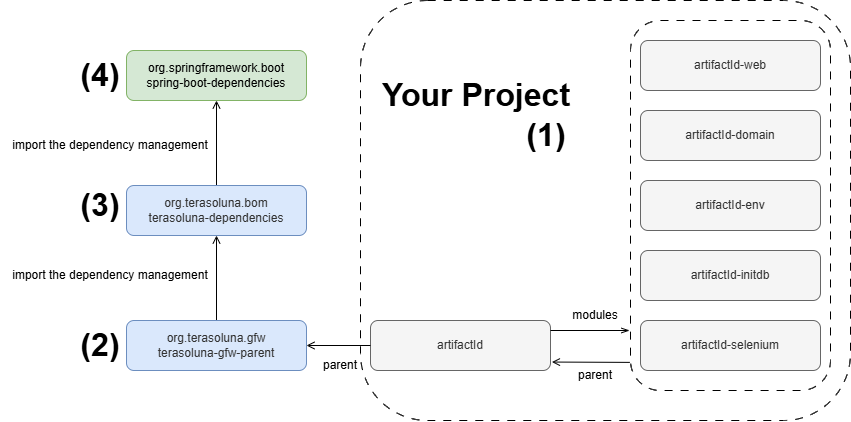
項番
|
説明
|
|---|---|
(1)
|
Maven Archetypeで作成したプロジェクト。 Maven Archetypeで作成したプロジェクトはマルチモジュール構成となっており、親プロジェクトと各サブモジュールは相互参照の関係になっている。 version 1.11.1.RELEASE用のMaven Archetypeで作成したプロジェクトでは、親プロジェクトとして「org.terasoluna.gfw:terasoluna-gfw-parent:1.11.1.RELEASE」を指定している。 |
(2)
|
TERASOLUNA Server Framework for Java (5.x) Parentプロジェクト。 TERASOLUNA Server Framework for Java (5.x) Parentプロジェクトでは、
を行っている。 |
(3)
|
TERASOLUNA Framework For Java (5.x) Dependenciesプロジェクト。 TERASOLUNA Framework For Java (5.x) Dependenciesプロジェクトでは、
を行っている。 利用しているSpring Bootのバージョンは利用するOSSのバージョン参照のこと。 |
(4)
|
Spring Boot Dependenciesプロジェクト。 |
3.1.9.2. アプリケーションコンテキストの構成とBean定義ファイルの関係
Spring Frameworkのアプリケーションコンテキスト(DIコンテナ)の構成とBean定義ファイルの関係を以下に示す。
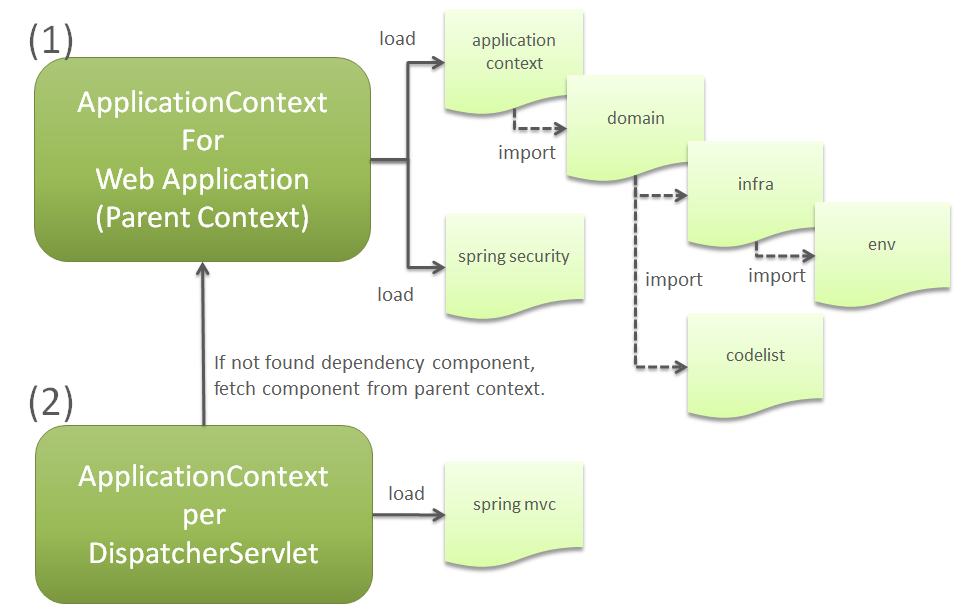
項番
|
説明
|
|---|---|
(1)
|
Webアプリケーション用のアプリケーションコンテキスト。 上記図で示す通り、
で定義したコンポーネントがWebアプリケーション用のアプリケーションコンテキスト(DIコンテナ)に登録される。 Webアプリケーション用のアプリケーションコンテキストに登録されているコンポーネントは、各 |
(2)
|
上記図で示す通り、
で定義したコンポーネントが
|
項番
|
説明
|
|---|---|
(1)
|
Webアプリケーション用のアプリケーションコンテキスト。 上記図で示す通り、
で定義したコンポーネントがWebアプリケーション用のアプリケーションコンテキスト(DIコンテナ)に登録される。 Webアプリケーション用のアプリケーションコンテキストに登録されているコンポーネントは、各 |
(2)
|
上記図で示す通り、
で定義したコンポーネントが
|
Caution
同じコンポーネントを両方のアプリケーションコンテキストに登録した時の動作について
Webアプリケーション用のアプリケーションコンテキストと DispatcherServlet 用のアプリケーションコンテキストの両方に同じコンポーネントが登録されている場合は、同じアプリケーションコンテキスト( DispatcherServlet 用のアプリケーションコンテキスト)内に登録されているコンポーネントがインジェクションされる点を補足しておく。
特に、ドメイン層のコンポーネント(ServiceやRepositoryなど)を DispatcherServlet 用のアプリケーションコンテキストに登録してしまうと、トランザクション制御を行うコンポーネント(AOP)が有効にならないため、データベースへの操作がコミットされない不具合が発生してしまう。
3.1.9.3. 複数のアプリケーションを持つ開発プロジェクトについて
複数のアプリケーションを持つ開発プロジェクトについては、以下のようなマルチプロジェクト構成にすることを推奨する。
プロジェクト名 |
説明 |
|---|---|
bar-parent |
parent-pom(親POM)と呼ばれるプロジェクト。 pom.xmlファイルだけを持ち、その他のソースコードや設定ファイルは一切持たない、シンプルなプロジェクト。 他のプロジェクトのpom上で、このbar-parentプロジェクトを<parent>タグに指定することによって、親POMに指定された共通設定情報を自身に反映させることができる。 |
bar-initdb |
RDBMSのテーブル定義(DDL)と初期データをINSERTするためのSQL文を格納する。 これもmavenプロジェクトとして管理する。 pom.xmlにsql-maven-pluginの設定を定義することにより、ビルドライフサイクルの過程で任意のRDBMSに対するDDL文や初期データINSERT文の実行を自動化することができる。 |
bar-common |
プロジェクト共通ライブラリを格納する。 ここはweb非依存にし、webに関わるクラスはbar-common-webに配置する。 |
bar-common-web |
プロジェクト共通webライブラリを格納する。 |
bar-domain-a |
aドメインに関わるドメイン層のjavaクラス、単体テストケース等を格納するプロジェクト。 最終的に*.jarファイル化する。 |
bar-domain-b |
bドメインに関わるドメイン層のクラス。 |
bar-web-a |
アプリケーション層のjavaクラス、jsp/html、設定ファイル、単体テストケース等を格納するプロジェクト。 最終的にWebアプリケーションとして*.warファイル化する。 bar-web-aは、bar-commonとbar-envへの依存性を持つ。 |
bar-web-b |
もう一つのサブシステムとしてのWebアプリケーション。 構造はbar-web-aと同じ。 |
bar-env |
環境依存性のある設定ファイルだけを集めるプロジェクト。 |
bar-web-a-selenium |
web-aプロジェクトのための、Selenium WebDriverによるテストケースを格納するプロジェクト。 |
bar-web-b-selenium |
web-bプロジェクトのための、Selenium WebDriverによるテストケースを格納するプロジェクト。 |